> For the complete documentation index, see [llms.txt](https://docs.globo.io/llms.txt). Markdown versions of documentation pages are available by appending `.md` to page URLs; this page is available as [Markdown](https://docs.globo.io/askly-customer-surveys/surveys/automations.md).

# Do something after each response

Get an email, tag the customer, or send answers to another app every time someone responds.

You can make Askly do things for you each time a customer answers. For example, email your team or add a tag to the customer.

1. Open the survey and switch to **Flow**, then **Merchant**.
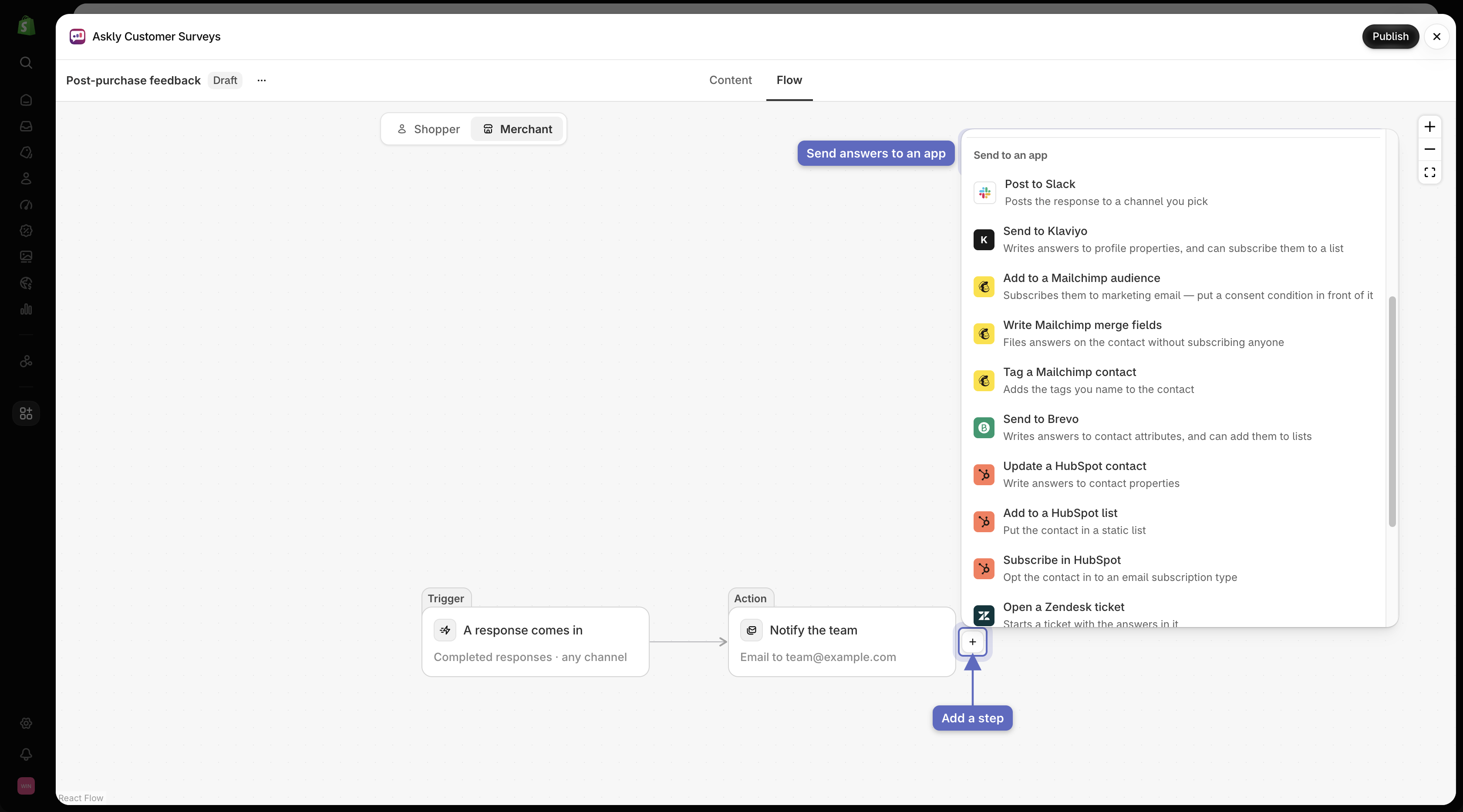
2. Point at a step and select the **+** below it (**Add a step after this**).
3. Pick what should happen (see the list below).

   <figure><img src="https://609121677-files.gitbook.io/~/files/v0/b/gitbook-x-prod.appspot.com/o/spaces%2FZGBRJVX5BLagz6gFEmK1%2Fuploads%2Fgit-blob-b1ea41c22f5de005ea8d8c42b9b35cdd0d9de976%2Fscreenshot-automations-add-step-menu.png?alt=media" alt="Merchant flow in Flow builder with the add-step menu open showing integrations under Send to an app"><figcaption><p>Add automation steps to the merchant flow to send survey responses directly to external tools and apps.</p></figcaption></figure>
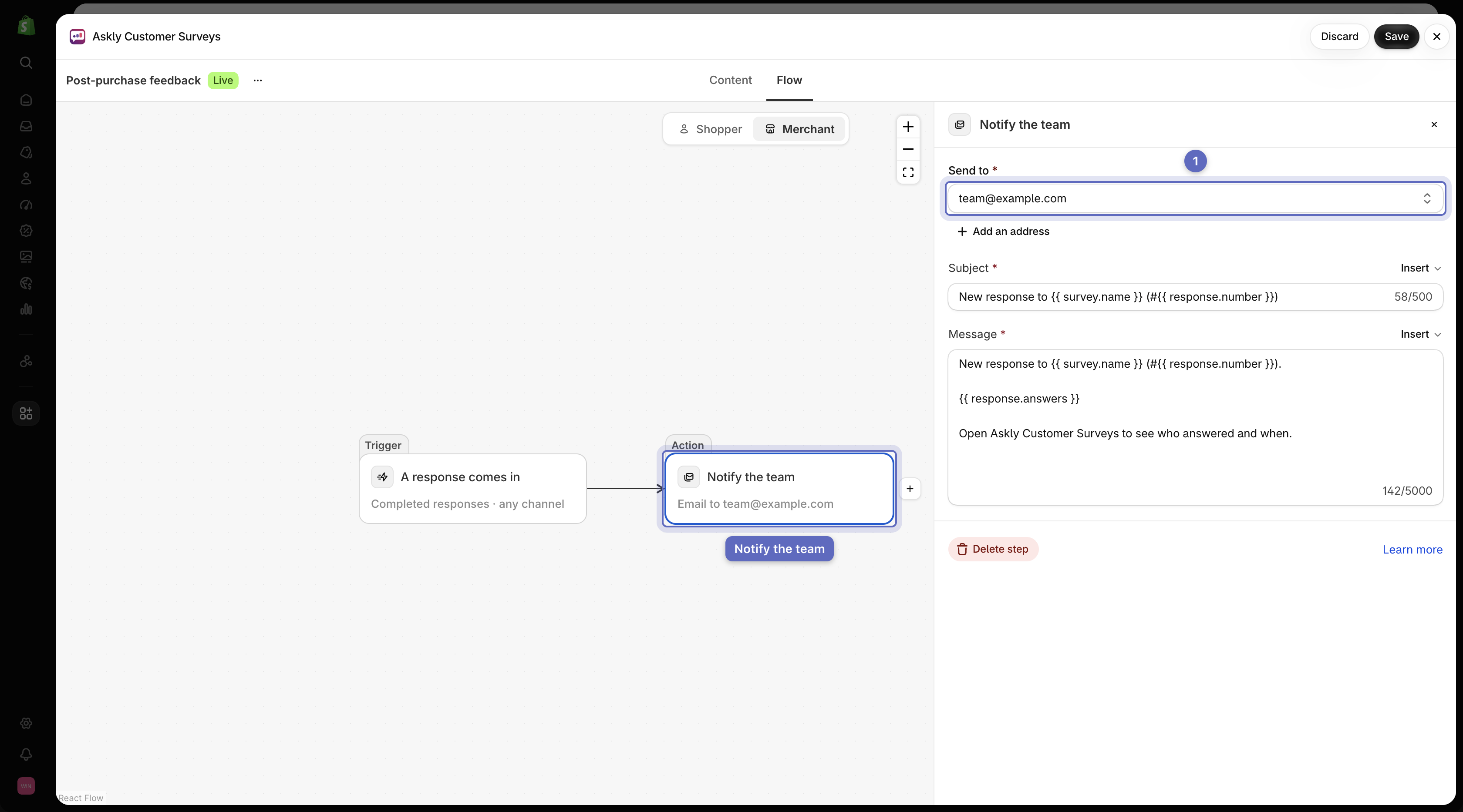
4. Fill in the settings for that step.

   <figure><img src="https://609121677-files.gitbook.io/~/files/v0/b/gitbook-x-prod.appspot.com/o/spaces%2FZGBRJVX5BLagz6gFEmK1%2Fuploads%2Fgit-blob-8a4d0e9f5ebe5f26b1a02ead4fe19a507b1e1473%2Fscreenshot-automations-notify-team-step.png?alt=media" alt="Merchant flow with the Notify the team step selected and its email settings drawer open"><figcaption><p>Configure email notifications in the Notify the team step to alert your team immediately when new responses arrive.</p></figcaption></figure>
5. Select **Save**.

## What you can do

| Step                                 | What it does                                                                                                                                                                                         |
| ------------------------------------ | ---------------------------------------------------------------------------------------------------------------------------------------------------------------------------------------------------- |
| **Notify the team**                  | Emails you or your team.                                                                                                                                                                             |
| **Notify the respondent**            | Emails the customer who answered.                                                                                                                                                                    |
| **Tag the customer**                 | Adds a tag to the customer in Shopify.                                                                                                                                                               |
| **Save the answers to the customer** | Saves each answer on the customer's profile in Shopify.                                                                                                                                              |
| **Condition**                        | Only runs the next steps for certain answers, such as low ratings.                                                                                                                                   |
| **Send a webhook**                   | Sends the answers to a link you paste. For developers.                                                                                                                                               |
| **Send to an app**                   | Sends the answers to Slack, Klaviyo, Mailchimp, Brevo, HubSpot, or Zendesk. [Connect the app first](/askly-customer-surveys/settings/integrations.md). **Trigger a Zap** (Zapier) only needs a link. |

The first time you add **Tag the customer** or **Save the answers to the customer**, Shopify asks you to allow access to your customers. Allow it, or the step isn't added.

## Good to know

* Steps run when a customer finishes the survey. To also run them when someone stops halfway, select the **Trigger** step at the top and turn on **Also run for abandoned responses**. Under **Wait for**, pick how long to wait after their last answer. Only steps that are safe to repeat run then, such as Slack messages and updating a contact. Emails wait for a finished survey.
* Steps that need a customer, like **Tag the customer**, can't run on [anonymous surveys](/askly-customer-surveys/surveys/create.md). The editor marks them **Won't run**.
* **Tag the customer** and **Save the answers to the customer** only run when Shopify can confirm who answered: a customer logged in to your online store, checkout, the thank you or order status page, or customer accounts, or someone who answered from your post-purchase email. Answers from a share link or POS aren't saved to the customer.
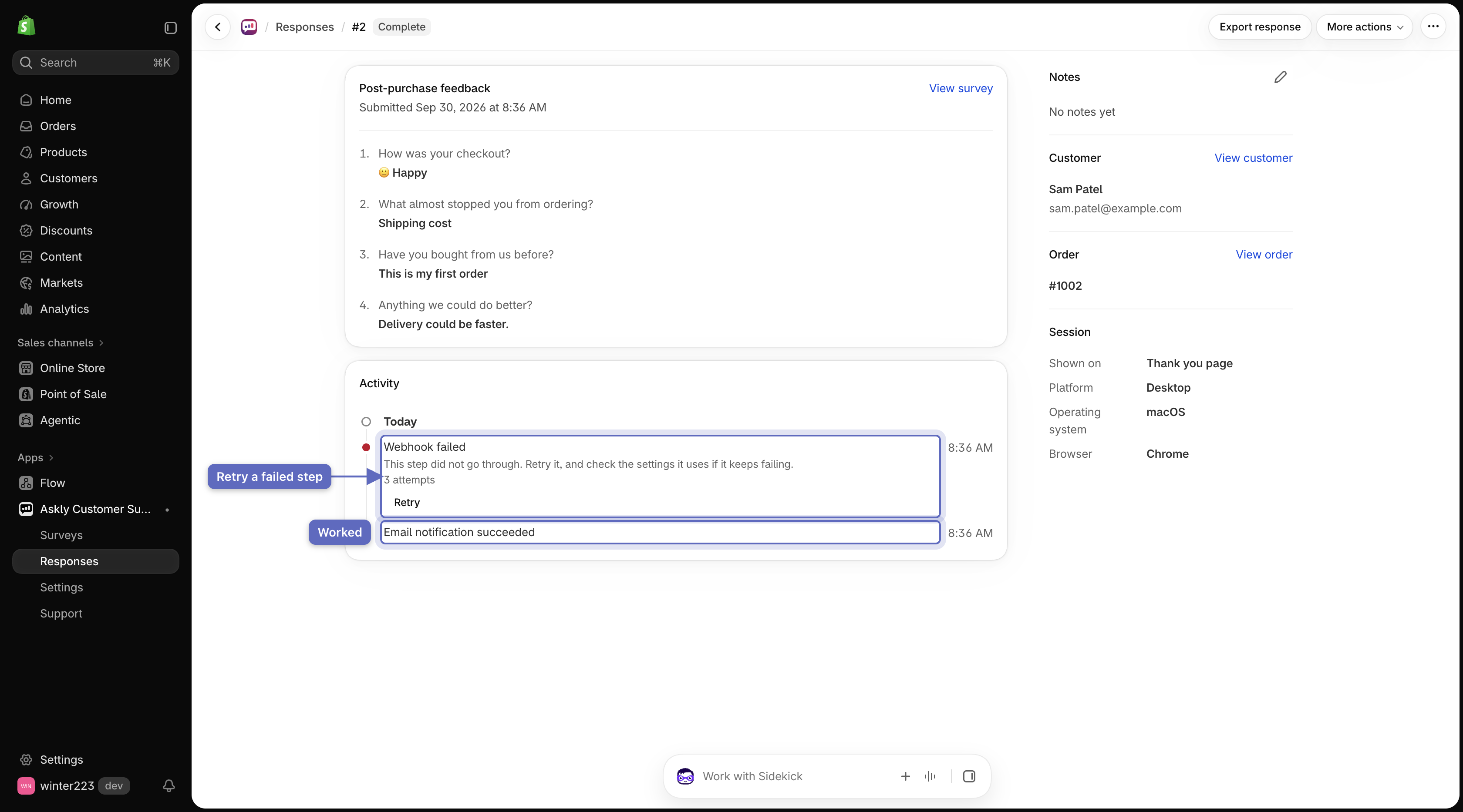
* To see whether each step worked, open a response in **Responses**. Its **Activity** card lists each step. Select **Retry** on one that failed.

  <figure><img src="https://609121677-files.gitbook.io/~/files/v0/b/gitbook-x-prod.appspot.com/o/spaces%2FZGBRJVX5BLagz6gFEmK1%2Fuploads%2Fgit-blob-06085e5ecde6ff9d87062e8731209021398d2145%2Fscreenshot-automations-activity-card.png?alt=media" alt="A survey response showing the Activity card with a succeeded Email notification and a failed Webhook with a Retry button."><figcaption><p>Review which steps ran for a response, and retry any step that failed.</p></figcaption></figure>

Next: [design and translate](/askly-customer-surveys/surveys/design-and-translate.md).