> For the complete documentation index, see [llms.txt](https://docs.globo.io/llms.txt). Markdown versions of documentation pages are available by appending `.md` to page URLs; this page is available as [Markdown](https://docs.globo.io/askly-customer-surveys/surveys/branching.md).

# Show different questions based on answers

Send customers to different questions depending on how they answer.

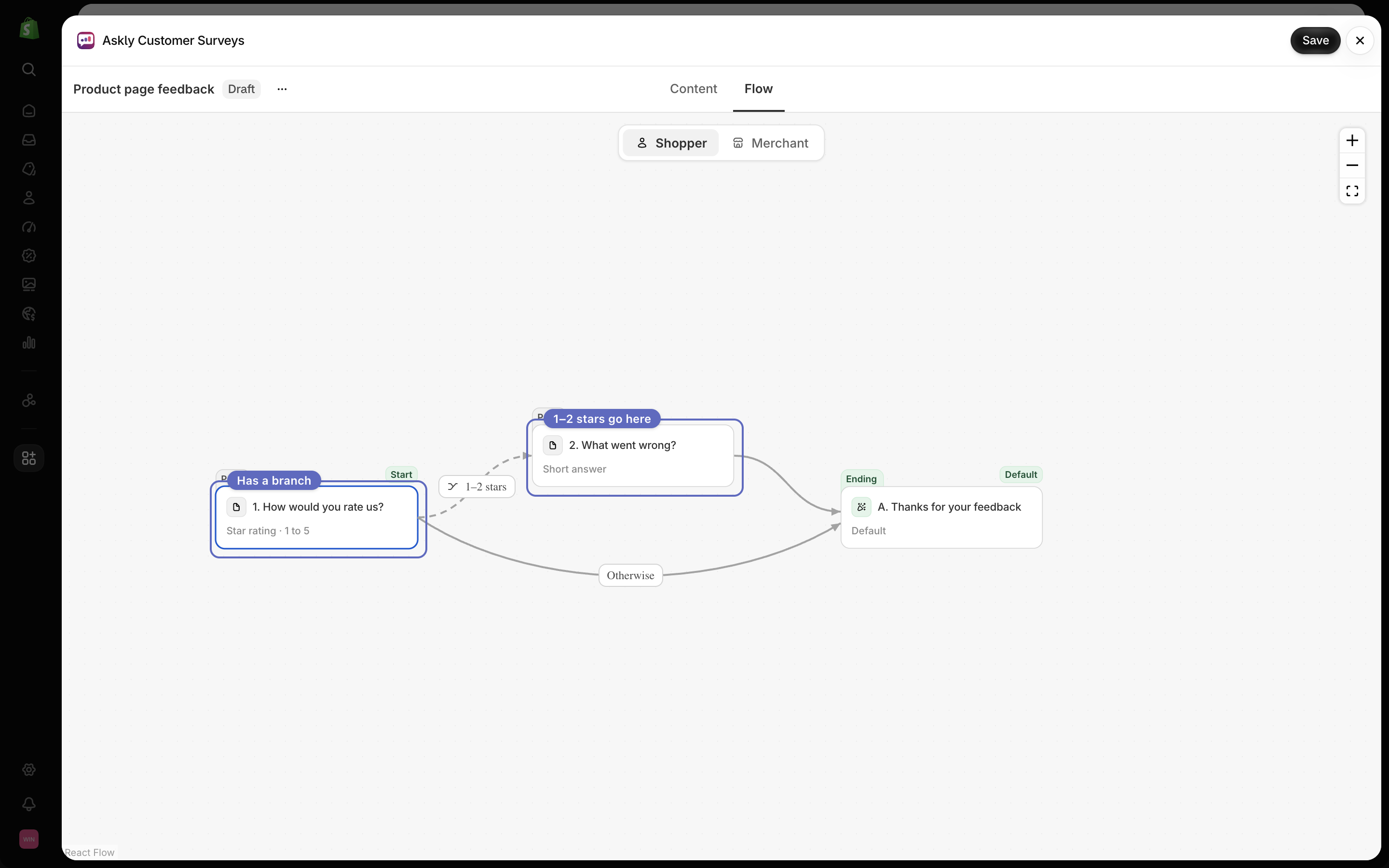
Example: if someone gives 1 or 2 stars, ask "What went wrong?". Everyone else skips that question.

![A rating question: 1–2 stars go to "What went wrong?", 3–5 stars go straight to the thank-you screen.](https://609121677-files.gitbook.io/~/files/v0/b/gitbook-x-prod.appspot.com/o/spaces%2FZGBRJVX5BLagz6gFEmK1%2Fuploads%2Fgit-blob-6627108d41652e57027399b61f801dea60e6e462%2Fbranching.svg?alt=media)

1. Open the survey and switch to **Flow**. Make sure **Shopper** is selected.

   <figure><img src="https://609121677-files.gitbook.io/~/files/v0/b/gitbook-x-prod.appspot.com/o/spaces%2FZGBRJVX5BLagz6gFEmK1%2Fuploads%2Fgit-blob-9f34ccac039cfa0d8837d4e6d20766e8d59f7a0e%2Fscreenshot-branching-flow-shopper.png?alt=media" alt="Askly Flow builder with Shopper selected and number badges on the Shopper switch and the rating question"><figcaption><p>Open Flow, make sure Shopper is selected, then select the question page you want to branch from.</p></figcaption></figure>
2. Select the page with the question you want to check. The **Logic** window opens.
3. Select **Add branch**.
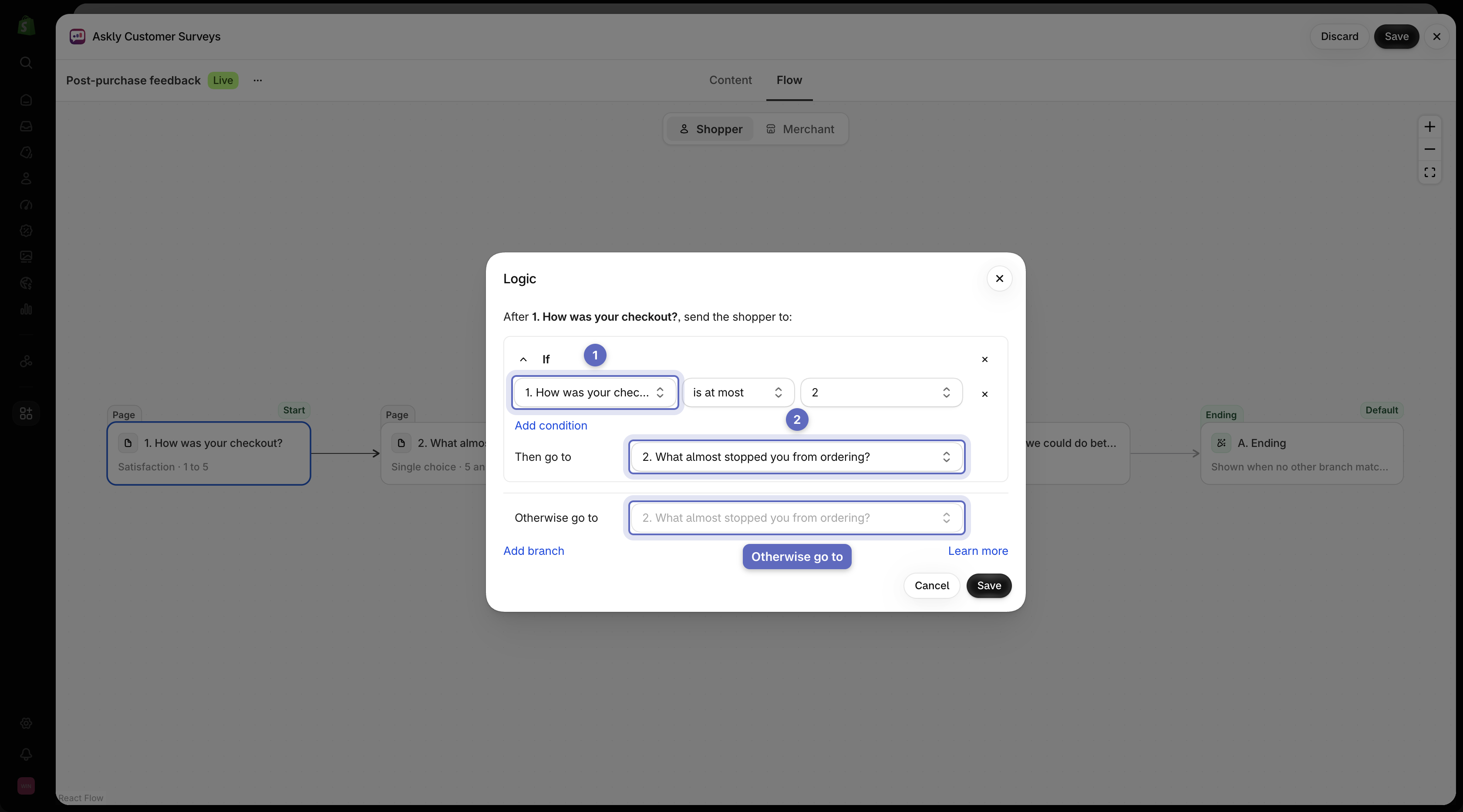
4. Under **What to check**, pick the question. Then pick the answers to match.
5. Under **Then go to**, pick the page or ending to send them to.
6. Select **Save** in the **Logic** window, then **Save** the survey.

Everyone who doesn't match goes on to the next page as usual. On the last page, you choose where they go under **Otherwise go to**.

<figure><img src="https://609121677-files.gitbook.io/~/files/v0/b/gitbook-x-prod.appspot.com/o/spaces%2FZGBRJVX5BLagz6gFEmK1%2Fuploads%2Fgit-blob-255f78c938e3eaaddb48f3930330eb2b55245392%2Fscreenshot-branching-logic-window.png?alt=media" alt="Logic window over the Shopper flow showing a rule to direct ratings of 1 to 2 stars to a follow-up page"><figcaption><p>Set up conditional branching rules in Flow to send shoppers down different question paths based on their answers.</p></figcaption></figure>

<figure><img src="https://609121677-files.gitbook.io/~/files/v0/b/gitbook-x-prod.appspot.com/o/spaces%2FZGBRJVX5BLagz6gFEmK1%2Fuploads%2Fgit-blob-979c9b157b7adc9e4109b0c1e22a7eb2288d7c79%2Fscreenshot-branching-otherwise-go-to.png?alt=media" alt="Logic window showing the Otherwise go to dropdown set to a thank-you ending"><figcaption><p>The Otherwise go to setting defines where shoppers go when no branching condition matches.</p></figcaption></figure>

<figure><img src="https://609121677-files.gitbook.io/~/files/v0/b/gitbook-x-prod.appspot.com/o/spaces%2FZGBRJVX5BLagz6gFEmK1%2Fuploads%2Fgit-blob-e1ea3e3de02dbf213a321f9f39af10eab87a088e%2Fscreenshot-branching-flow-with-branch.png?alt=media" alt="Flow canvas showing two paths leaving the rating card: one to What went wrong for low ratings, and one directly to the thank-you ending"><figcaption><p>The Flow canvas displays your branching structure, showing the different question paths shoppers follow based on their responses.</p></figcaption></figure>

{% hint style="info" %}
Branches are set per page. They decide where customers go after they finish that page. To check more than one answer in the same branch, select **Add condition**.
{% endhint %}

Next: [thank-you screens and discount codes](/askly-customer-surveys/surveys/endings-and-discounts.md).

To try both paths, [test your survey](/askly-customer-surveys/surveys/test.md) once it's ready.