> For the complete documentation index, see [llms.txt](https://docs.globo.io/llms.txt). Markdown versions of documentation pages are available by appending `.md` to page URLs; this page is available as [Markdown](https://docs.globo.io/globo-combined-listings/getting-started/enable-the-app.md).
# Turn on the app in your theme
Enable the Combined Listings app embed in your theme so option widgets can render on your storefront.
Globo Combined Listings shows shoppers an **option picker** — the widget that lets them switch between your grouped products — right on your storefront. It renders through a theme **app embed**; until the embed is enabled, nothing appears on your store, even for active groups. You can turn the embed off again anytime without affecting your products or orders.
## Enable the app embed
{% stepper %}
{% step %}
### Open the theme editor
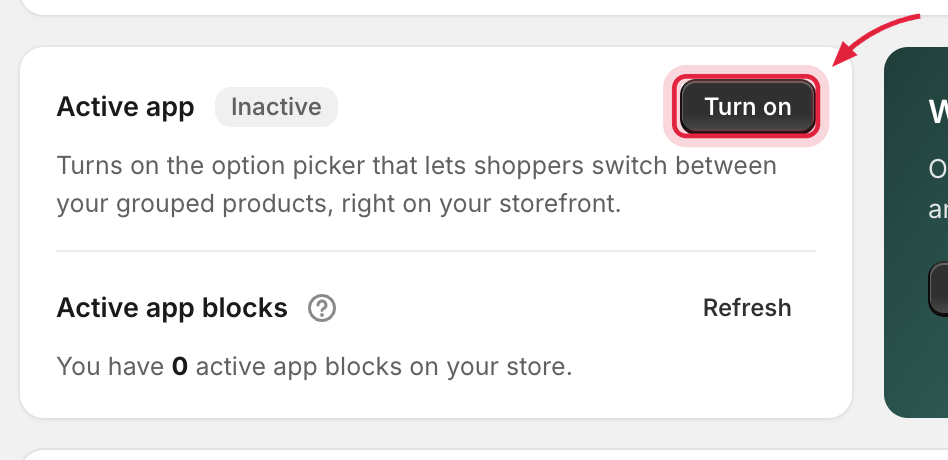
From the app's **Home** page, click **Turn on** in the app status card — it deep-links straight to the app embed in your theme editor.
Click Turn on to enable the storefront app embed.
{% endstep %}
{% step %}
### Turn on "Combined Listings"
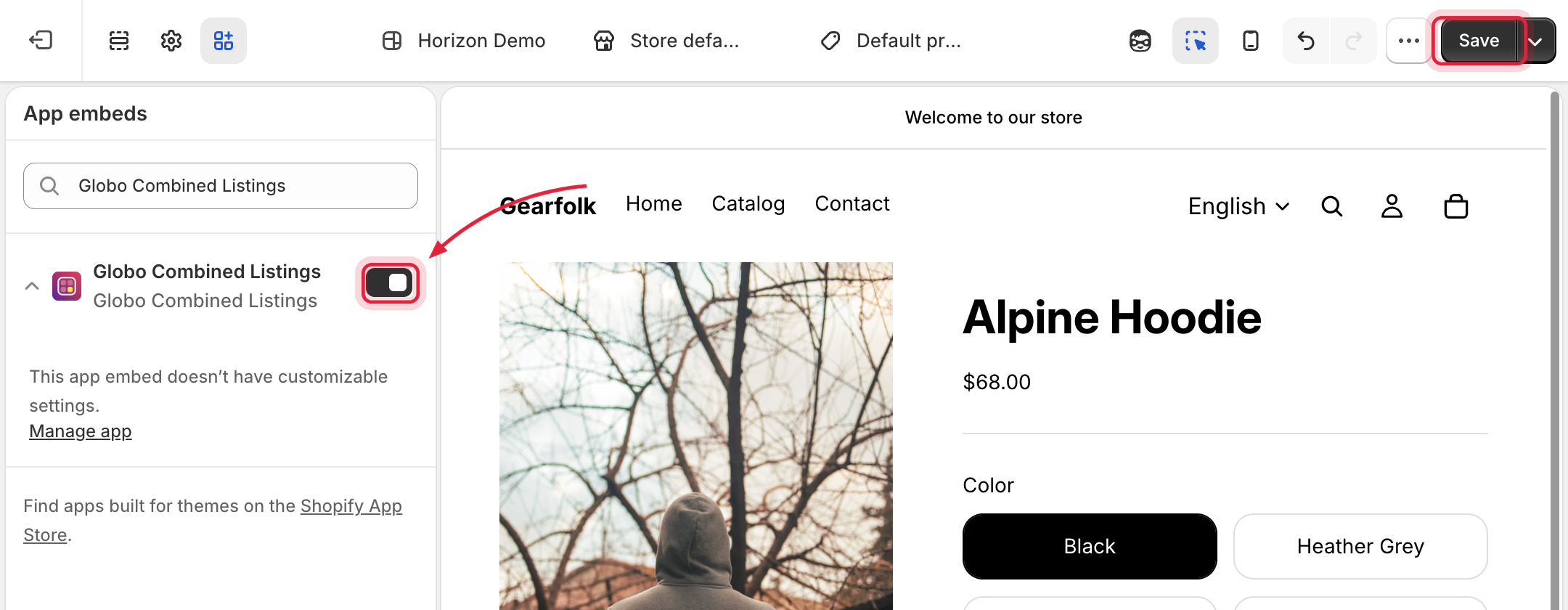
In the theme editor sidebar under **App embeds**, switch on **Combined Listings**.
Turn on Combined Listings under App embeds, then click Save.
{% endstep %}
{% step %}
### Save the theme
Click **Save** in the theme editor. Back in the app, the Home status card shows **Active** (use **Refresh** if it hasn't updated yet).
{% endstep %}
{% endstepper %}
## Check the status anytime
The **Home** page shows whether the embed is active on your published theme, and how many product-page blocks are placed. The [setup guide](/globo-combined-listings/getting-started/quickstart.md#setup-guide) task *"Turn on the app in your theme"* completes automatically once the embed is on.
{% hint style="warning" %}
The embed is **per theme**. If you publish a different theme or install a new one, enable the embed on that theme too. Unpublished/preview themes need the embed enabled to preview widgets there.
{% endhint %}
## Related
* Widgets still not visible? See [Troubleshooting](/globo-combined-listings/help/troubleshooting.md#widgets-dont-appear-on-the-storefront).
* There is also a global on/off switch in [Settings](/globo-combined-listings/settings/settings.md#enable-combined-listings-on-your-storefront) — both must be on for widgets to render.
* Optional: place a dedicated [product page block](/globo-combined-listings/storefront/product-page-block.md) for precise widget position on product pages.