> For the complete documentation index, see [llms.txt](https://docs.globo.io/llms.txt). Markdown versions of documentation pages are available by appending `.md` to page URLs; this page is available as [Markdown](https://docs.globo.io/globo-combined-listings/product-groups/group-types.md).

# Group types

Every group answers one question: **how do your products differ from each other?** Match your catalog to one of the pictures below.

{% hint style="info" %}
Not sure? Start with **Group by single option** — it fits most stores. You can always create other groups later.
{% endhint %}

## Group by single option

**One thing changes between your products** — like Color.

<figure><img src="/files/6nz1KBwIk0DWK9NGsfoH" alt="Three color products become one listing with a Color picker"><figcaption><p>Three separate color products → one listing with a Color picker.</p></figcaption></figure>

* **You have:** *Summer Tee — Red*, *Summer Tee — Blue*, *Summer Tee — Green* (3 products).
* **Shoppers see:** one Summer Tee listing with a Color picker. Picking a color opens that product.
* **Rule of thumb:** each value = exactly one product.

Also fits: scents, materials, pack sizes, patterns — any single dimension.

→ [Create a single-option group](/globo-combined-listings/product-groups/create-a-group/create-a-single-option-group.md)

## Group by multiple options

**Two or more things change** — like Color *and* Size — and you have **one product per combination**.

<figure><img src="/files/2B2fJuh7A8yUlXSbtFk3" alt="Four color-size products become one listing with Color and Size pickers"><figcaption><p>One product per combination → one listing with two pickers.</p></figcaption></figure>

* **You have:** *Hoodie Black/M*, *Black/L*, *White/M*, *White/L* (4 products).
* **Shoppers see:** one Hoodie listing with two pickers — pick Color, then Size, separately.
* **Rule of thumb:** each **combination** = one product. You connect them in the *Match variants to products* step.

→ [Create a multiple-options group](/globo-combined-listings/product-groups/create-a-group/create-a-multiple-options-group.md)

## Group as a single choice

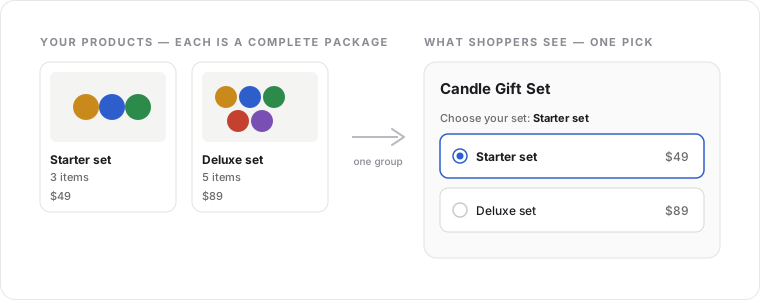
**Each product is a complete package** — shoppers pick once, nothing to mix and match.

<figure><img src="/files/yPnfKU3Glx6Kw8TRYujU" alt="Two bundle products become one listing with a single set picker"><figcaption><p>Fixed bundles → one listing with a single picker.</p></figcaption></figure>

* **You have:** *Starter set* and *Deluxe set* — each a fixed bundle sold as-is.
* **Shoppers see:** one listing with a single picker: Starter set · Deluxe set.
* **Rule of thumb:** one pick = one product. Choices never combine with each other.

Also fits: products that differ by more than one thing but you'd rather show as one list than two pickers — each choice already bundles every option together, like a single Color-and-Size pairing.

→ [Create a single-choice group](/globo-combined-listings/product-groups/create-a-group/create-a-single-choice-group.md)

## Group by title pattern (automatic)

Not a fourth type — a **shortcut**. If your titles follow a pattern like `Summer Tee - Red`, the app detects the groups and creates them for you as single-option groups.

<figure><img src="/files/18GUG5TM8NlUgbrkFOIR" alt="Titles sharing a base name are detected and grouped automatically"><figcaption><p>Titles share a pattern → groups are detected and created for you.</p></figcaption></figure>

Best when you have **many** products to group at once. See [Group by title pattern](/globo-combined-listings/product-groups/group-by-title-pattern.md).

## Still unsure? Answer one question

**What changes between your products?**

| Answer                                                             | Pick                          |
| ------------------------------------------------------------------ | ----------------------------- |
| One thing (color, scent, size…)                                    | **Group by single option**    |
| Two or more things, picked one at a time (color, then size)        | **Group by multiple options** |
| Nothing "combines" — each product is its own fixed package         | **Group as a single choice**  |
| One thing, and it's already written in the titles of many products | **Group by title pattern**    |

{% hint style="info" %}
The type is chosen when you create the group and can't be changed afterwards — but groups are quick to delete and recreate, and your products are never affected.
{% endhint %}