> For the complete documentation index, see [llms.txt](https://docs.globo.io/llms.txt). Markdown versions of documentation pages are available by appending `.md` to page URLs; this page is available as [Markdown](https://docs.globo.io/globo-mega-menu/analytics-and-billing/plans-and-billing.md).
# Plans and Billing
Compare plans, upgrade, downgrade or cancel.
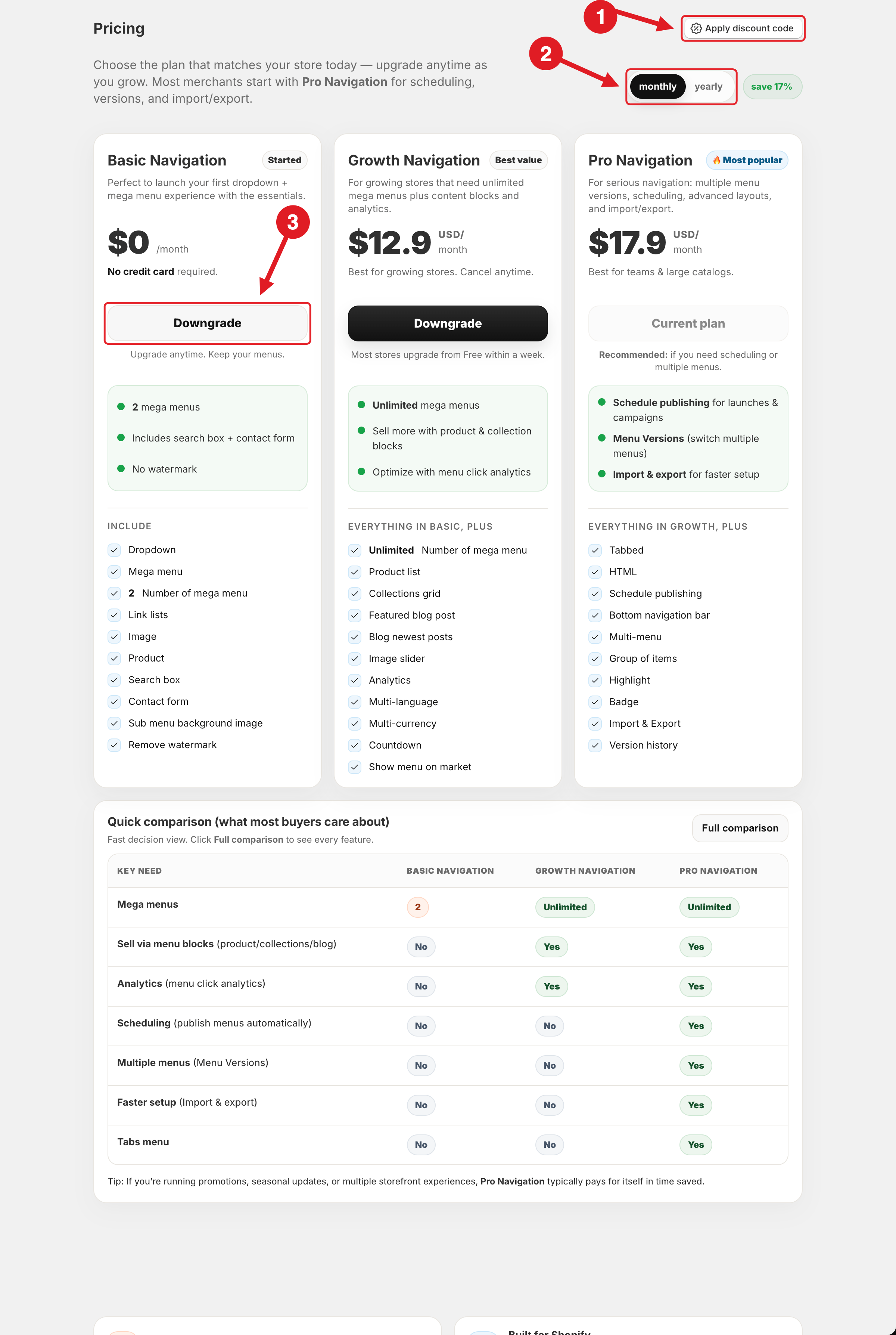
Globo Mega Menu has three plans: a free **Basic Navigation** plan and two paid plans, **Growth Navigation** and **Pro Navigation**. All charges are billed through Shopify, on your Shopify invoice. You can upgrade, downgrade or cancel at any time from the **Pricing** page in the app.
Apply a discount code (1), choose monthly or yearly billing (2), or downgrade to Basic Navigation (3)
## 💳 Compare Plans
| | Basic Navigation | Growth Navigation | Pro Navigation |
| --------------------------------------------------- | :--------------: | :---------------: | :---------------: |
| **Price** | $0 / month | $12.9 USD / month | $17.9 USD / month |
| **Mega menus** | 2 | Unlimited | Unlimited |
| Dropdown, Mega menu, Link lists, Image, Product | ✅ | ✅ | ✅ |
| Search box, Contact form, Sub menu background image | ✅ | ✅ | ✅ |
| Remove watermark | ✅ | ✅ | ✅ |
| Product list, Collections grid | – | ✅ | ✅ |
| Featured blog post, Blog newest posts | – | ✅ | ✅ |
| Image slider, Countdown | – | ✅ | ✅ |
| Analytics: menu clicks | ✅ | ✅ | ✅ |
| Analytics: impressions, orders, revenue | – | ✅ | ✅ |
| Translate built-in texts (Localization > General) | ✅ | ✅ | ✅ |
| Multi-language: translate menu items | – | ✅ | ✅ |
| Multi-currency | – | ✅ | ✅ |
| Show menu on market | – | ✅ | ✅ |
| Tabbed, HTML, Group of items | – | – | ✅ |
| Highlight (item colors), Badge | – | – | ✅ |
| Multi-menu, Schedule publishing | – | – | ✅ |
| Import & Export, Version history | – | – | ✅ |
| Bottom navigation bar | – | – | ✅ |
* **Basic Navigation** — for a first dropdown and mega menu with the essentials. No credit card required.
* **Growth Navigation** — unlimited mega menus, product/collection/blog blocks and analytics.
* **Pro Navigation** — everything in Growth plus scheduling, multiple menus, version history, import/export, tabs, custom HTML and the bottom navigation bar.
Prices are shown per month. With **yearly** billing you save 17%. Always check **Pricing** in the app for the current prices.
{% hint style="info" %}
**Analytics on Basic Navigation:** menu **clicks** are tracked on every plan. **Impressions**, **Orders** and **Revenue** need **Growth Navigation** or **Pro Navigation**. See [Analytics](/globo-mega-menu/analytics-and-billing/analytics.md).
{% endhint %}
## Upgrade
{% stepper %}
{% step %}
### Open Pricing
Click **Pricing** in the app sidebar.
{% endstep %}
{% step %}
### Apply a discount code (optional)
If you have a discount code, click **Apply discount code** (1), enter the code and click **Apply**. The discounted price is shown on the plans.
{% endstep %}
{% step %}
### Choose monthly or yearly
Use the **monthly** / **yearly** switch (2). Yearly billing saves 17%.
{% endstep %}
{% step %}
### Choose a plan
Click the button on the plan you want. If a free trial is available for your store, the button shows **Start X-day trial**.
{% endstep %}
{% step %}
### Approve the charge
Shopify shows a confirmation page. Click to approve the charge. You'll return to the app, and the plan's features are unlocked. Your current plan shows **Current plan**.
{% endstep %}
{% endstepper %}
## Downgrade or Cancel
{% stepper %}
{% step %}
### Open Pricing
Click **Pricing** in the app sidebar.
{% endstep %}
{% step %}
### Click Downgrade
To switch to a cheaper paid plan, click **Downgrade** on that plan. To stop paying, click **Downgrade** on **Basic Navigation** (3). Your paid subscription is cancelled automatically.
{% endstep %}
{% endstepper %}
{% hint style="warning" %}
Your menus are kept when you downgrade ("Upgrade anytime. Keep your menus."), but features that aren't in your new plan are hidden on the storefront. When you publish, the publish dialog tells you which features are outside your plan. Uninstalling the app also cancels the subscription.
{% endhint %}
{% hint style="info" %}
**Development stores** can use all features for free. When the store goes live, paid features are hidden until you choose a plan.
{% endhint %}
{% hint style="info" %}
A store can have at most **10 menus** in the app. Remove unused menus in **Menu manager** to add more.
{% endhint %}
***
### Related Articles
{% content-ref url="/pages/nwgOYpSQZ8801JE0K4U6" %}
[Can I Try the App Before Paying?](/globo-mega-menu/faqs/can-i-try-the-app-before-paying.md)
{% endcontent-ref %}
{% content-ref url="/pages/Is9isralsTW3K41PW2NN" %}
[Analytics](/globo-mega-menu/analytics-and-billing/analytics.md)
{% endcontent-ref %}
{% content-ref url="/pages/y4jw4IUpG9nPD0Jeh1po" %}
[Mobile Bottom Navigation Bar](/globo-mega-menu/mobile-bottom-bar/mobile-bottom-navigation-bar.md)
{% endcontent-ref %}
***
**💬 Need help?**
Email us at **📧** [**contact@globo.io**](mailto:contact@globo.io) - we’re happy to assist!