> For the complete documentation index, see [llms.txt](https://docs.globo.io/llms.txt). Markdown versions of documentation pages are available by appending `.md` to page URLs; this page is available as [Markdown](https://docs.globo.io/globo-mega-menu/manage-menu-items/manage-submenu-items.md).
# Submenus
Add dropdowns, tabs and mega menu panels under your top-level items.
A submenu is the panel that opens when a shopper hovers over or clicks a top-level item. It can be a simple dropdown list, a large mega menu with images and products, or tabs that switch between groups of content.
## Add a Submenu
{% stepper %}
{% step %}
### Click Add submenu
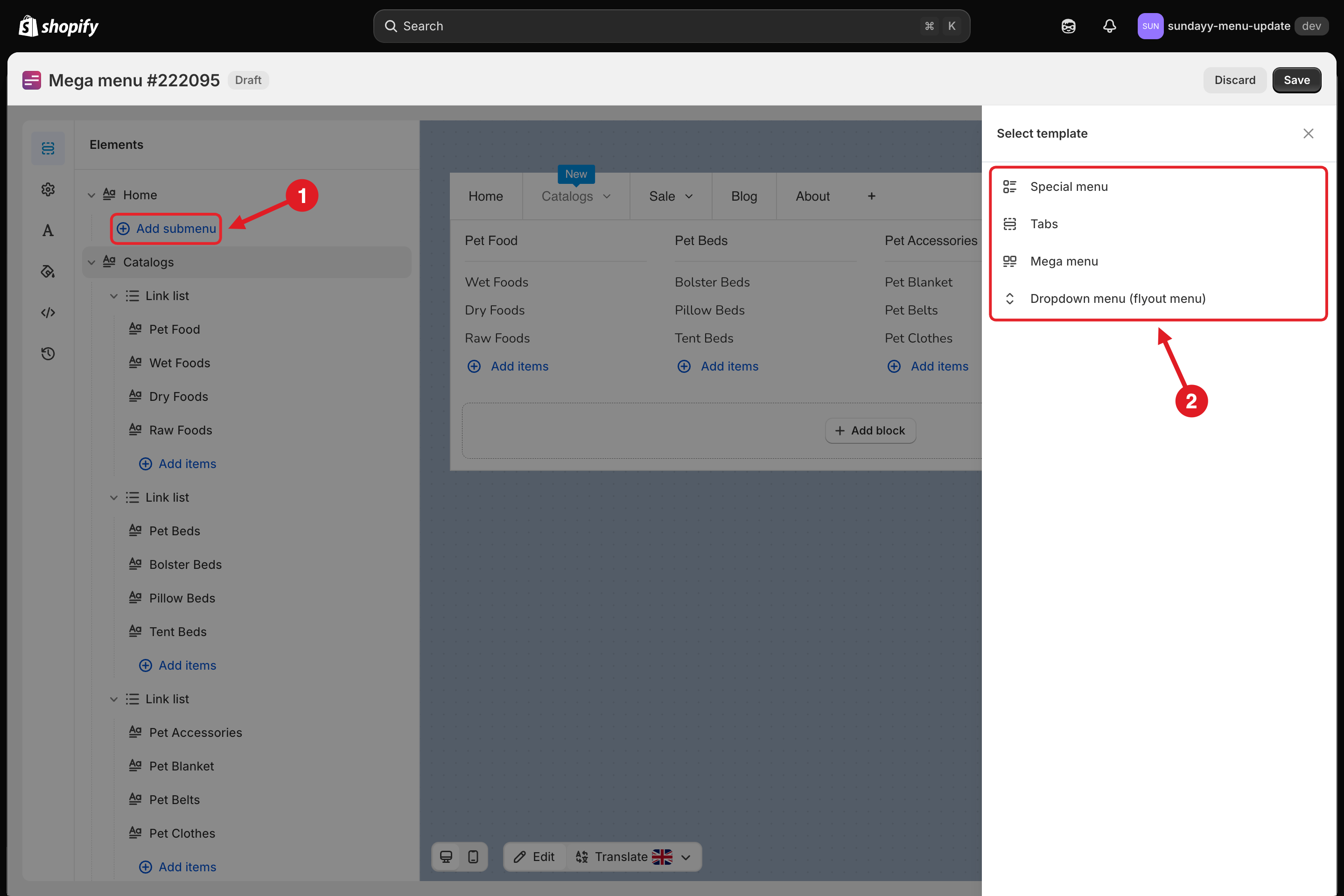
In the **Elements** tree, find the top-level item and click **Add submenu** under it (1).
**Add submenu** only appears under top-level items that don't have a submenu yet. If the item already has one, see **Change or Remove a Submenu** below.
{% endstep %}
{% step %}
### Choose a group
The **Select template** panel opens with four groups (2):
1. Add submenu · 2. Choose a group in Select template
| Group | Best for |
| ------------------------------- | -------------------------------------------------------------------------------------------------- |
| **Special menu** | Large catalogs: a category list on the left with a mega panel for each category, or a masonry grid |
| **Tabs** | Switching between groups (e.g. Men / Women / Kids) inside one submenu |
| **Mega menu** | A wide panel with columns of links, images, products or a contact form |
| **Dropdown menu (flyout menu)** | A simple list of links, with optional deeper levels |
Move your pointer over a group to see its templates.
{% endstep %}
{% step %}
### Choose a template
Click **Select** on the template you want. The submenu is added with sample content that you can replace.
{% hint style="info" %}
Templates that your plan doesn't include show a plan badge (for example **Pro Navigation**) and an **Upgrade to use** button instead of **Select**.
{% endhint %}
{% endstep %}
{% step %}
### Edit the content and save
Replace the sample titles, links and images with your own, then click **Save** in the top bar and **Publish**.
{% endstep %}
{% endstepper %}
## 🧩 Submenu Types
| Type | Templates | Plan |
| ----------------------------------------------------------------------------------------------- | ----------------------------------------------------------------------------------------------------- | -------------------------------------------------------------------------------------------------------------------------------------- |
| [Dropdown menu](/globo-mega-menu/manage-menu-items/manage-submenu-items/dropdown-menu.md) | Vertical dropdown, Horizontal dropdown | All plans |
| [Mega menu](/globo-mega-menu/manage-menu-items/manage-submenu-items/mega-menu.md) | Blank, 4 link list, 3 link lists + 1 image, product lists, product carousel, Map + contact + address… | Basic templates on all plans (including **Basic Navigation**); product list templates need **Growth Navigation** or **Pro Navigation** |
| [Tabs](/globo-mega-menu/manage-menu-items/manage-submenu-items/tabbed-menu.md) | Simple / nested 2-level / nested 3-level tabs, on the left, top or right | **Pro Navigation** |
| [Special menu](/globo-mega-menu/manage-menu-items/manage-submenu-items/apply-masonry-layout.md) | Special menu, Masonry layout | **Pro Navigation** |
See [Plans and Billing](/globo-mega-menu/analytics-and-billing/plans-and-billing.md) for the full feature list per plan.
## ⚙️ Submenu Layout Options
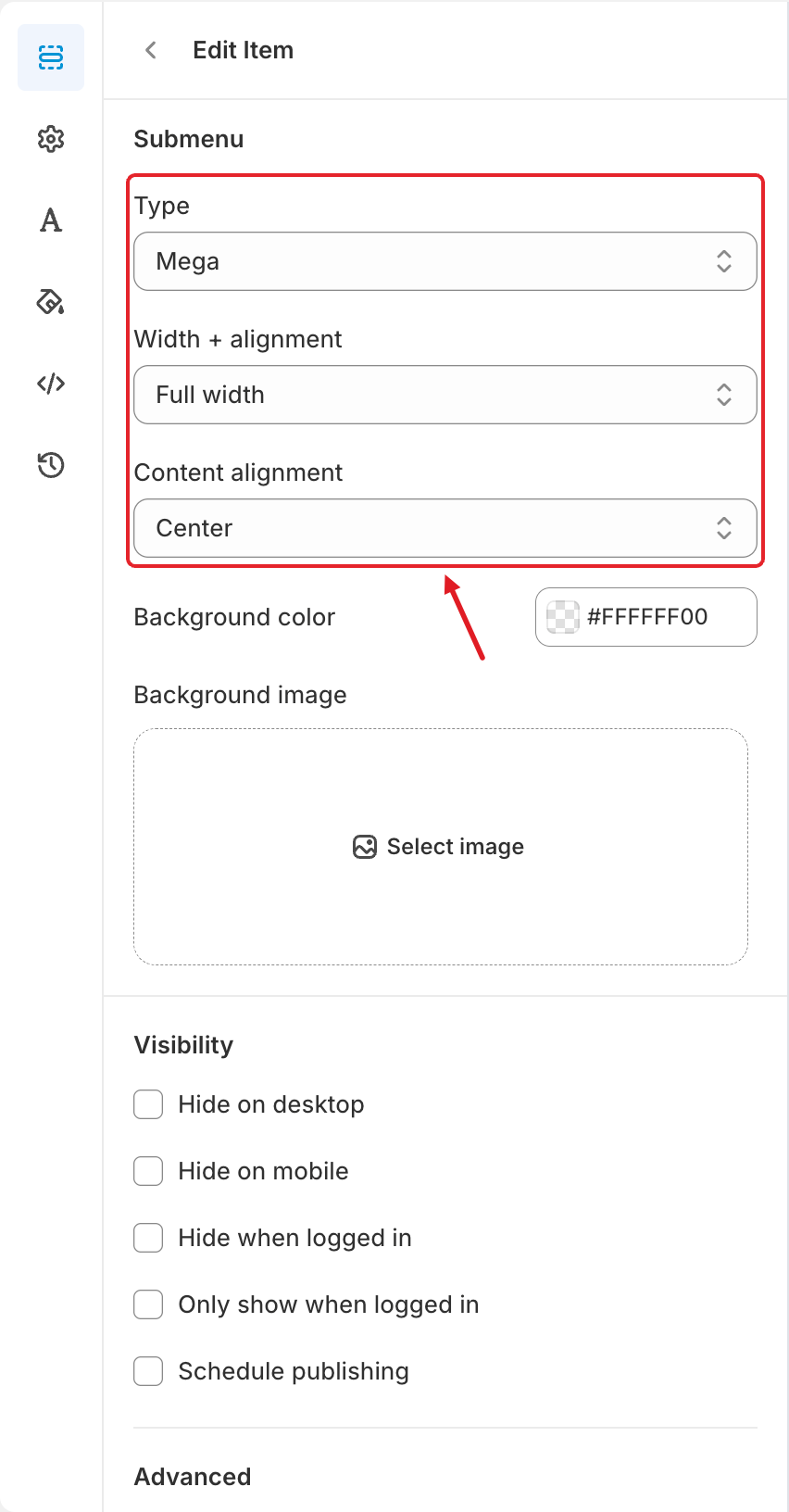
To change how a submenu is laid out, open its parent item (hover over it and click ✏️ **Edit Item**) and scroll to the **Submenu** section:
Submenu settings of a mega menu
| Setting | Options | What it does |
| ---------------------------------------- | --------------------------------------------------------------------------------------------------- | ----------------------------------------------------------------------------------------------------------------------- |
| **Type** | Mega menus: **None**, **Mega**. Dropdowns: **None**, **Vertical dropdown**, **Horizontal dropdown** | Switches the submenu layout. **None** turns the submenu off without deleting its content. |
| **Width + alignment** (horizontal menus) | **Full width**, **Center**, **Left**, **Right** | **Full width** stretches the panel across the menu bar. The other options make a narrower panel aligned under the item. |
| **Width** | A number in **px** | Appears when **Width + alignment** isn't **Full width**. Sets the panel width (default 550 px for a mega menu). |
| **Height + alignment** (vertical menus) | **Full height**, **Center**, **Top**, **Bottom** | Used instead of width when your menu is vertical. |
| **Content alignment** (mega menus) | **Center**, **Left**, **Right**, **Space around**, **Space between**, **Space evenly** | How the blocks are spread across the panel when they don't fill the full width. |
| **Background color** (mega menus) | Any color | The panel background. `#FFFFFF00` means transparent, so the menu's submenu color is used. |
| **Background image** (mega menus) | Click **Select image** | An image behind the panel content, for example a seasonal banner. |
{% hint style="info" %}
A **Horizontal dropdown** always uses the full width, so it has no **Width + alignment** option. A **Vertical dropdown** can't use **Full width**.
{% endhint %}
## Change or Remove a Submenu
* **Change the layout**: open the parent item's **Submenu** section and change **Type** or the alignment options above.
* **Turn it off for now**: set **Type** to **None**. The content is kept, so you can switch it back later.
* **Start over with another template**: set **Type** to **None**. **Add submenu** then appears under the item in the **Elements** tree again, so you can pick a different template.
* **Remove single blocks or items**: hover over them in the preview or the **Elements** tree and click **Delete Item**.
{% hint style="warning" %}
**Submenu doesn't open on the storefront?** Check that the submenu **Type** isn't **None**, that the submenu has at least one item or block, and that you clicked **Save** and **Publish**. For theme issues, see [The Menu Doesn't Show (or Shows Incorrectly)](/globo-mega-menu/faqs/why-the-menu-does-not-show-or-shows-incorrectly-on-our-website.md).
{% endhint %}
***
### Related Articles
{% content-ref url="/pages/hJkM6yHjBj8M4Ax3ccZK" %}
[Dropdown Menu](/globo-mega-menu/manage-menu-items/manage-submenu-items/dropdown-menu.md)
{% endcontent-ref %}
{% content-ref url="/pages/f5H2ZdBdZILUk8k7C2Xo" %}
[Mega Menu](/globo-mega-menu/manage-menu-items/manage-submenu-items/mega-menu.md)
{% endcontent-ref %}
{% content-ref url="/pages/tijc2NMtByMgkQkH1lzx" %}
[Tabbed Menu](/globo-mega-menu/manage-menu-items/manage-submenu-items/tabbed-menu.md)
{% endcontent-ref %}
{% content-ref url="/pages/ivNxvIka6pDDRkSaaZ7L" %}
[Apply Masonry Layout](/globo-mega-menu/manage-menu-items/manage-submenu-items/apply-masonry-layout.md)
{% endcontent-ref %}
{% content-ref url="/pages/lUHoSham1OxSYk97Xx5H" %}
[Blocks Overview](/globo-mega-menu/menu-blocks/blocks.md)
{% endcontent-ref %}
***
**💬 Need help?**
Email us at **📧** [**contact@globo.io**](mailto:contact@globo.io) - we’re happy to assist!