> For the complete documentation index, see [llms.txt](https://docs.globo.io/llms.txt). Markdown versions of documentation pages are available by appending `.md` to page URLs; this page is available as [Markdown](https://docs.globo.io/globo-mega-menu/manage-menus/menu-manager.md).

# Menu Manager

See, create and manage every menu in your store.

**Menu manager** is the app's home for all your menus. From here you create new menus, import a backup, publish or disable a menu, open it in the editor, and rename, duplicate, export, translate or delete it.

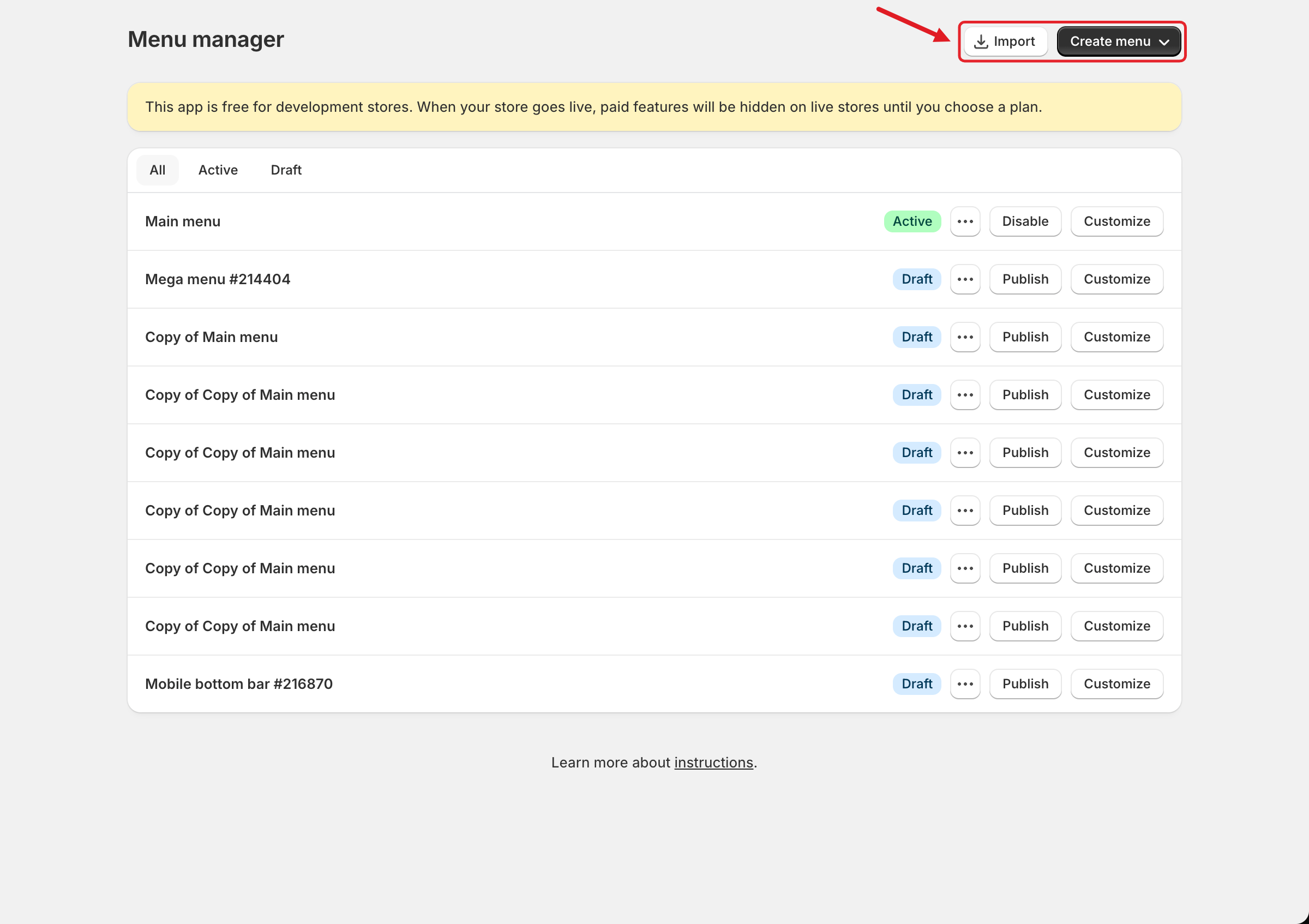
The **Import** and **Create menu** buttons are at the top right. Below them is the list of every mega menu and mobile bottom bar in your store.

<figure><img src="https://2995734148-files.gitbook.io/~/files/v0/b/gitbook-x-prod.appspot.com/o/spaces%2FqP3YAfC1xaiWJzITQ9sI%2Fuploads%2Fgit-blob-ae513c74322bafb35923fa12b3476c7dc9e74cea%2Fmenu-manager.png?alt=media" alt="Menu manager"><figcaption><p>Menu manager: Import and Create menu are at the top right</p></figcaption></figure>

## 📋 The Menu List

Each row is one menu. From left to right:

| Element                       | What it means                                                                                                                                                                                                       |
| ----------------------------- | ------------------------------------------------------------------------------------------------------------------------------------------------------------------------------------------------------------------- |
| **All / Active / Draft** tabs | Show all menus, only published menus, or only unpublished menus.                                                                                                                                                    |
| **Menu name**                 | For example *Main menu*, *Mega menu #214404* or *Mobile bottom bar #216870*. New menus get a name with a number, and you can rename them.                                                                           |
| 📅 **Calendar icon**          | Appears only when the menu has a schedule. Hover over it to see **Publish on:** and/or **Unpublish on:** with the dates. See [Schedule Menus and Items](/globo-mega-menu/manage-menus/schedule-menus-and-items.md). |
| **Active** badge (green)      | The menu is published and can appear on your storefront.                                                                                                                                                            |
| **Draft** badge (blue)        | The menu isn't published. Customers don't see it.                                                                                                                                                                   |
| **⋯**                         | Opens the menu actions (see **Menu Actions** below).                                                                                                                                                                |
| **Publish** / **Disable**     | A draft menu has **Publish**, which opens the Publish dialog. An active menu has **Disable**, which unpublishes it and turns it back into a draft.                                                                  |
| **Customize**                 | Opens the menu in the editor. See [Menu Editor Overview](/globo-mega-menu/manage-menus/menu-editor-overview.md).                                                                                                    |

{% hint style="info" %}
The footer link **Learn more about instructions** opens this help center.
{% endhint %}

## <mark style="color:blue;">Create a Menu</mark>

{% stepper %}
{% step %}

### Choose the menu type

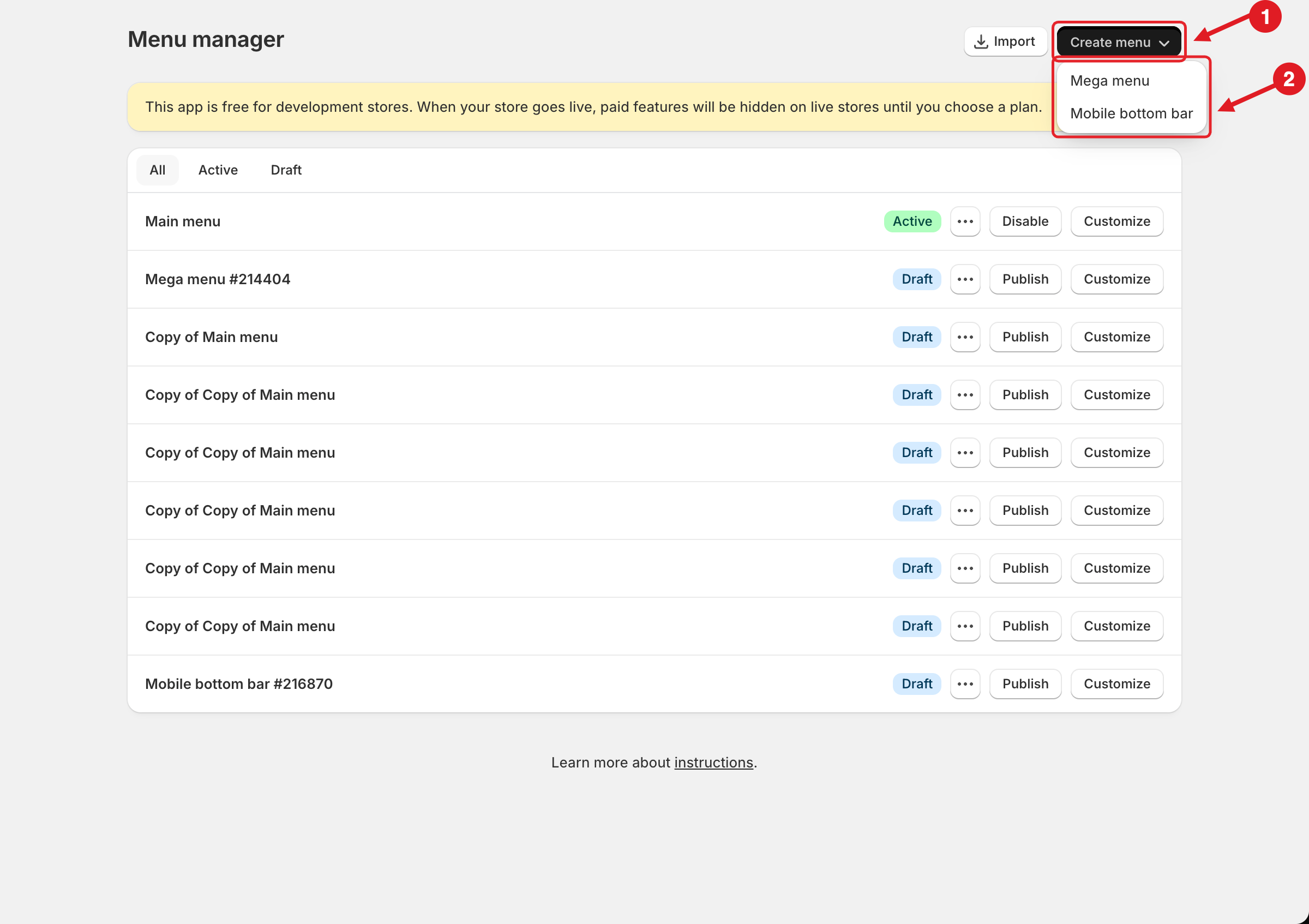
Click **Create menu (1)**, then choose a type from the dropdown **(2)**:

* **Mega menu**: the main navigation menu in your store header, with dropdowns, mega menus, tabs and blocks.
* **Mobile bottom bar**: a fixed navigation bar at the bottom of the screen on mobile. See [Mobile Bottom Navigation Bar](/globo-mega-menu/mobile-bottom-bar/mobile-bottom-navigation-bar.md).

<figure><img src="https://2995734148-files.gitbook.io/~/files/v0/b/gitbook-x-prod.appspot.com/o/spaces%2FqP3YAfC1xaiWJzITQ9sI%2Fuploads%2Fgit-blob-80ce4763709dc2fbe49019e580611f5a19ee6394%2Fmenu-manager-create-dropdown.png?alt=media" alt="Create menu dropdown"><figcaption><p>(1) Create menu, (2) choose Mega menu or Mobile bottom bar</p></figcaption></figure>
{% endstep %}

{% step %}

### Choose how to start (Mega menu)

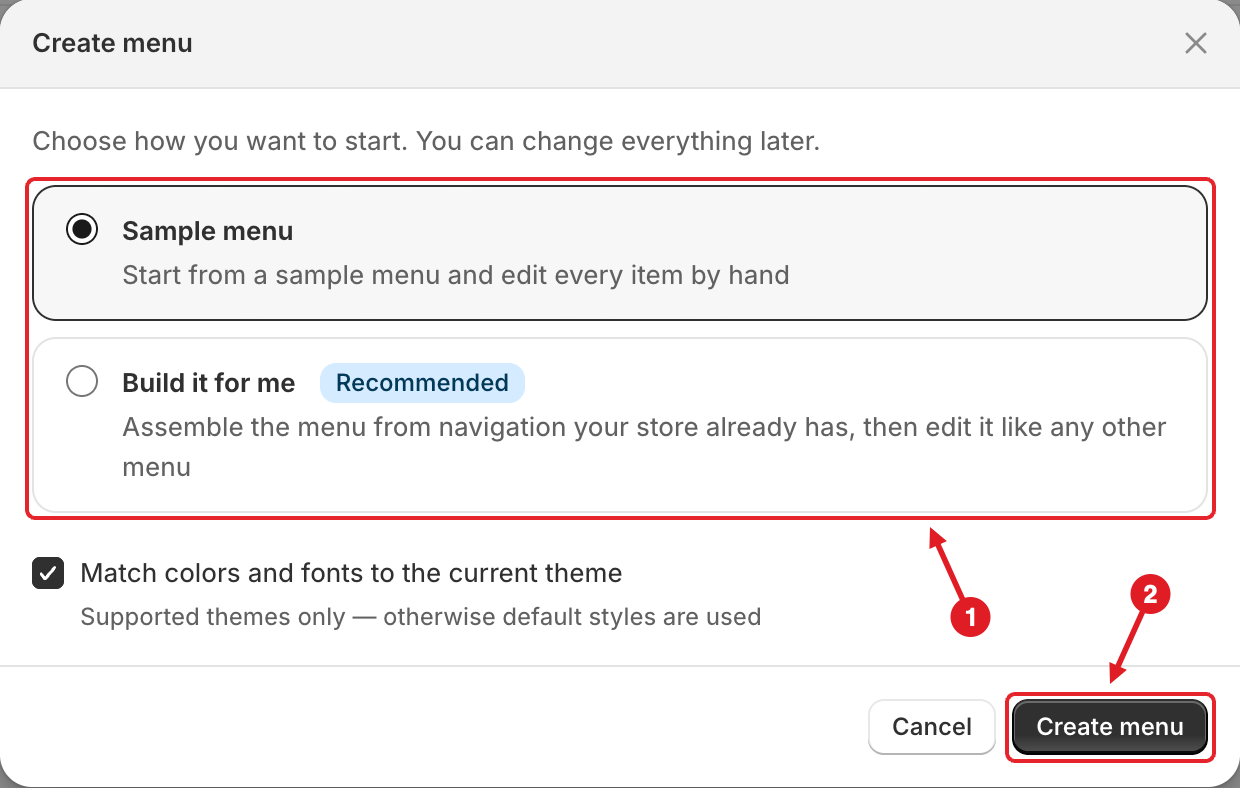
For a **Mega menu**, the **Create menu** dialog asks *"Choose how you want to start. You can change everything later."*

| Option                                | What happens                                                                                                                                                                                               |
| ------------------------------------- | ---------------------------------------------------------------------------------------------------------------------------------------------------------------------------------------------------------- |
| **Sample menu** (selected by default) | Creates a menu with example items that you edit by hand.                                                                                                                                                   |
| **Build it for me** (Recommended)     | Builds the menu from navigation you already set up in Shopify. When you select it, a **Shopify menu** list appears: pick the Shopify menu to copy (for example *Main menu*). Nested links become submenus. |

**Match colors and fonts to the current theme** is ticked by default. It reuses your theme's colors and fonts so the menu fits in straight away. This works on supported themes only; on other themes, default styles are used.

<figure><img src="https://2995734148-files.gitbook.io/~/files/v0/b/gitbook-x-prod.appspot.com/o/spaces%2FqP3YAfC1xaiWJzITQ9sI%2Fuploads%2Fgit-blob-5d291986d77295ed51a1e009f574371759681eee%2Fcreate-menu-modal.png?alt=media" alt="Create menu dialog"><figcaption><p>Create menu dialog</p></figcaption></figure>
{% endstep %}

{% step %}

### Click Create menu

The new menu is added to the list as a **Draft**. Open it with **Customize** to build it, then publish it. See [Publish New Menu to Theme](/globo-mega-menu/basic-knowledge/publish-new-menu-to-theme.md).
{% endstep %}
{% endstepper %}

{% hint style="info" %}
**About Build it for me:**

* It's a one-time copy. If you change your Shopify navigation (**Online Store** > **Navigation**) later, the app menu is **not** updated. Edit the menu in the app instead.
* Navigation deeper than 7 levels is trimmed, and you'll see a message saying that some deeply nested items were not imported.
* If the Shopify menu you picked is empty, the app creates the sample menu instead.
* If you see *No Shopify navigation was found for this store*, create a menu in **Online Store** > **Navigation** first, or choose **Sample menu**.
  {% endhint %}

## <mark style="color:blue;">Menu Actions</mark>

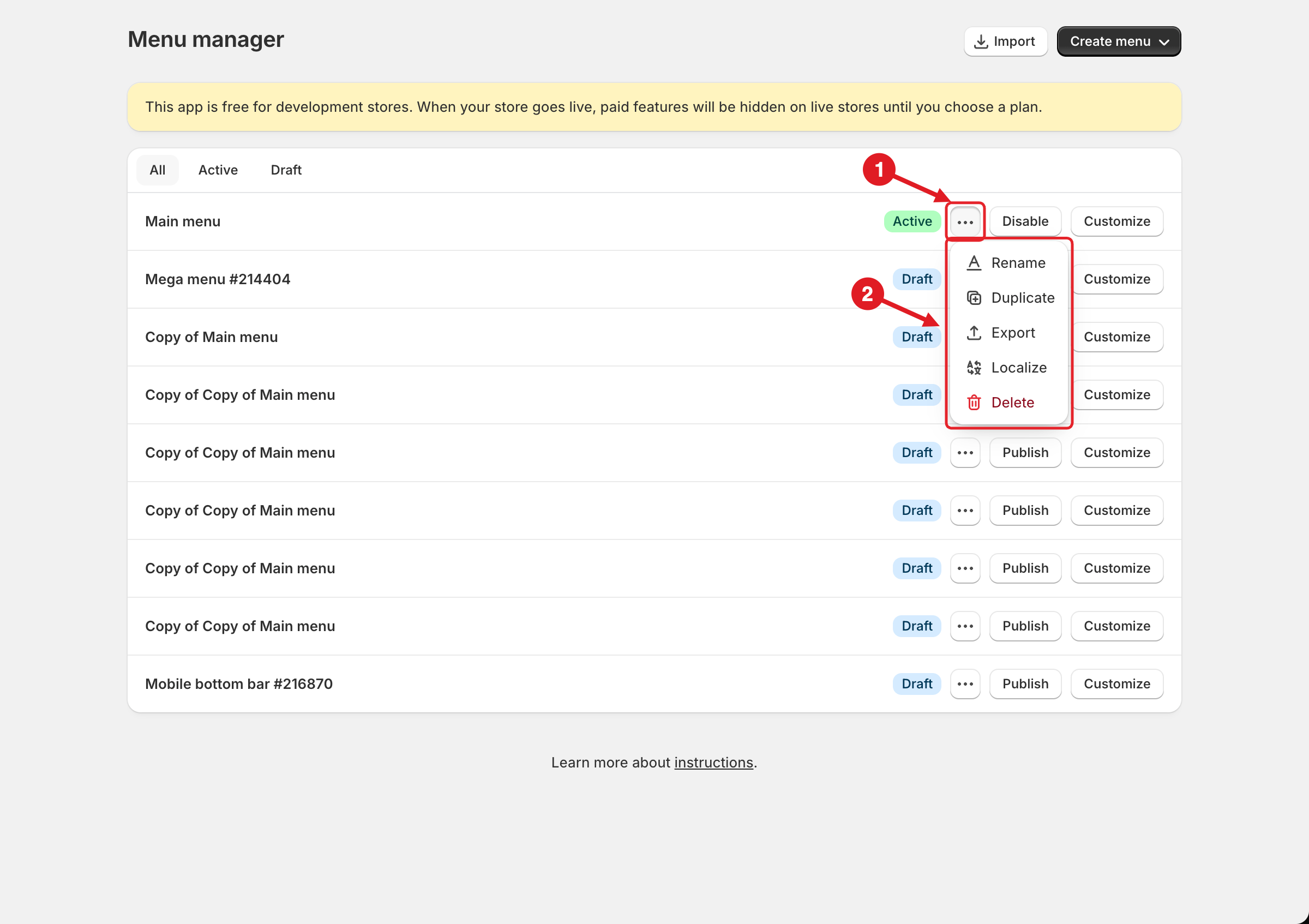
To see a menu's actions, click **⋯ (1)** on its row. A list of actions opens **(2)**:

<figure><img src="https://2995734148-files.gitbook.io/~/files/v0/b/gitbook-x-prod.appspot.com/o/spaces%2FqP3YAfC1xaiWJzITQ9sI%2Fuploads%2Fgit-blob-8dfb31b18642099f9772b2ee02fbcef5ecd2a111%2Fmenu-manager-actions.png?alt=media" alt="Menu actions"><figcaption><p>(1) Click ⋯ on a menu row, (2) choose an action</p></figcaption></figure>

| Action        | What it does                                                                                                                                                                                                                                                                                                             |
| ------------- | ------------------------------------------------------------------------------------------------------------------------------------------------------------------------------------------------------------------------------------------------------------------------------------------------------------------------ |
| **Rename**    | Turns the name into a text field. Type the new name and click **Save** in the save bar at the top of the page. Names can be up to **50 characters** and can use only letters, numbers, spaces and `- # [ ]`. Special characters like `_ @ !` aren't allowed.                                                             |
| **Duplicate** | Makes a copy named **Copy of …**. The copy starts as a **Draft**. Duplicate a menu to back it up before big changes, or to start a seasonal version.                                                                                                                                                                     |
| **Export**    | Downloads the whole menu as a `.json` file (**Pro Navigation**). See [Import/Export Menu](/globo-mega-menu/basic-knowledge/import-export-menu.md).                                                                                                                                                                       |
| **Localize**  | Opens the **Localization** page for this menu, on every plan. On **Basic Navigation** you can translate the built-in texts in the **General** tab; translating the menu items needs **Growth Navigation** or **Pro Navigation**. See [Translate Menu Items](/globo-mega-menu/manage-menu-items/translate-menu-items.md). |
| **Delete**    | Asks you to confirm (*"If you delete … , this can't be undone."*). Click **Delete menu** to remove it.                                                                                                                                                                                                                   |

{% hint style="warning" %}
**Deleting a menu can't be undone from the app.** If you're not sure, **Duplicate** or **Export** the menu first. If you deleted a menu by mistake, contact us: we may be able to restore it as a draft. See [I Deleted a Menu or an Item by Mistake](/globo-mega-menu/faqs/i-deleted-a-menu-or-an-item-by-mistake.md).
{% endhint %}

{% hint style="info" %}
**Is an action greyed out?** A greyed-out action with *This option is only available to PRO plan* isn't included in your current plan. See [Plans and Billing](/globo-mega-menu/analytics-and-billing/plans-and-billing.md). If a **Mobile bottom bar** row has all its buttons greyed out, the **Bottom navigation bar** feature isn't in your plan.
{% endhint %}

## <mark style="color:blue;">Menu Limit</mark>

Each store can have up to **10 menus**, counting both mega menus and mobile bottom bars. When you reach the limit, this banner appears. **Create menu**, **Import** and **Duplicate** are then disabled until you delete a menu you no longer use.

<figure><img src="https://2995734148-files.gitbook.io/~/files/v0/b/gitbook-x-prod.appspot.com/o/spaces%2FqP3YAfC1xaiWJzITQ9sI%2Fuploads%2Fgit-blob-46669a41d7ff33c48e4ae46e355af00633eca222%2Fmenu-limit-reached.png?alt=media" alt="Menu limit reached"><figcaption><p>Menu limit reached banner</p></figcaption></figure>

{% hint style="success" %}
**Tip:** delete old test copies (*Copy of Copy of …*) often, and give your menus clear names such as *Main menu - Black Friday*. You'll find the right menu faster, and you'll stay under the limit.
{% endhint %}

***

### Related Articles

{% content-ref url="/pages/2emGhof9opxewBZhmMTJ" %}
[Menu Editor Overview](/globo-mega-menu/manage-menus/menu-editor-overview.md)
{% endcontent-ref %}

{% content-ref url="/pages/GicujsB7qcB0s3MYM7JU" %}
[Publish New Menu to Theme](/globo-mega-menu/basic-knowledge/publish-new-menu-to-theme.md)
{% endcontent-ref %}

{% content-ref url="/pages/rb0UuspGr9ZweviZCVJl" %}
[Import/Export Menu](/globo-mega-menu/basic-knowledge/import-export-menu.md)
{% endcontent-ref %}

{% content-ref url="/pages/m9R9gJXxj6b9zp7Ty1Lm" %}
[Translate Menu Items](/globo-mega-menu/manage-menu-items/translate-menu-items.md)
{% endcontent-ref %}

{% content-ref url="/pages/ae5iAailCwvlkNqFtWrN" %}
[Multiple Menus and Campaigns](/globo-mega-menu/manage-menus/multiple-menus-and-campaigns.md)
{% endcontent-ref %}

***

**💬 Need help?**

Email us at **📧** [**contact@globo.io**](mailto:contact@globo.io) - we’re happy to assist!