> For the complete documentation index, see [llms.txt](https://docs.globo.io/llms.txt). Markdown versions of documentation pages are available by appending `.md` to page URLs; this page is available as [Markdown](https://docs.globo.io/globo-mega-menu/manage-menus/show-menus-by-market.md).
# Show Menus by Market
Show a menu only to visitors from selected Shopify Markets.
**Market availability** limits a menu to visitors from the [Shopify Markets](https://help.shopify.com/manual/markets) you choose. For example, you can show a US menu with US-only collections to visitors in the United States, and a separate EU menu to visitors in Europe.
{% hint style="info" %}
Market availability is available on the **Growth Navigation** and **Pro Navigation** plans. On **Basic Navigation** (free), the setting is greyed out with a link to the Growth plan.
{% endhint %}
## Set Up Market Availability
{% stepper %}
{% step %}
### Open the Advanced tab
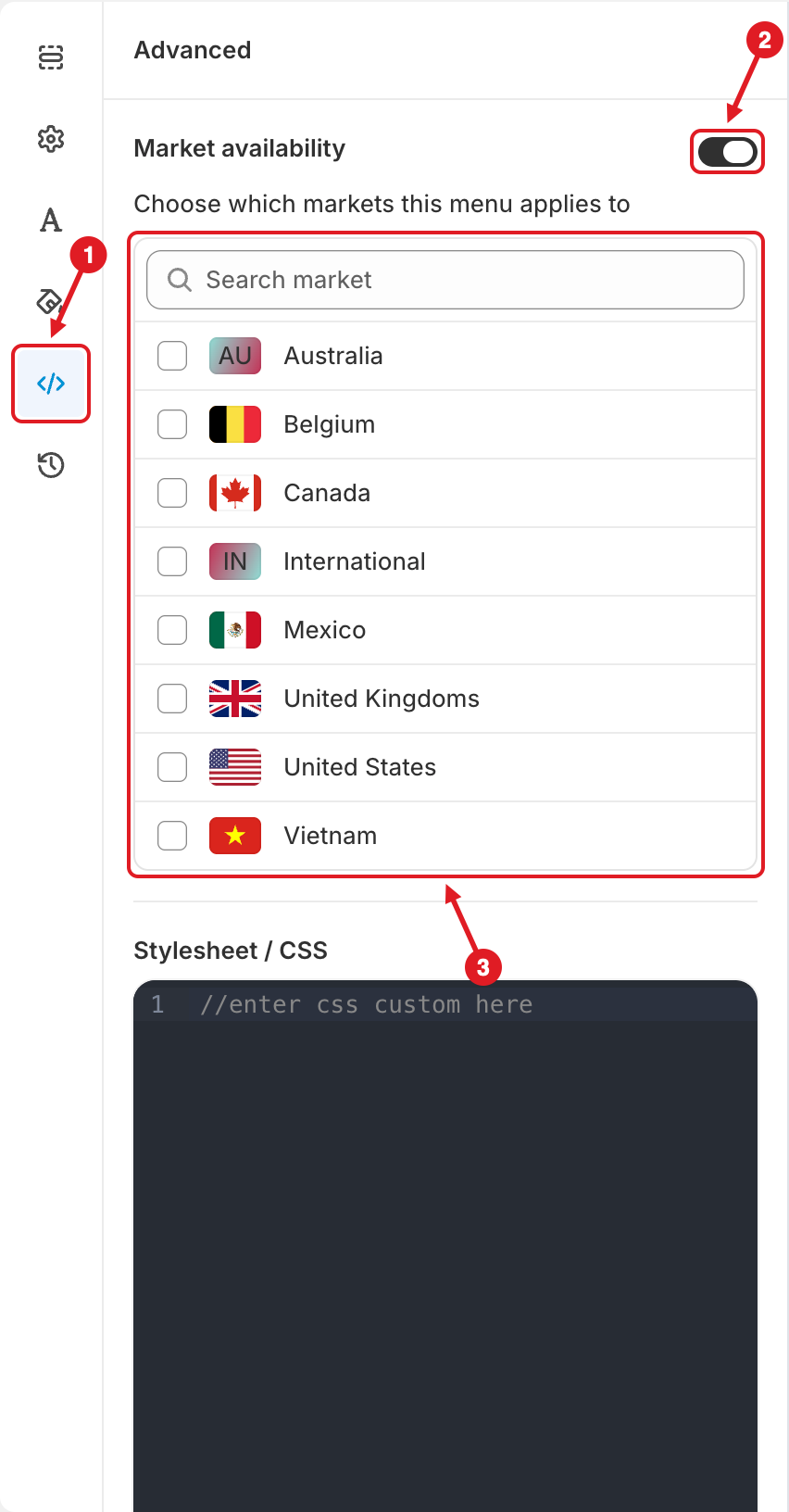
In the menu editor, click the **Advanced** icon (``) **(1)** in the left bar.
{% endstep %}
{% step %}
### Turn on Market availability
Turn on the **Market availability** toggle **(2)**. A list titled **Choose which markets this menu applies to** appears.
(1) Advanced tab, (2) Market availability toggle, (3) market list
{% endstep %}
{% step %}
### Choose the markets
In the market list **(3)**, tick every market this menu should appear in. Use **Search market** to find a market quickly.
* The list shows the **active** markets from your Shopify admin (**Settings** > **Markets**).
* A market with a single country shows that country's flag. A market with several countries (such as *International*) shows the first two letters of its name instead.
{% endstep %}
{% step %}
### Save and publish
Click **Save**, then **Publish** so the storefront gets the change. See [Publish New Menu to Theme](/globo-mega-menu/basic-knowledge/publish-new-menu-to-theme.md).
{% endstep %}
{% endstepper %}
## ⚙️ How It Works
* The app checks the country of each visitor's session, as detected or chosen with your store's country selector. The menu loads only if that country belongs to one of the markets you ticked.
* Visitors from any other country don't get this menu. They see another active menu that matches them, or your theme's own menu if there isn't one.
* When **Market availability** is off, the menu shows in all markets.
{% hint style="success" %}
**One menu per market:** create one menu for each market (tip: **Duplicate** your main menu in [Menu Manager](/globo-mega-menu/manage-menus/menu-manager.md) and edit the copy). Turn on **Market availability** in each one, tick its market(s), then publish them all. Each visitor sees the menu that matches their market.
{% endhint %}
{% hint style="warning" %}
**Troubleshooting**
* **Toggle is on but no market is ticked:** the menu won't show to anyone. Tick at least one market, or turn the toggle off.
* **A market is missing from the list:** make sure it's **active** in **Settings** > **Markets** in Shopify, then reopen the editor.
* **Two menus for the same market:** if both use automatic placement, only one shows. See [Which Menu Is Shown?](/globo-mega-menu/manage-menus/multiple-menus-and-campaigns.md)
* **Testing:** switch country with your storefront's country selector to check each market's menu.
{% endhint %}
{% hint style="info" %}
Want the **same** menu in different **languages** instead? You don't need one menu per market. Translate the menu instead: see [Translate Menu Items](/globo-mega-menu/manage-menu-items/translate-menu-items.md).
{% endhint %}
***
### Related Articles
{% content-ref url="/pages/ae5iAailCwvlkNqFtWrN" %}
[Multiple Menus and Campaigns](/globo-mega-menu/manage-menus/multiple-menus-and-campaigns.md)
{% endcontent-ref %}
{% content-ref url="/pages/m9R9gJXxj6b9zp7Ty1Lm" %}
[Translate Menu Items](/globo-mega-menu/manage-menu-items/translate-menu-items.md)
{% endcontent-ref %}
{% content-ref url="/pages/PlhtXYBdkqWPGsShmLmy" %}
[Can I Have Different Menus for Different Countries?](/globo-mega-menu/faqs/can-i-have-different-menus-on-different-markets-countries.md)
{% endcontent-ref %}
***
**💬 Need help?**
Email us at **📧** [**contact@globo.io**](mailto:contact@globo.io) - we’re happy to assist!