> For the complete documentation index, see [llms.txt](https://docs.globo.io/llms.txt). Markdown versions of documentation pages are available by appending `.md` to page URLs; this page is available as [Markdown](https://docs.globo.io/globo-mega-menu/menu-blocks/blog-posts.md).
# Blog Posts and Articles
Show your latest or hand-picked blog articles.
Blog blocks show articles from your Shopify blog in the menu, each with its featured image and title. Use them to drive traffic to guides, lookbooks or news. There are two kinds:
* **Latest Blog posts**: shows the newest articles of one blog you choose.
* **Articles**: shows only the articles you pick by hand.
{% hint style="info" %}
Blog blocks are available on the **Growth Navigation** and **Pro Navigation** plans.
{% endhint %}
## Add a Blog Block
{% stepper %}
{% step %}
### Open the Select block panel
In the mega menu panel of the preview, click **+ Add block**.
{% endstep %}
{% step %}
### Pick Latest Blog posts or Articles
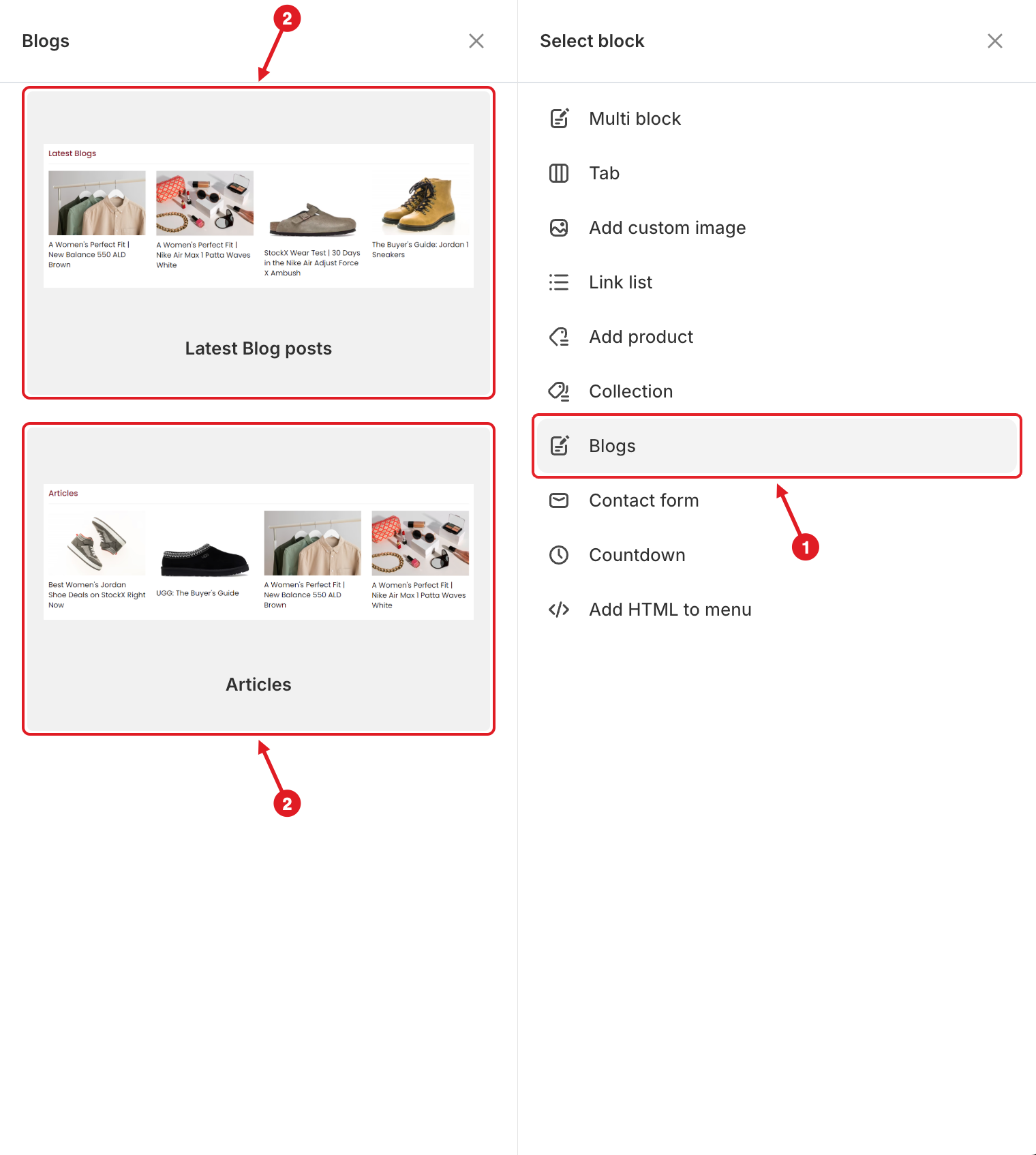
1. Click **Blogs** on the right.
2. Hover over **Latest Blog posts** or **Articles** and click **Select**.
1. Click Blogs · 2. Pick Latest Blog posts or Articles
{% endstep %}
{% step %}
### Choose the content
* **Latest Blog posts**: under **Blog**, pick the blog, then set **Number of articles**.
* **Articles**: under **Articles**, pick the articles to show.
{% endstep %}
{% step %}
### Adjust the display, then save
Set the options below, then click **Save** and **Publish**.
{% endstep %}
{% endstepper %}
## ⚙️ Settings
| Setting | What it does | Block |
| ---------------------- | ------------------------------------------------------------------------------------------------------------------------ | ----------------- |
| **Title** / **Link** | Heading above the articles (for example "Latest Blogs") and where it links. | Both |
| **Width** | How much of the mega menu row the block takes (**Auto** or 8.33%–100%). | Both |
| **List view** | **Carousel**, **List** or **Grid**. Default: **List**. | Both |
| **Number of articles** | How many of the newest articles to show. Default: **10**. | Latest Blog posts |
| **Blog** | The blog to take articles from. | Latest Blog posts |
| **Articles** | The articles you pick. | Articles |
| **Item(s) per row** | Only for **Grid** and **Carousel**: **1**, **2**, **3**, **4** or **6**. Default: **3**. | Both |
| **Item view** | **Image above** or **Image left**. | Both |
| **Image ratio** | **Auto**, **1:1**, **4:3**, **3:4**, **16:9** or **9:16**. | Both |
| **Visibility** | **Hide on desktop**, **Hide on mobile**, **Hide when logged in**, **Only show when logged in**, **Schedule publishing**. | Both |
{% hint style="success" %}
**Tip:** For a wide row of article cards, use **Grid** with **Image above**. For a narrow column, use **List** with **Image left**.
{% endhint %}
{% hint style="warning" %}
Articles are read live from your blog, so a **Latest Blog posts** block shows new posts on its own. The block only remembers **which** blog or articles you picked: if you delete an article or change its handle (URL), open the block and pick it again. An article without a featured image shows a grey placeholder. See [Changes I Made in Shopify Admin Don't Appear in the Menu](/globo-mega-menu/faqs/why-are-shopifys-changes-not-reflected-on-menu.md).
{% endhint %}
***
### Related Articles
{% content-ref url="/pages/lUHoSham1OxSYk97Xx5H" %}
[Blocks Overview](/globo-mega-menu/menu-blocks/blocks.md)
{% endcontent-ref %}
{% content-ref url="/pages/f5H2ZdBdZILUk8k7C2Xo" %}
[Mega Menu](/globo-mega-menu/manage-menu-items/manage-submenu-items/mega-menu.md)
{% endcontent-ref %}
{% content-ref url="/pages/dDqYFHXOREFy0RvVlyIU" %}
[Changes I Made in Shopify Admin Don't Appear in the Menu](/globo-mega-menu/faqs/why-are-shopifys-changes-not-reflected-on-menu.md)
{% endcontent-ref %}
***
**💬 Need help?**
Email us at **📧** [**contact@globo.io**](mailto:contact@globo.io) - we’re happy to assist!