> For the complete documentation index, see [llms.txt](https://docs.globo.io/llms.txt). Markdown versions of documentation pages are available by appending `.md` to page URLs; this page is available as [Markdown](https://docs.globo.io/mega-menu/basic-knowledge/disable-app-from-theme.md).
# Disable App from Theme
Hide the app menu to see your original theme menu or troubleshoot — without uninstalling.
Sometimes you want your theme's original menu back — to compare, to troubleshoot a display problem, or to pause a seasonal menu. You don't need to uninstall the app or delete anything. Pick the option that fits:
| Option | What it affects | Use it when |
| -------------------------- | -------------------------------------------------------------------- | ------------------------------------------------------------------------------------------- |
| **Disable one menu** | Only that menu, on every theme | You want to take a single menu down but keep using the app |
| **Turn off the app embed** | The whole app (all menus and the mobile bottom bar) on **one theme** | You want to check whether a problem comes from the app, or stop the app on a specific theme |
## Option 1: Disable One Menu
{% stepper %}
{% step %}
### Find the menu
Go to **Menu manager** (or open the menu in the editor). Active menus show an **Active** badge.
{% endstep %}
{% step %}
### Click Disable
Click **Disable** on the menu's row in **Menu manager**, or **Disable** in the top-right corner of the editor (next to **Publish**). You'll see a **Menu disabled** message.
{% endstep %}
{% endstepper %}
The menu goes back to **Draft**. Nothing is deleted: its items, blocks and settings stay in the app, and you can [publish it again](/mega-menu/basic-knowledge/publish-new-menu-to-theme.md) at any time. If no other app menu is published in the same place, your theme's original menu shows again.
{% hint style="info" %}
Disabling also cancels the menu's schedule, if it had one. Set the dates again when you republish. See [Schedule Menus and Items](/mega-menu/manage-menus/schedule-menus-and-items.md).
{% endhint %}
## Option 2: Turn Off the App Embed on a Theme
{% stepper %}
{% step %}
### Open the theme editor
Go to **Online Store** > **Themes** and click **Customize** on the theme. (From the app, you can also click **Manage in theme editor** on the **App status** card on **Home**.)
{% endstep %}
{% step %}
### Turn off Mega menu
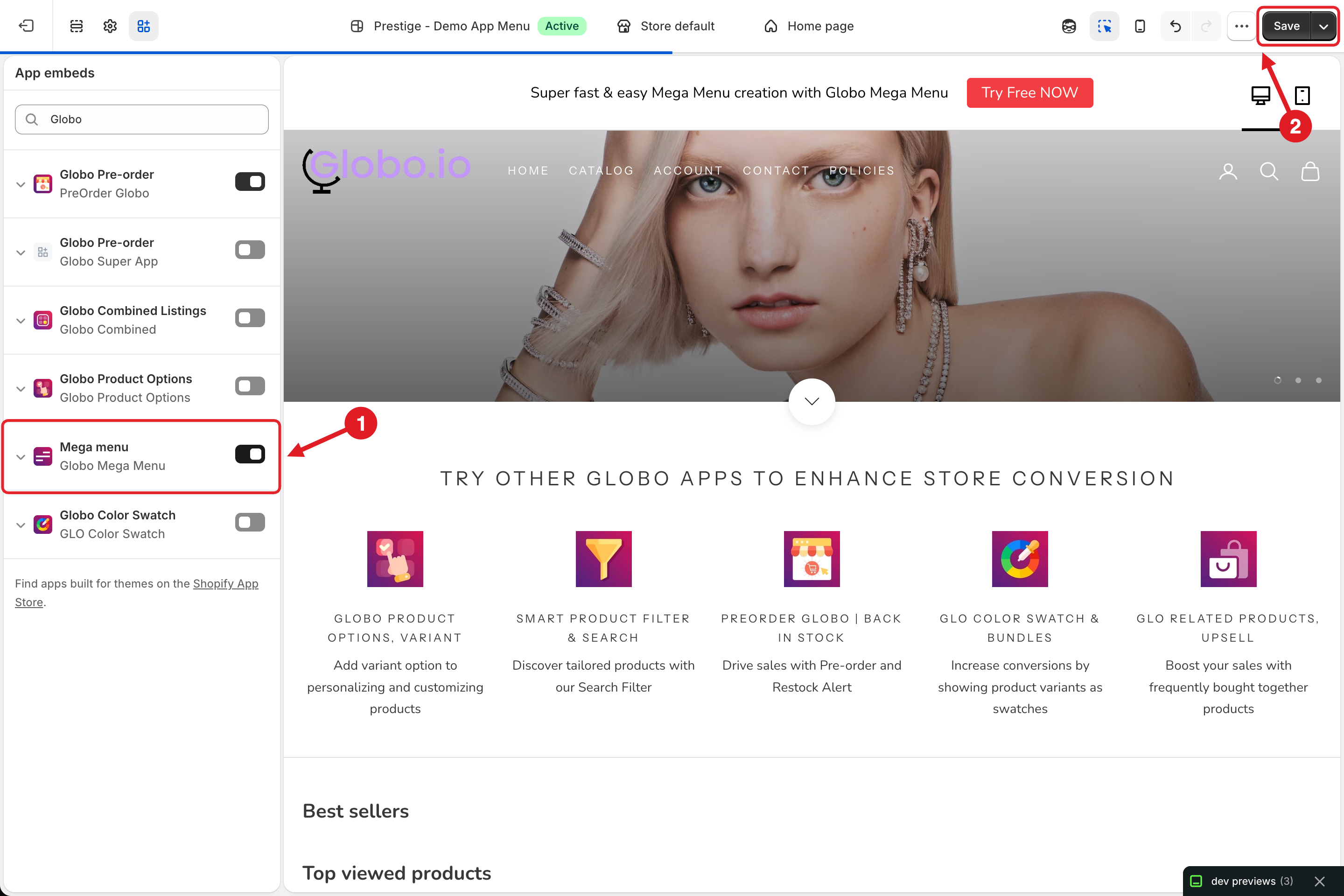
Click the **App embeds** icon in the left sidebar, toggle **Mega menu** (Globo Mega Menu) **off (1)** and click **Save (2)**.
App embeds: (1) Mega menu toggle, (2) Save
{% endstep %}
{% endstepper %}
The app no longer loads on that theme and your theme's original header menu is shown. Your menus stay **Active** in the app and still appear on any other theme where the embed is on.
To turn it back on, toggle **Mega menu** on again and click **Save**.
{% hint style="warning" %}
Turning off the app embed doesn't cancel your subscription. To stop billing, downgrade or uninstall the app — see [Plans and Billing](/mega-menu/analytics-and-billing/plans-and-billing.md).
{% endhint %}
***
### Related Articles
{% content-ref url="/pages/A3ybekGYPMIrQCj905wO" %}
[Enable App Embed](/mega-menu/basic-knowledge/enable-app-embed.md)
{% endcontent-ref %}
{% content-ref url="/pages/RTHlRZHDj8aGWFxfHvDm" %}
[Preview Menu Before Going Live](/mega-menu/basic-knowledge/preview-menu-on-draft-theme.md)
{% endcontent-ref %}
{% content-ref url="/pages/uZRxVoy6Lr9mPJcevwai" %}
[Menu Manager](/mega-menu/manage-menus/menu-manager.md)
{% endcontent-ref %}
{% content-ref url="/pages/xrVVZ40v8dnp0dB2SnP5" %}
[The Menu Doesn't Show (or Shows Incorrectly)](/mega-menu/faqs/why-the-menu-does-not-show-or-shows-incorrectly-on-our-website.md)
{% endcontent-ref %}
***
**💬 Need help?**
Email us at **📧** [**contact@globo.io**](mailto:contact@globo.io) - we’re happy to assist!