> For the complete documentation index, see [llms.txt](https://docs.globo.io/llms.txt). Markdown versions of documentation pages are available by appending `.md` to page URLs; this page is available as [Markdown](https://docs.globo.io/mega-menu/basic-knowledge/enable-app-embed.md).
# Enable App Embed
Turn on the app embed so Globo Mega Menu can load on your storefront.
The app adds its code to your theme through Shopify **App embeds** (Online Store 2.0). No theme code is edited, and turning the embed off removes the app from that theme instantly.
You need to do this **once per theme**: right after installing the app, and again whenever you start using a new theme.
## Steps to Enable
{% stepper %}
{% step %}
### Open the app and check App status
Go to Shopify admin > **Apps** > **Globo Mega Menu**. On **Home**, find the **App status** card.
App status card: (1) current status, (2) Activate button
* **Inactive (1)** — the app embed is off. The card says *Enable the app embed in your theme to start using the app*.
* **Active** — the embed is already on and the button changes to **Manage in theme editor**. Nothing else to do.
{% endstep %}
{% step %}
### Click Activate
Click **Activate (2)**. The theme editor opens in a new browser tab, directly on the **App embeds** panel.
{% hint style="info" %}
You can also click **Activate now** on the **Activate the Globo Mega Menu app embed** step of the **Get started** checklist on **Home** (it changes to **Activated** once done), or **Go to app embeds settings**, which appears when you publish a menu from **Menu manager** while the embed is off (publishing from the editor only shows a **Menu published** message). They all open the same place.
{% endhint %}
{% endstep %}
{% step %}
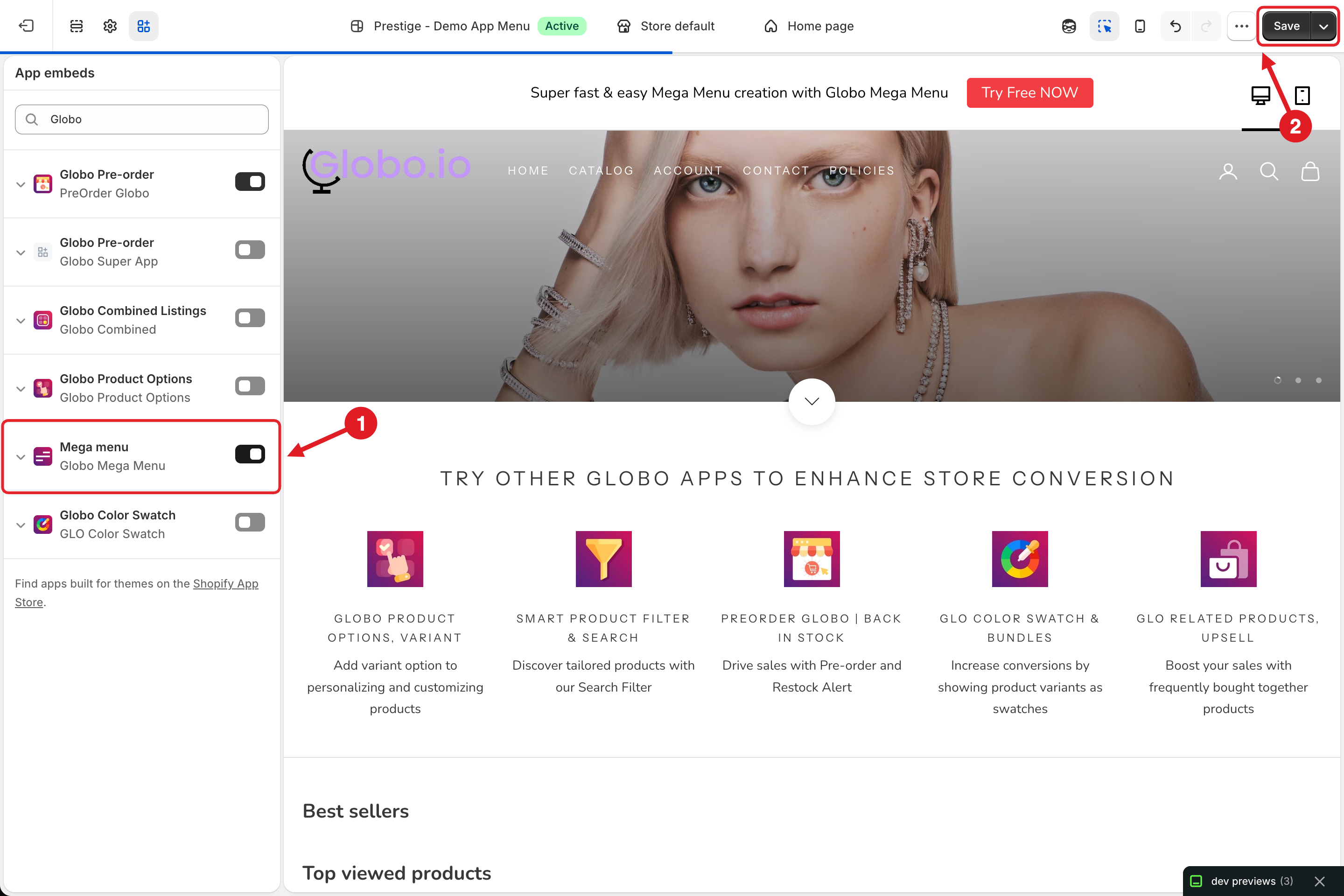
### Turn on Mega menu
Find **Mega menu** (subtitle **Globo Mega Menu**) and make sure its toggle is **on (1)**.
Theme editor: (1) Mega menu toggle, (2) Save
{% hint style="info" %}
Type **Globo** in the search box at the top of **App embeds** to find it quickly, especially if you use several apps.
{% endhint %}
{% endstep %}
{% step %}
### Save
Click **Save (2)** in the top-right corner of the theme editor. The toggle is not applied until you save.
{% endstep %}
{% step %}
### Confirm in the app
Go back to the app's browser tab. The **App status** card refreshes when you return to the tab and should now show **Active**.
{% endstep %}
{% endstepper %}
## Enable It Manually
You can also do it without the app: **Online Store** > **Themes** > **Customize** on the theme > click the **App embeds** icon in the left sidebar > toggle **Mega menu** on > **Save**.
## ⚠️ Good to Know
{% hint style="warning" %}
App embeds are enabled **per theme**. If you switch, duplicate or publish another theme, check that **Mega menu** is enabled on that theme too — otherwise the menu won't show there.
{% endhint %}
* The embed only loads the app. You still need to [publish a menu](/mega-menu/basic-knowledge/publish-new-menu-to-theme.md) for something to appear.
* **App status** on Home checks the theme you last published a menu to (or your live theme if you haven't published yet).
* **Menu still not showing?** Wait a few minutes after publishing, clear your browser cache or open the store in a private window, then see [The Menu Doesn't Show (or Shows Incorrectly)](/mega-menu/faqs/why-the-menu-does-not-show-or-shows-incorrectly-on-our-website.md).
***
### Related Articles
{% content-ref url="/pages/GicujsB7qcB0s3MYM7JU" %}
[Publish New Menu to Theme](/mega-menu/basic-knowledge/publish-new-menu-to-theme.md)
{% endcontent-ref %}
{% content-ref url="/pages/a9eezz4VJLITzn3qkD5a" %}
[Disable App from Theme](/mega-menu/basic-knowledge/disable-app-from-theme.md)
{% endcontent-ref %}
{% content-ref url="/pages/xrVVZ40v8dnp0dB2SnP5" %}
[The Menu Doesn't Show (or Shows Incorrectly)](/mega-menu/faqs/why-the-menu-does-not-show-or-shows-incorrectly-on-our-website.md)
{% endcontent-ref %}
{% content-ref url="/pages/9mmChkRayUxL6tTLfPaO" %}
[Will It Work with My Theme?](/mega-menu/faqs/will-it-work-with-my-shopify-theme.md)
{% endcontent-ref %}
***
**💬 Need help?**
Email us at **📧** [**contact@globo.io**](mailto:contact@globo.io) - we’re happy to assist!