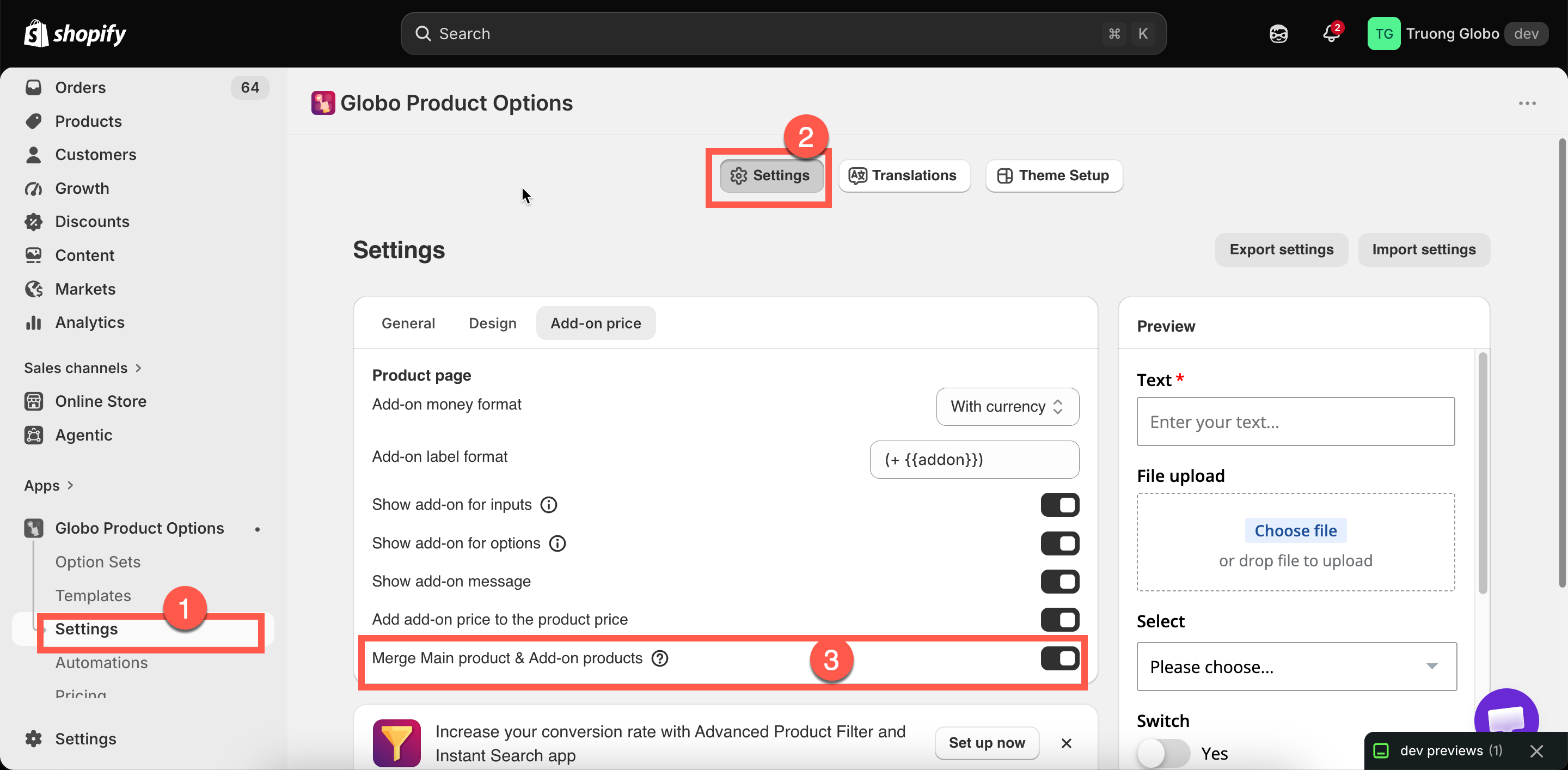
Merge main product and add-ons
Show add-on products as part of the main item in the cart instead of as separate lines.
By default, an add-on backed by a product is added as its own cart line, linked to the main item. One bracelet with three add-ons therefore produces four cart lines.
Merge Main product & Add-on products displays them as a single item instead. New stores have this setting off by default.
Where the setting is
The setting is under Settings > Settings > Add-on price, labeled Merge Main product & Add-on products. It is store-wide and applies to every option set.

What changes
Lines shown
The main item plus one line per add-on product
The main item, with its add-ons presented as part of it
Price shown
Each line priced separately
Combined
Option details
Listed under the main item
The setting changes the display only. The add-on products are still real products; their inventory is still reduced, their weight is still included in shipping, and your Shopify reports still record them as sales of those products.
Which to choose
Customers benefit from seeing exactly what they are paying for
The cart looks cluttered with add-on lines
Add-ons are substantial items in their own right
Add-ons are small components of one customized thing
You want each add-on's price visible in the cart
You want the cart to read as "one personalized product, one price"
You are troubleshooting a pricing problem
Your products are heavily configured, with many add-ons per item
For a made-to-order product with six components, merging matches how the customer views the purchase. For a bracelet with a separately sold gift box, separate lines are clearer.
Related cart settings
Two other settings affect how add-ons appear in the cart. Both are under Settings > Settings > General > Cart page.
Hide quantity box and remove button for add-on products
Stops customers changing or deleting an add-on line independently of the item it belongs to. On by default, and worth leaving on — a customer who removes the gift box but keeps the "gift wrapped" option creates an order you cannot fulfill as described.
Show "Edit Options" button in cart
Lets customers reopen the option form from the cart and change their choices. See Cart page.
Notes
Store-wide, not per option set.
The setting affects display only. Inventory, weight, tax, and reporting are not affected.
The setting applies to product-backed add-ons only. A Fixed amount charge has no separate cart line to merge.
It is no longer needed to make a cart drawer app work. See Cart drawer apps.
Check your cart page after changing this setting, as cart layouts and behavior may vary between themes.
Last updated
Was this helpful?