> For the complete documentation index, see [llms.txt](https://docs.globo.io/llms.txt). Markdown versions of documentation pages are available by appending `.md` to page URLs; this page is available as [Markdown](https://docs.globo.io/options/option-types/shared-settings/out-of-stock-options.md).

# Out of stock options

Control how an option value is displayed when its add-on product is out of stock.

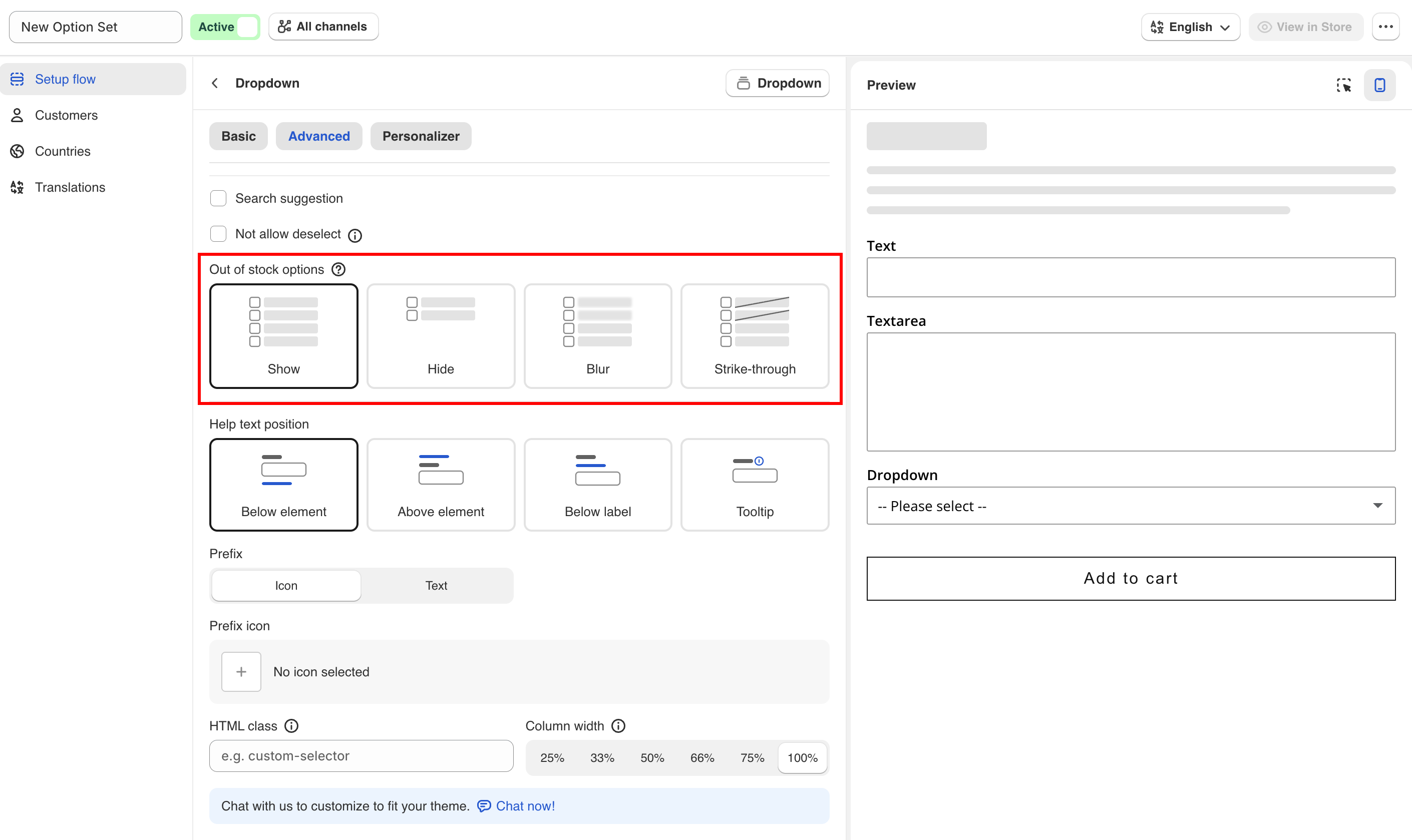
Sets how an option value is displayed when the add-on product linked to it is out of stock. Available on the **Advanced** tab.

<table><thead><tr><th width="230">Value</th><th>Description</th></tr></thead><tbody><tr><td><strong>Show</strong> (default)</td><td>The value is displayed normally and can still be selected.</td></tr><tr><td><strong>Hide</strong></td><td>The value is removed from the list.</td></tr><tr><td><strong>Blur</strong></td><td>The value is displayed faded and cannot be selected.</td></tr><tr><td><strong>Strike-through</strong></td><td>The value is displayed with a line through it and cannot be selected.</td></tr></tbody></table>

Use **Blur** for color and image swatches, so customers can still see the color or image. Use **Strike-through** for short text lists and **Hide** for long ones. Use **Show** for made-to-order products, where inventory is only a record.

{% hint style="warning" %}
This setting applies only to option values linked to an add-on product, either an existing product or a product generated by the app. Values that use **Fixed amount** have no product and no inventory, so the setting has no effect. See [Add-on pricing](/options/add-on-pricing/add-on-pricing.md).
{% endhint %}

## How stock is determined

Stock is read from the linked product's inventory in Shopify. There is nothing to configure in the app. Set the inventory on the add-on product in Shopify admin as you would for any other product.

The availability check runs when the product page loads. If an option value is linked to a specific variant, the check applies to that variant only.

See [Stock and inventory](/options/add-on-pricing/stock-and-inventory.md).

## Notes

* This setting may not be available on all plans. See [Compare plans](/options/plans-and-billing/compare-plans.md).
* The setting applies to the whole option. All option values use the same display.
* The setting controls display and selection only. It does not prevent the customer from buying the main product.

<figure><img src="https://3141646361-files.gitbook.io/~/files/v0/b/gitbook-x-prod.appspot.com/o/spaces%2FkMyxhAk2ZlJa4wZQGfBI%2Fuploads%2Fgit-blob-2e1a964764c638427e30355cceeb373b106eafab%2Foos.png?alt=media" alt="Color swatches with one value blurred"><figcaption><p>The four ways a sold-out value can be displayed: Show, Hide, Blur, and Strike-through.</p></figcaption></figure>
