
Overview
Every order that used your options, with the revenue your add-ons brought in.
Orders in the app menu lists the orders that came in through your option sets, and totals what your options earned. Shopify’s own order list cannot do this — it has no idea which orders used an option set, or how much of a total came from add-ons.
The page has two tabs, and this section covers both:
| Tab | What it is for | Read |
|---|---|---|
| Orders | The orders that used your options, and what they earned | This page, Order details, and Export orders and files |
| Automations | Workflows that run on those orders — email, order notes, order tags, Google Drive | Automations and the pages under it |
Neither tab is available on every plan. See Compare plans.
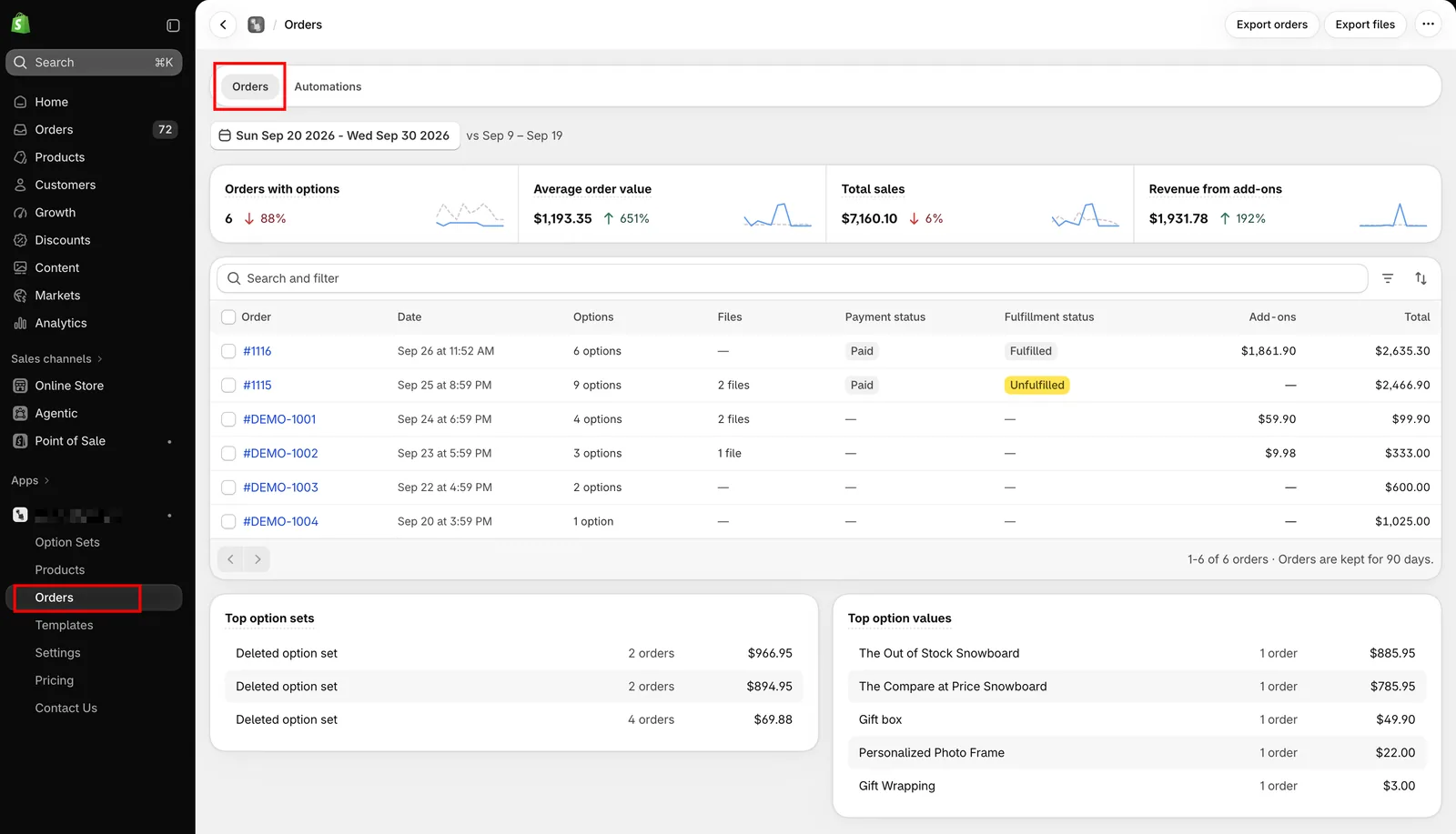
Totals for the period, then the orders behind them.
The numbers along the top
| Metric | What it counts |
|---|---|
| Orders with options | Orders placed with at least one option set in this period |
| Total sales | Total value of those orders, including shipping and taxes |
| Average order value | Total sales divided by the number of orders |
| Revenue from add-ons | What customers paid for add-on prices and add-on products |
Each one is compared against the previous period of the same length, so a 30-day range is measured against the 30 days before it.
Revenue from add-ons is the figure worth watching. It is the money your options brought in that the product price alone would not have.
Top option sets and Top option values
Two rankings sit below the metrics.
| Ranking | Based on |
|---|---|
| Top option sets | Add-on revenue, counting both add-on prices and add-on products |
| Top option values | Only values that added an add-on product, ranked by that product's revenue |
An option set deleted since the order was placed still appears, marked Deleted option set.
The list
| Column | Shows |
|---|---|
| Order | The order number, and the channel it came from |
| Date | When it was placed |
| Products | How many items it contains |
| Files | How many files the customer uploaded |
| Add-ons | What the add-ons on this order came to |
| Total | The order total |
| Payment status | Paid, Partially paid, Payment pending, Refunded, and so on |
| Fulfillment status | Fulfilled, Partially fulfilled, Unfulfilled, Scheduled, On hold |
Orders from Online Store, Point of Sale, and draft orders all appear, labelled by channel.
Finding an order
| Control | Options |
|---|---|
| Search | By order |
| Filter | With files or Without files, With add-ons or Without add-ons, by option set, and by channel |
| Sort by | Newest first, Oldest first, Highest total, Lowest total, Highest add-ons |
With files is the filter to reach for first thing in the morning — it gives you exactly the orders waiting on artwork.
Next
- Order details — the option summary, the uploaded files, and the notes for one order
- Export orders and files — getting the data out as CSV or ZIP
Notes
- Only orders containing at least one option set appear. An ordinary order never shows up here.
- The list is a record of what was ordered. Editing an option set later does not change orders already placed.
- Nothing here changes an order. Use View in Shopify for anything that does.
Was this helpful?
Thanks for your feedback! Tell us what was missing
Report an issue