> For the complete documentation index, see [llms.txt](https://docs.globo.io/llms.txt). Markdown versions of documentation pages are available by appending `.md` to page URLs; this page is available as [Markdown](https://docs.globo.io/options/settings/custom-fonts.md).

# Custom fonts

Upload your own font files and use them in the widget and in the live preview.

Upload a font file once, and it becomes available anywhere the app lets you select a font: the widget's typography, the Personalizer's text layers, and the Font picker option type.

Uploading your own fonts makes the preview accurate. If your engraving machine uses a particular typeface, uploading that typeface means the customer sees what they actually receive.

## Where it is

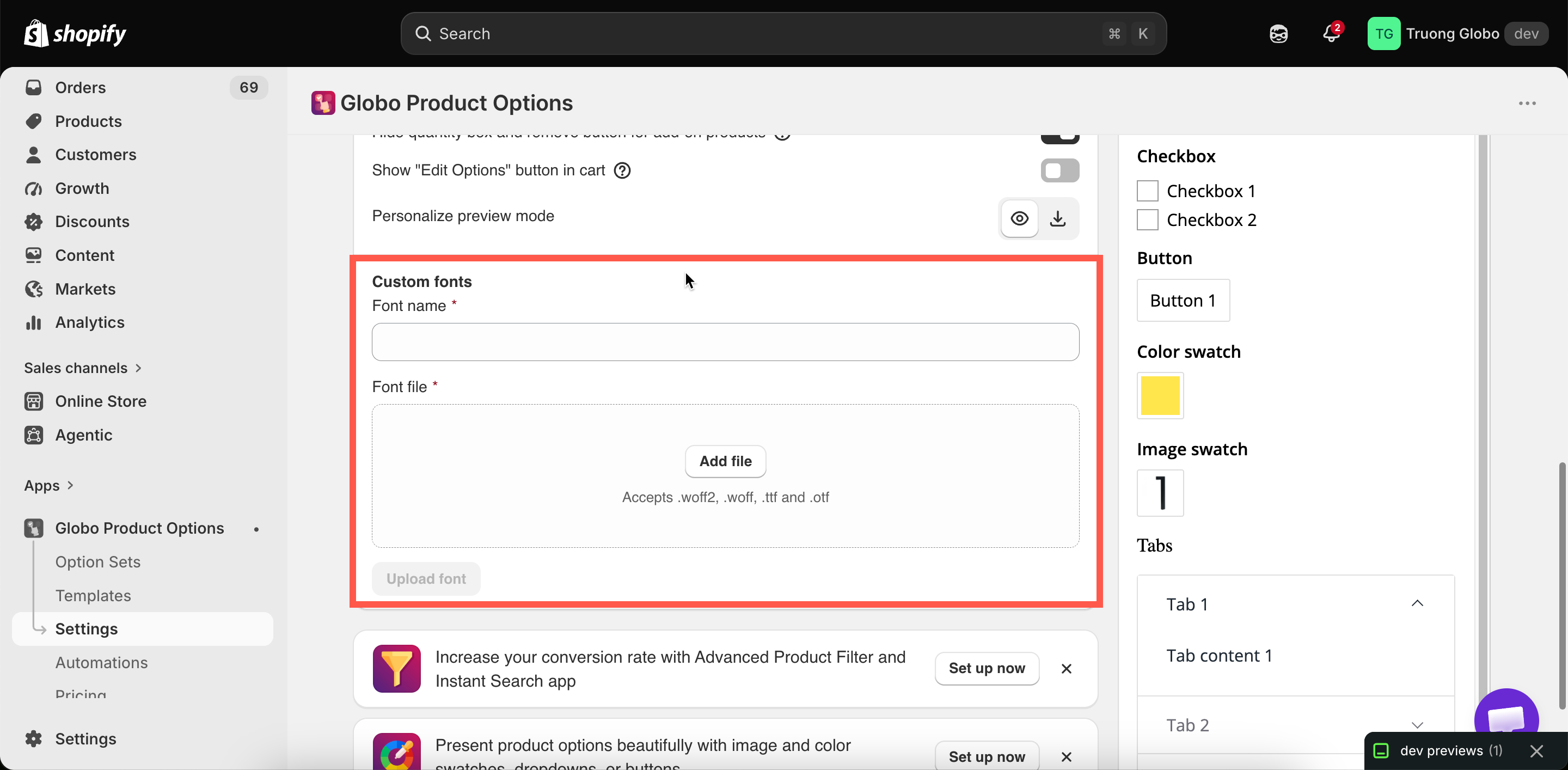
**Settings** > **Settings** > **General** > **Custom fonts**.

<figure><img src="https://3141646361-files.gitbook.io/~/files/v0/b/gitbook-x-prod.appspot.com/o/spaces%2FkMyxhAk2ZlJa4wZQGfBI%2Fuploads%2Fgit-blob-fab7e190eae33d49ada4275319f10a7508ea4258%2F2026-09-07_11-51-14.png?alt=media" alt="The Custom fonts area in the General settings section"><figcaption><p>Custom fonts, in the General section of Settings.</p></figcaption></figure>

## Steps

{% stepper %}
{% step %}

### Get the font file

You need the font file itself, and the right to use it commercially. Font licensing applies to a website in the same way as to printed material.
{% endstep %}

{% step %}

### Upload it

The upload area accepts **.woff2**, **.woff**, **.ttf**, and **.otf**. Any other format is rejected with a message.
{% endstep %}

{% step %}

### Give it a name

The **Font name** you enter is how the font appears in every font picker in the app. Use the real font name rather than something like `font1`.
{% endstep %}

{% step %}

### Select Upload font

{% endstep %}

{% step %}

### Use it

The font now appears wherever you select a font:

* **Settings** > **Design** > **Typography**, to set a text style to a custom font
* An option's **Personalizer** tab, where you set **Font family** to **Custom** and then select the font
* A [Font picker](/options/option-types/selection-types/font-picker.md) option's **Custom fonts** list, to offer the font to customers
  {% endstep %}

{% step %}

### Test the characters you need

Uploading and testing is the only reliable check. Try accented letters, apostrophes, and digits, because display and script fonts often omit some characters.
{% endstep %}
{% endstepper %}

## Accepted formats

<table><thead><tr><th width="180">Format</th><th>Notes</th></tr></thead><tbody><tr><td><strong>.woff2</strong></td><td>The best choice where you have it. Smallest, so pages load faster</td></tr><tr><td><strong>.woff</strong></td><td>Also web-optimized</td></tr><tr><td><strong>.ttf</strong></td><td>Common desktop format. Works, but larger than the web formats</td></tr><tr><td><strong>.otf</strong></td><td>The same</td></tr></tbody></table>

Upload `.woff2` where you have it. A desktop `.ttf` or `.otf` also works, but the file is larger.

## When to use a custom font

<table><thead><tr><th width="290">Use</th><th>Why</th></tr></thead><tbody><tr><td>The Personalizer, matching your production font</td><td>The customer's preview is then genuinely accurate. This is the strongest reason to use custom fonts at all</td></tr><tr><td>A <a href="/options/option-types/selection-types/font-picker.md">Font picker</a> offering your real engraving fonts</td><td>Customers choose from what you can actually cut</td></tr><tr><td>Widget typography matching a brand font</td><td>Where your theme uses a font the app's list does not have</td></tr></tbody></table>

## Practical advice

<table><thead><tr><th width="290">Do</th><th>Avoid</th></tr></thead><tbody><tr><td>Upload only the fonts you use</td><td>A library of twenty fonts, most of them unused. Each one in a Font picker is loaded when previewing</td></tr><tr><td>Upload the specific weight you need</td><td>Relying on the bold or italic setting. Many fonts have no real bold or italic cut, and the result looks distorted</td></tr><tr><td>Name them recognizably</td><td>Names like <code>final-2</code> that mean nothing in six months</td></tr><tr><td>Check licensing for web use</td><td>Assuming a desktop license covers your storefront</td></tr><tr><td>Test with real customer names</td><td>Testing with the word "test", which uses four very ordinary characters</td></tr></tbody></table>

## Notes

* Custom fonts may not be available on all plans. See [Compare plans](/options/plans-and-billing/compare-plans.md).
* Uploaded fonts are stored with your store's files.
* A custom font used in the Personalizer is loaded when the product page opens, so keep the file as small as the format allows.
* The date picker's calendar language is a separate setting. See [Date and time picker](/options/option-types/input-types/date-and-time-picker.md).
