> For the complete documentation index, see [llms.txt](https://docs.globo.io/llms.txt). Markdown versions of documentation pages are available by appending `.md` to page URLs; this page is available as [Markdown](https://docs.globo.io/options/storefront-display-and-design/show-options-on-orders/packing-slip.md).

# Display options in packing slip

Add option details to your packing slips, through Order Printer or Shopify's own packing slip template.

There are two ways to do this. Use whichever matches how you print your packing slips.

## Using Shopify Order Printer

Our **Product Options** app works with Shopify's **Order Printer** app, so you can include custom option details right on your packing slips.

{% stepper %}
{% step %}

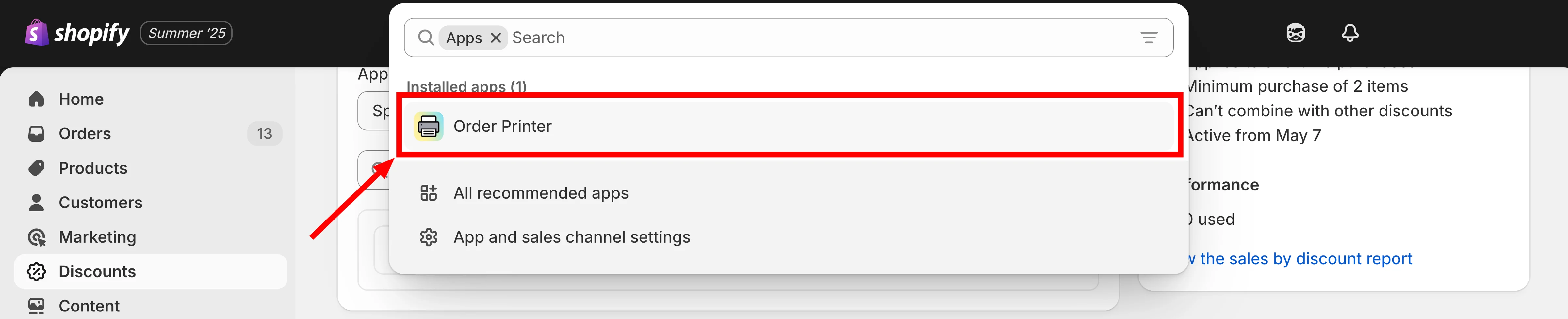
### From your **Shopify admin**, click on **Apps**

{% endstep %}

{% step %}

### Select **Order Printer** from your app list

<figure><img src="https://3141646361-files.gitbook.io/~/files/v0/b/gitbook-x-prod.appspot.com/o/spaces%2FkMyxhAk2ZlJa4wZQGfBI%2Fuploads%2Fgit-blob-08d25470d1e0c91a7c0e64886286399cd6f63aad%2Fscreenshot-packing-slip-open-order-printer.png?alt=media" alt="The Apps list in Shopify admin with Order Printer highlighted"><figcaption><p>Open Order Printer from your app list.</p></figcaption></figure>
{% endstep %}

{% step %}

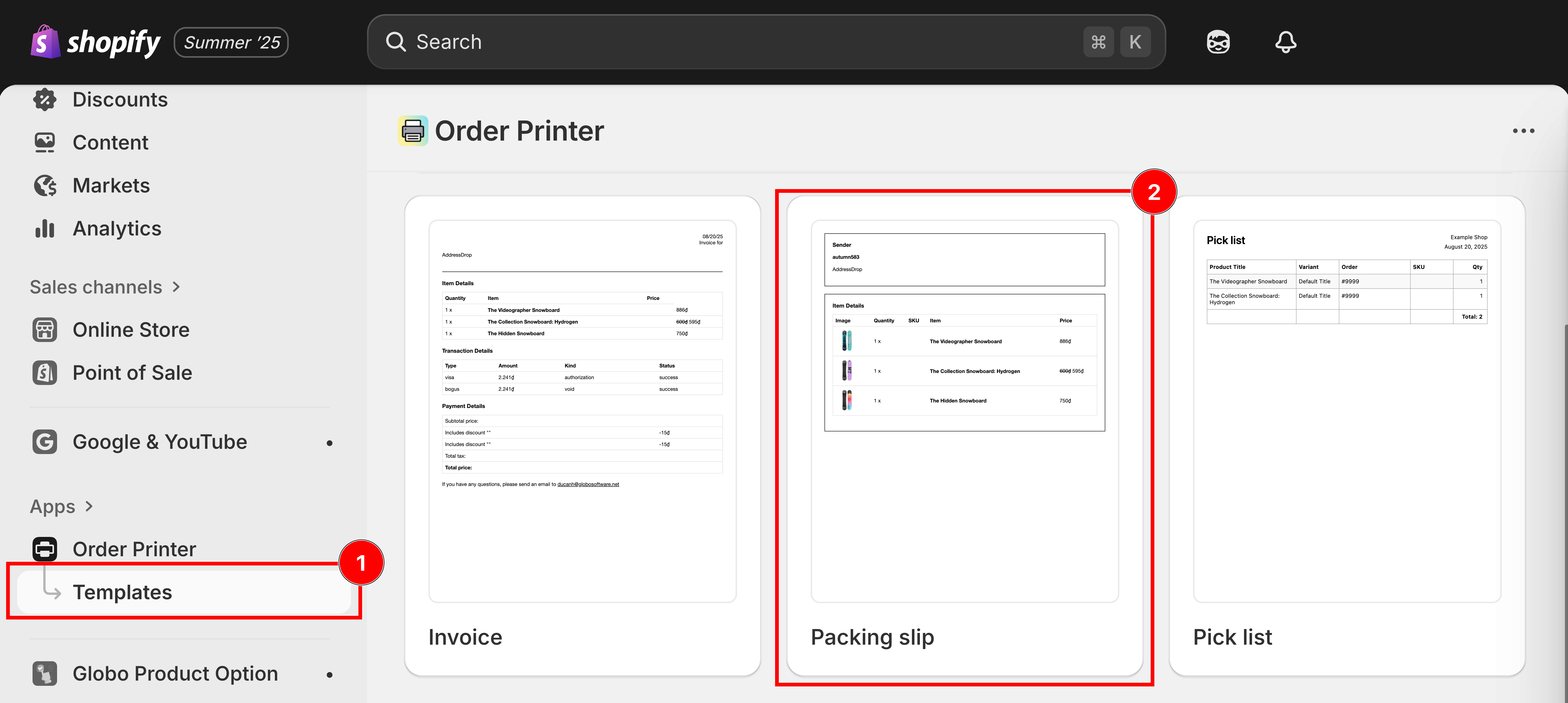
### Click **Manage Templates** > **Packing slip**

<figure><img src="https://3141646361-files.gitbook.io/~/files/v0/b/gitbook-x-prod.appspot.com/o/spaces%2FkMyxhAk2ZlJa4wZQGfBI%2Fuploads%2Fgit-blob-09dda3d846ddc20012eb8d00c89c9b20dc11ffdc%2Fscreenshot-packing-slip-manage-templates.png?alt=media" alt="The Order Printer templates screen with Manage templates and the Packing slip template highlighted"><figcaption><p>Manage templates, then open the Packing slip template.</p></figcaption></figure>
{% endstep %}

{% step %}

### **Download the packing slip template**

[Click this button to download](https://github.com/globo-software/display-cart-line-item-in-notification/blob/main/gpo-packing-slip-template-order-printer.liquid)
{% endstep %}

{% step %}

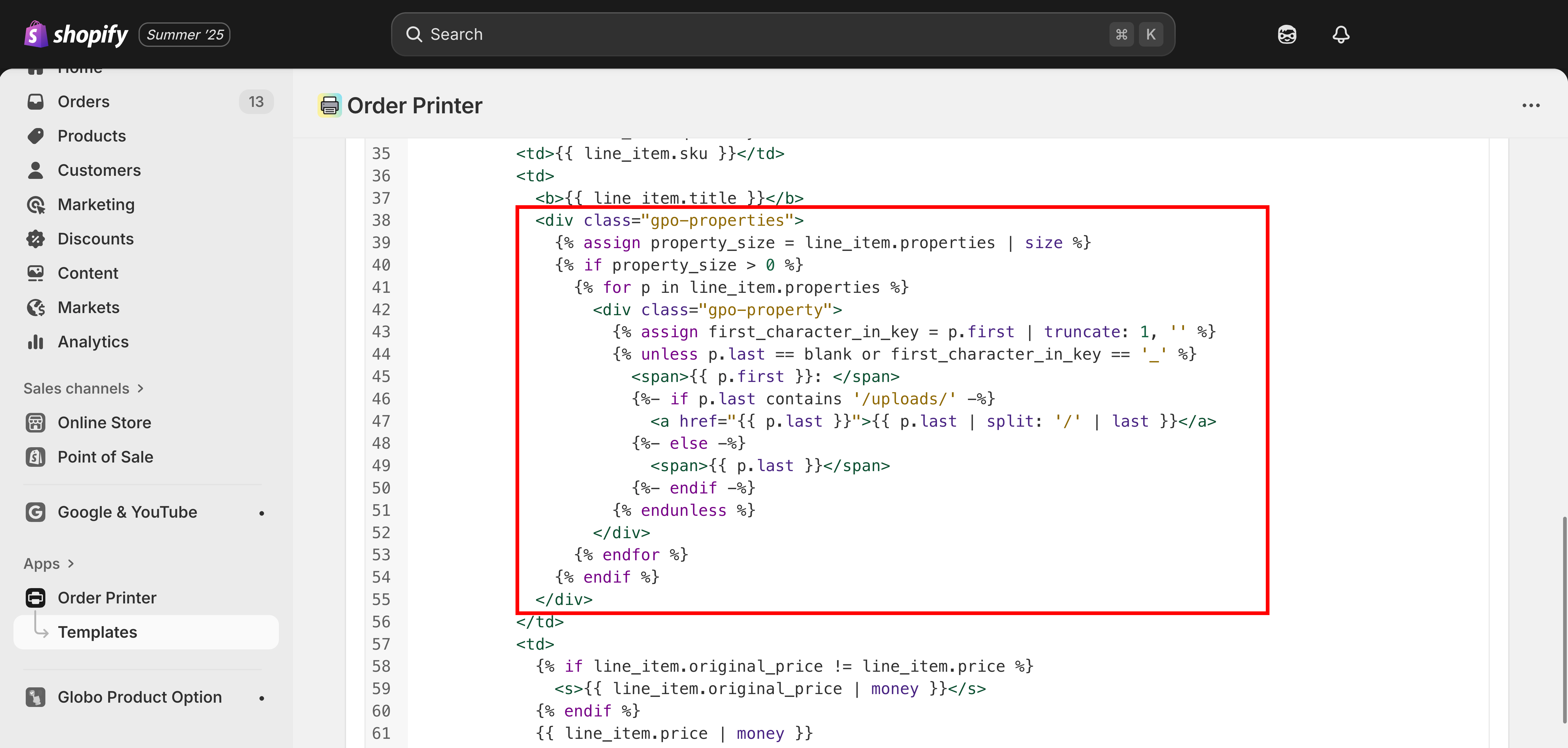
### **Copy the code** and **paste to Template Details** section

```liquid
 <div class="gpo-properties">
    {% assign property_size = line_item.properties | size %} 
    {% if property_size > 0 %} 
      {% for p in line_item.properties %} 
        <div class="gpo-property">
          {% assign first_character_in_key = p.first | truncate: 1, '' %}
          {% unless p.last == blank or first_character_in_key == '_' %} 
            <span>{{ p.first }}: </span>
            {%- if p.last contains '/uploads/' -%} 
              <a href="{{ p.last }}">{{ p.last | split: '/' | last }}</a> 
            {%- else -%} 
              <span>{{ p.last }}</span>
            {%- endif -%} 
          {% endunless %} 
        </div> 
      {% endfor %}
    {% endif %} 
  </div>
```

<figure><img src="https://3141646361-files.gitbook.io/~/files/v0/b/gitbook-x-prod.appspot.com/o/spaces%2FkMyxhAk2ZlJa4wZQGfBI%2Fuploads%2Fgit-blob-66cfd739a1d9aac6a815928fff23279a11365163%2Fscreenshot-packing-slip-template-details.png?alt=media" alt="The Order Printer packing slip editor with the snippet pasted into the Template Details field"><figcaption><p>Paste the snippet into the Template Details section.</p></figcaption></figure>
{% endstep %}

{% step %}

### **Save the change**

{% endstep %}
{% endstepper %}

## Through Shopify settings

This method lets you directly update Shopify's built-in packing slip template from your store's settings.

{% stepper %}
{% step %}

### From your **Shopify admin**, click on **Settings**

{% endstep %}

{% step %}

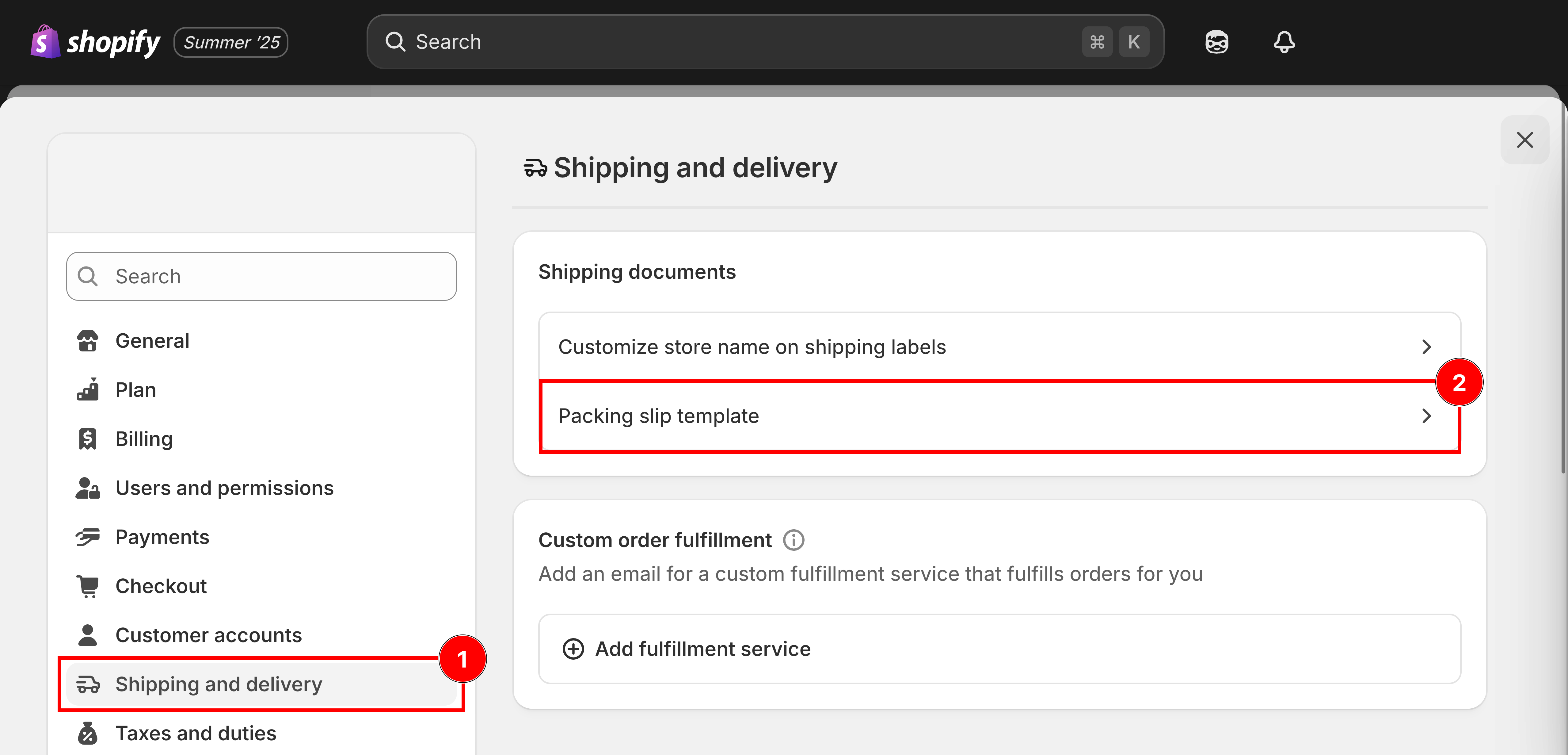
### Go to **Shipping and Delivery**

{% endstep %}

{% step %}

### Scroll down to the **Packing Slip Template** section

Click **Edit** next to the Packing Slip Template.

<figure><img src="https://3141646361-files.gitbook.io/~/files/v0/b/gitbook-x-prod.appspot.com/o/spaces%2FkMyxhAk2ZlJa4wZQGfBI%2Fuploads%2Fgit-blob-b4013ffc83b03e8dc69f098698b3b2e5e9e51bb9%2Fscreenshot-packing-slip-shipping-settings.png?alt=media" alt="Shopify&#x27;s Shipping and delivery settings with the Packing slip template row highlighted"><figcaption><p>Shipping and delivery, then the Packing slip template.</p></figcaption></figure>
{% endstep %}

{% step %}

### **Download the packing slip template**

[Click this button to download](https://github.com/globo-software/display-cart-line-item-in-notification/blob/main/gpo-packing-slip-template.liquid)
{% endstep %}

{% step %}

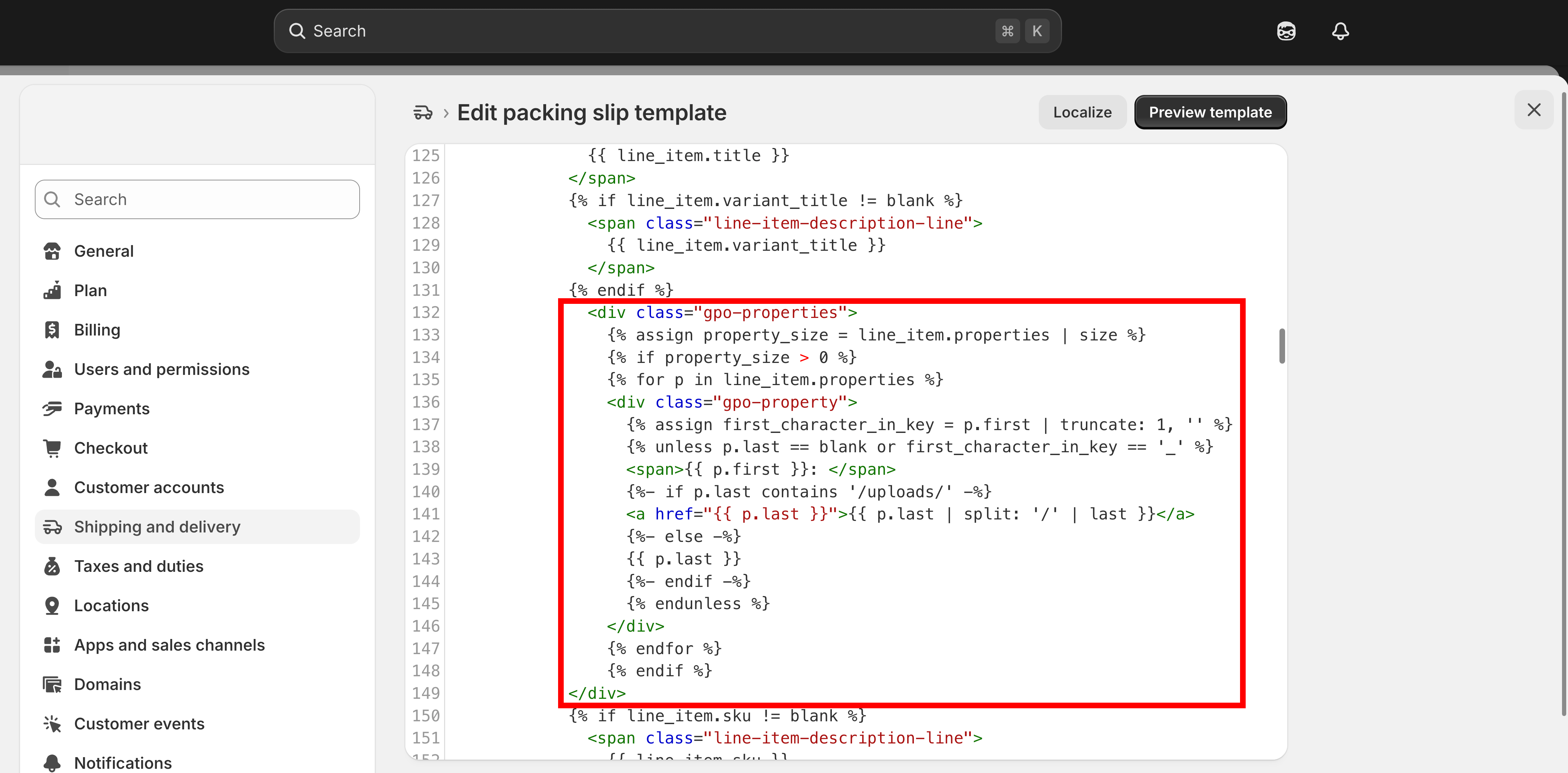
### **Copy the code** and paste to **Edit Packing Slip Template** field

```liquid
  <div class="gpo-properties">
          {% assign property_size = line_item.properties | size %} 
          {% if property_size > 0 %} 
          {% for p in line_item.properties %} 
          <div class="gpo-property">
            {% assign first_character_in_key = p.first | truncate: 1, '' %}
            {% unless p.last == blank or first_character_in_key == '_' %} 
            <span>{{ p.first }}: </span>
            {%- if p.last contains '/uploads/' -%} 
            <a href="{{ p.last }}">{{ p.last | split: '/' | last }}</a> 
            {%- else -%} 
            {{ p.last }} 
            {%- endif -%} 
            {% endunless %} 
          </div> 
          {% endfor %}
          {% endif %} 
    </div>
```

<figure><img src="https://3141646361-files.gitbook.io/~/files/v0/b/gitbook-x-prod.appspot.com/o/spaces%2FkMyxhAk2ZlJa4wZQGfBI%2Fuploads%2Fgit-blob-e6edaa2d0f4665ced724392a6ced71f5de31d501%2Fscreenshot-packing-slip-edit-template.png?alt=media" alt="The Edit packing slip template field in Shopify settings with the snippet pasted in"><figcaption><p>Paste the snippet into the Edit Packing Slip Template field.</p></figcaption></figure>
{% endstep %}

{% step %}

### Save

{% endstep %}
{% endstepper %}

{% hint style="info" %}
📧 **Need Help?**

If you run into any issues while setting up your option set, feel free to reach out to us at **Chat** or email <contact@globo.io>.

See [Contact support](/options/help/contact-support.md).
{% endhint %}