> For the complete documentation index, see [llms.txt](https://docs.globo.io/llms.txt). Markdown versions of documentation pages are available by appending `.md` to page URLs; this page is available as [Markdown](https://docs.globo.io/options/translations-and-languages/app-admin-language.md).

# App admin language

Change the language of the app's admin interface, and understand what it does not affect.

The app's admin can be displayed in eighteen languages. This setting is for you and your staff. It does not affect what your customers see.

## Where it is

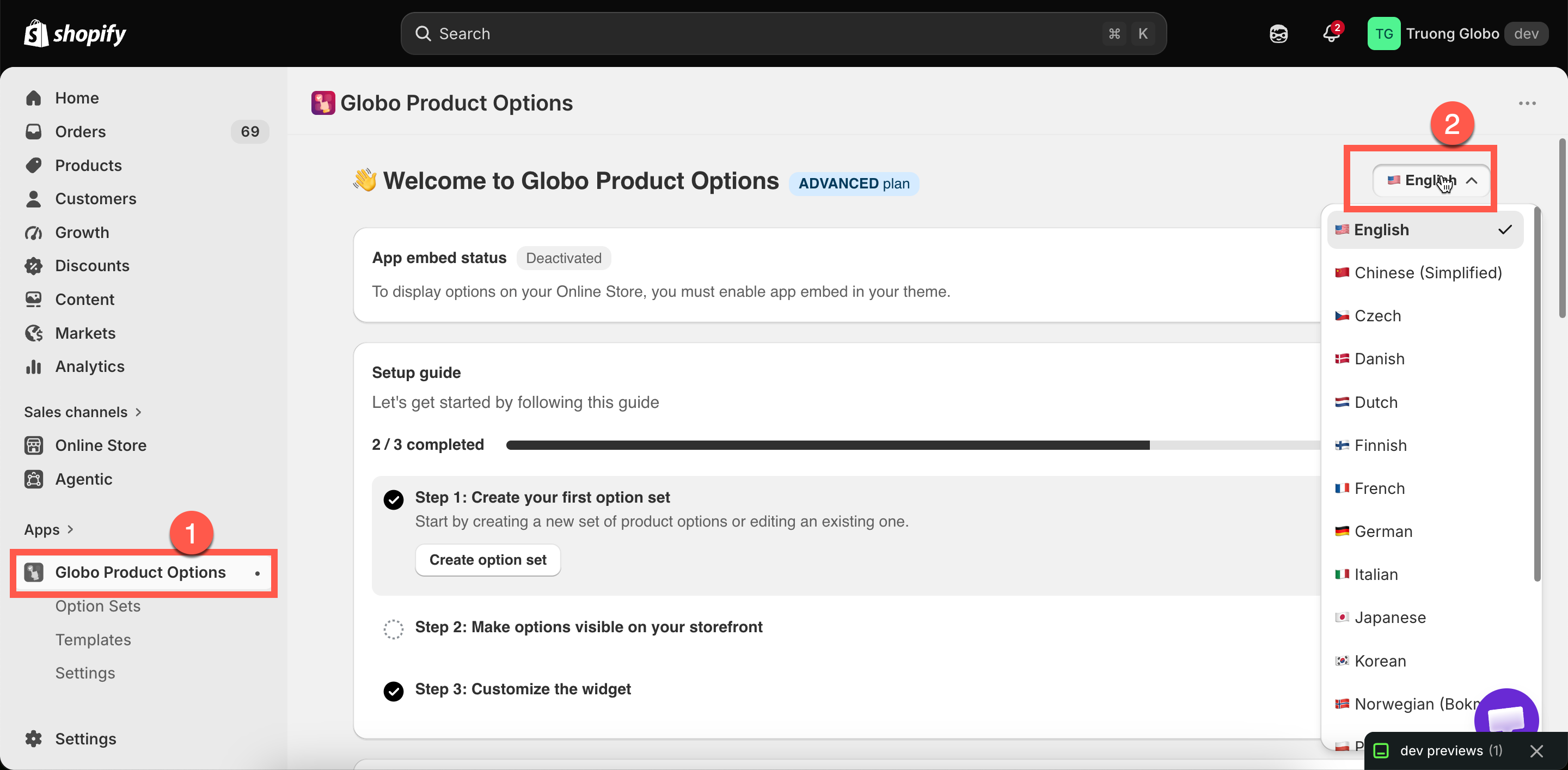
The language control is in the top-right of the **Dashboard**, and shows the current language with its flag.

Select it and choose a language. The app reloads in that language.

<figure><img src="https://3141646361-files.gitbook.io/~/files/v0/b/gitbook-x-prod.appspot.com/o/spaces%2FkMyxhAk2ZlJa4wZQGfBI%2Fuploads%2Fgit-blob-aebbea18665b76e670b3ece8b06dc03fa8d29fe8%2F2026-09-07_10-58-24.png?alt=media" alt="The language selector open on the dashboard listing the available admin languages"><figcaption><p>The admin language control is on the Dashboard, top right.</p></figcaption></figure>

## The eighteen languages

<table><thead><tr><th width="230">Language</th><th width="230">Language</th><th>Language</th></tr></thead><tbody><tr><td>English</td><td>German</td><td>Portuguese (Brazil)</td></tr><tr><td>Chinese (Simplified)</td><td>Italian</td><td>Portuguese (Portugal)</td></tr><tr><td>Czech</td><td>Japanese</td><td>Spanish</td></tr><tr><td>Danish</td><td>Korean</td><td>Swedish</td></tr><tr><td>Dutch</td><td>Norwegian (Bokmål)</td><td>Turkish</td></tr><tr><td>Finnish</td><td>Polish</td><td>French</td></tr></tbody></table>

## What it changes, and what it does not

<table><thead><tr><th width="290">Changes</th><th>Does not change</th></tr></thead><tbody><tr><td>Menu names, page titles, setting labels, buttons</td><td>Anything on your storefront</td></tr><tr><td>Help text and tooltips inside the app</td><td>Your option labels and values — those are <a href="/options/translations-and-languages/translate-option-content.md">option content</a></td></tr><tr><td>Validation messages you see while building</td><td>The messages customers see — those are <a href="/options/translations-and-languages/translate-widget-text.md">widget text</a></td></tr><tr><td>Your view of the app</td><td>What your colleagues see. It is per user</td></tr></tbody></table>

{% hint style="warning" %}
This setting does not change anything on your storefront. To show translated options to your customers, translate the [option content](/options/translations-and-languages/translate-option-content.md) and the [widget text](/options/translations-and-languages/translate-widget-text.md) instead.
{% endhint %}

## Notes

* The setting is saved, so you do not need to set it again.
* Changing it reloads the app.
* Your Shopify admin language is separate — set that in Shopify.
* Screenshots and menu names in this documentation are in English. If you work in another language, match the menus by their position on the screen.
