
Preorder Bundles, Buy X Get Y
Choose how your preorder offer works with Shopify purchase options, discounts, gift cards, Buy X Get Y promotions, bundles, and other product types.
You can configure the purchase option for each preorder offer individually. You do not need to switch your store to the Legacy Model to support different use cases.
Before you begin
You need an active preorder offer. Each offer can use its own purchase option, so you can use different settings for different products or offers.
For example, you can:
- Use Shopify purchase option for an offer that needs partial payments.
- Use Without purchase option for an offer that uses a Buy X Get Y promotion.
- Use Without purchase option for a gift card or bundle offer.
Purchase options
There are two options available in your preorder offer:
| Purchase option | Best for | Not supported |
|---|---|---|
| Use Shopify purchase option | Partial payments, preorder discounts, scheduled fulfillments, order tags | Gift cards, Buy X Get Y discounts |
| Use without purchase option | Bundles, Buy X Get Y, gift products, gift cards | Partial payments, payment-specific discounts |
Use Shopify purchase option
This is the recommended option for most preorder offers.
It uses Shopify’s purchase option (selling plan), which allows the preorder to work with Shopify’s payment and fulfillment features.
Supported:
- Partial payments
- Preorder discounts
- Order tags by offer
- Scheduled or held fulfillments
- Shopify discount codes
Not supported:
- Gift cards or store credits as payment
- Buy X Get Y discounts
Gift cards and Buy X Get Y discounts are not supported because of Shopify’s limitations for products using a purchase option.
If your offer needs one of these features, select Use without purchase option instead.
Use without purchase option
Choose this option when your preorder needs to work with product types or promotions that are not compatible with Shopify purchase options.
This option is suitable for:
- Product bundles
- Buy X Get Y offers
- Gift products
- Gift cards
Not supported:
- Partial payments
- Payment-specific discounts
- Preorder discounts
- Scheduled or held fulfillments by default
With this option, customers pay the full amount at checkout.
Important: You do not need to use the Legacy Model for these use cases. Select Use without purchase option for the specific preorder offer instead.
Set the purchase option
- In the left menu of the app, go to Preorders.
- Select the preorder offer you want to configure.
- Scroll down to Advanced.
- Under Purchase option, select one of the following:
- Use Shopify purchase option
- Use without purchase option
- Save your changes.
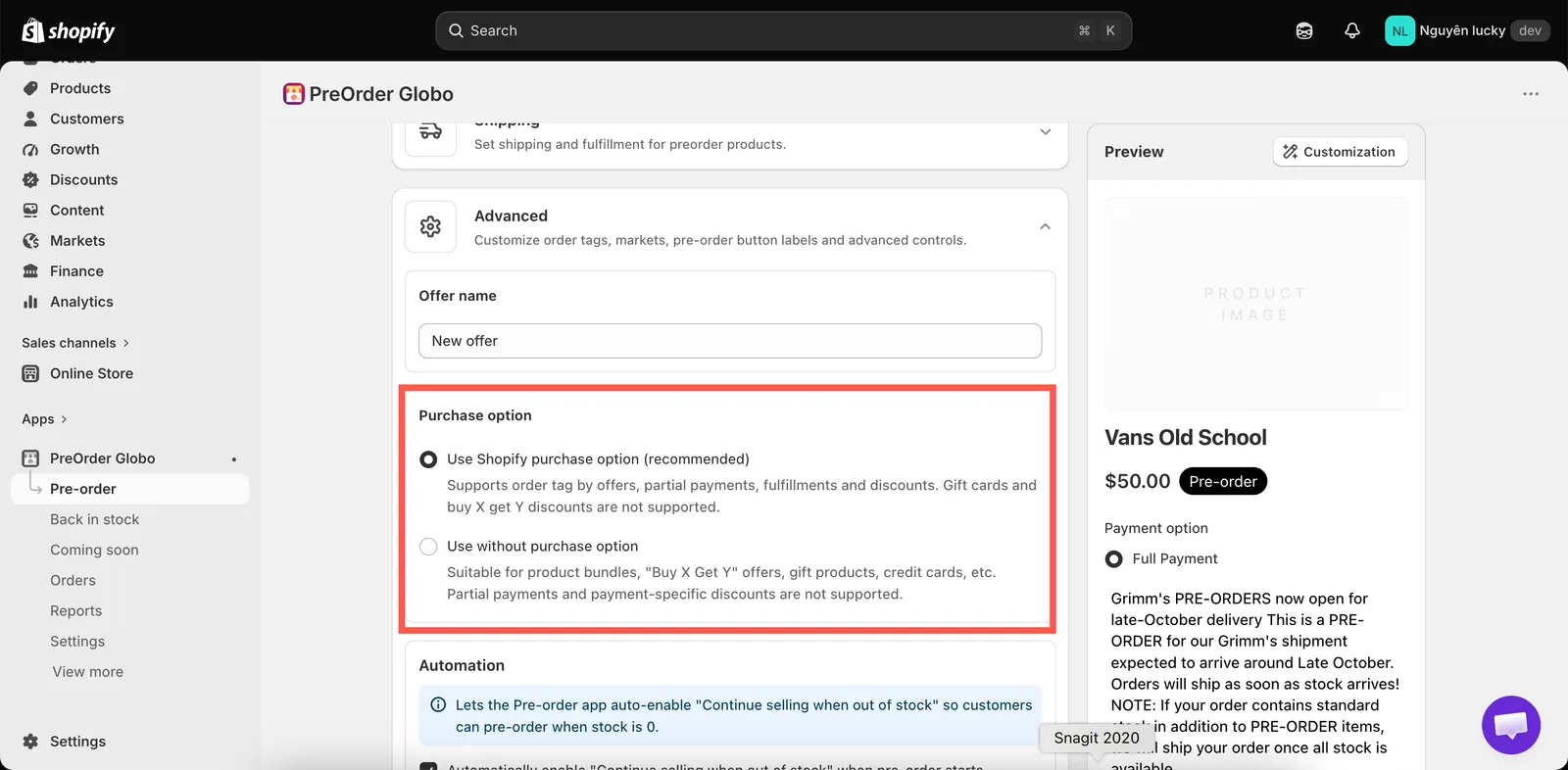
Which option should I choose?
I need partial payments
Select Use Shopify purchase option.
Partial payments require Shopify’s purchase option.
I want to use a Buy X Get Y promotion
Select Use without purchase option.
Buy X Get Y discounts are not supported when the preorder uses a Shopify purchase option.
I want customers to pay with a gift card
Select Use without purchase option.
Shopify does not allow gift cards or store credits to be used when the cart contains a preorder using a purchase option.
I sell a product bundle
You can use Use without purchase option when the bundle requires compatibility with a purchase option.
For supported bundle apps and specific bundle configurations, see our bundle guides.
I need preorder discounts and scheduled fulfillments
Select Use Shopify purchase option.
These features rely on Shopify’s purchase option.
Important limitations
Some features depend on the purchase option selected for the offer. The app also displays relevant limitations in the help text next to each setting.
Before choosing a purchase option, consider how customers need to pay and whether the offer uses discounts, gift cards, Buy X Get Y promotions, or bundles.
You can use different purchase options for different offers, so you can choose the setup that best fits each preorder use case.
Was this helpful?
Thanks for your feedback! Tell us what was missing
Report an issue