# Upload custom image for variant option value

## <mark style="color:blue;">Guide</mark>

### 1. Setup style for variant option is color swatch

* Go to admin app GLOBO Color Swatch **Dashboard -> Options list**
* Select your product variations to display as swatches<br>

  <figure><img src="https://3138853960-files.gitbook.io/~/files/v0/b/gitbook-x-prod.appspot.com/o/spaces%2FDsbeTbRNMPUo58YEXkMj%2Fuploads%2FbNQCFEqpzF5cO5nRTVEO%2Fimage.png?alt=media&#x26;token=6b133197-6c92-48bc-8edb-fa5fc691d540" alt="" width="563"><figcaption></figcaption></figure>

### 2. Change display style to swatch

* Choose one of 4 style

{% hint style="info" %}
Types variant support setup color hex:&#x20;

✅ Swatch

✅ Pill swatch

✅ Custom swatch with price

✅ Swatch dropdown
{% endhint %}

<figure><img src="https://3138853960-files.gitbook.io/~/files/v0/b/gitbook-x-prod.appspot.com/o/spaces%2FDsbeTbRNMPUo58YEXkMj%2Fuploads%2Fq7VjoWXH51Jsh8bGso1t%2Fimage.png?alt=media&#x26;token=a6a12351-ded4-447a-a053-90be249858e4" alt="" width="187"><figcaption><p>Swatch</p></figcaption></figure>

<figure><img src="https://3138853960-files.gitbook.io/~/files/v0/b/gitbook-x-prod.appspot.com/o/spaces%2FDsbeTbRNMPUo58YEXkMj%2Fuploads%2FAGsGIqCdGuI0aAvNpLVy%2Fimage.png?alt=media&#x26;token=32df610c-6dc3-464f-93ed-9ecf1acd1ad9" alt="" width="197"><figcaption><p>Pill swatch</p></figcaption></figure>

<figure><img src="https://3138853960-files.gitbook.io/~/files/v0/b/gitbook-x-prod.appspot.com/o/spaces%2FDsbeTbRNMPUo58YEXkMj%2Fuploads%2FPGMIpm4hGWoV4jO8dA8g%2Fimage.png?alt=media&#x26;token=df45f9d2-f90a-467d-b36c-97a496e4b31c" alt="" width="170"><figcaption><p>Custom swatch with price</p></figcaption></figure>

<figure><img src="https://3138853960-files.gitbook.io/~/files/v0/b/gitbook-x-prod.appspot.com/o/spaces%2FDsbeTbRNMPUo58YEXkMj%2Fuploads%2FA7tNotgaKfHu0010zR9n%2Fimage.png?alt=media&#x26;token=64c0688f-9b57-48cf-af0a-9441be735ade" alt="" width="175"><figcaption><p>Swatch dropdown</p></figcaption></figure>

* Click **save** button<br>

  <figure><img src="https://3138853960-files.gitbook.io/~/files/v0/b/gitbook-x-prod.appspot.com/o/spaces%2FDsbeTbRNMPUo58YEXkMj%2Fuploads%2Fc4ccIDjrtLrWvtuK6ZvM%2Fimage.png?alt=media&#x26;token=144a20f2-b9cd-4b81-9535-42acba560428" alt="" width="563"><figcaption></figcaption></figure>

### 3. Custom image

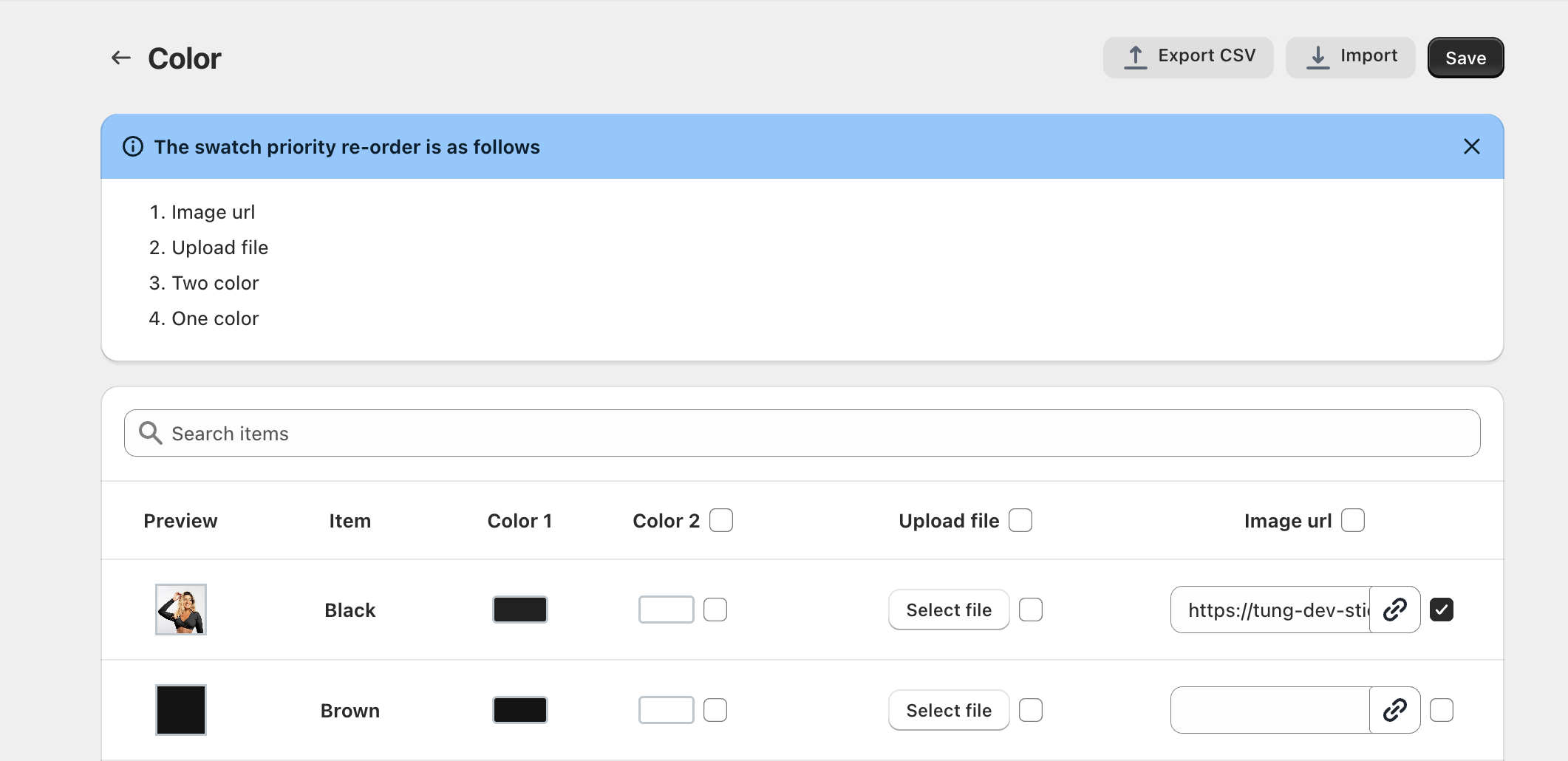
* After change style -> click **config button**
* In config page, you can upload image or use link image as swatch

{% hint style="info" %}
When you use a custom image, the image will be shown first, and the color code won't be displayed.
{% endhint %}

<figure><img src="https://3138853960-files.gitbook.io/~/files/v0/b/gitbook-x-prod.appspot.com/o/spaces%2FDsbeTbRNMPUo58YEXkMj%2Fuploads%2FWgEnBcSc8pJibZ8HguPJ%2Fimage.png?alt=media&#x26;token=d2cbf77a-dd61-4e6f-9f72-df0e005acc7a" alt=""><figcaption></figcaption></figure>

## <mark style="color:blue;">Demo</mark>

<figure><img src="https://3138853960-files.gitbook.io/~/files/v0/b/gitbook-x-prod.appspot.com/o/spaces%2FDsbeTbRNMPUo58YEXkMj%2Fuploads%2FuQDzWpW8pT4K1aEQoWAj%2Fimage.png?alt=media&#x26;token=013b42df-82fc-4502-819e-9841ce1e9ed5" alt=""><figcaption></figcaption></figure>