> For the complete documentation index, see [llms.txt](https://docs.globo.io/llms.txt). Markdown versions of documentation pages are available by appending `.md` to page URLs; this page is available as [Markdown](https://docs.globo.io/swatch/options/overview.md).

# Options overview

The Options page is where every product option gets its display style and its swatches.

**Options** is the main working page of the app. It lists every product option the app found in your catalog — Color, Size, Material, Style, and any custom option you use — and lets you decide, per option, how it should look on product pages and on collection pages.

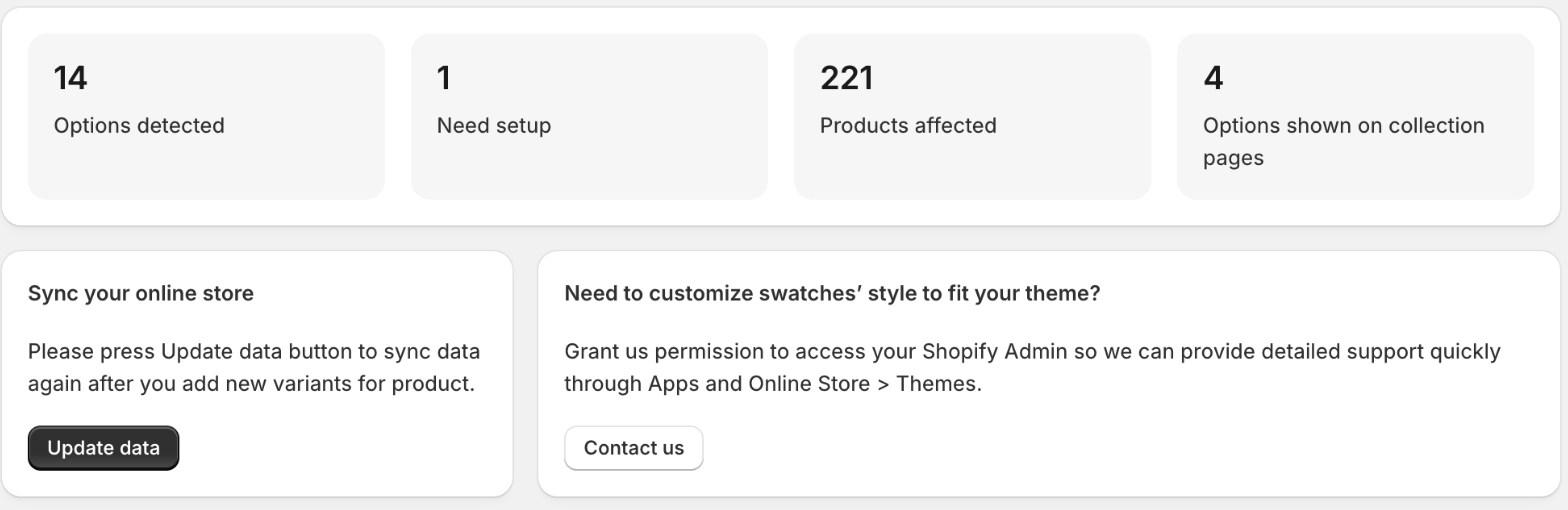
<figure><img src="https://3138853960-files.gitbook.io/~/files/v0/b/gitbook-x-prod.appspot.com/o/spaces%2FDsbeTbRNMPUo58YEXkMj%2Fuploads%2Fgit-blob-10122375b72c6603a01431253a5af15ddc218bfa%2Foptions-summary-and-sync.png?alt=media" alt="The top of the Options page: four summary cards and the Sync your online store and support cards"><figcaption><p>The summary cards tell you at a glance how many options still need swatches.</p></figcaption></figure>

## What's on the page

### Summary cards

| Card                                  | What it counts                                            |
| ------------------------------------- | --------------------------------------------------------- |
| **Options detected**                  | Product options found in your catalog.                    |
| **Need setup**                        | Options that still have values without a colour or image. |
| **Products affected**                 | Products that use those options.                          |
| **Options shown on collection pages** | Options with swatches enabled on collection pages.        |

### Sync your online store

**Update data** refreshes the app's copy of your catalog. Run it whenever you add products or variants — see [Sync product data](/swatch/getting-started/sync-product-data.md).

### Product page / Collection page

The two tabs switch which surface you're configuring. Each option is set up independently for product pages and for collection pages, so you can (for example) show full image swatches on the product page and small colour dots on collection pages.

### The option cards

Each option shows:

* the option name, **Used by how many products**, and the first couple of its values;
* **Status** — **Ready**, or **Needs setup** when values are still missing a colour or image;
* **Set swatches** — opens the value editor (only for styles that use colours or images);
* **Display on Desktop** and **Display on Mobile** — the display style pickers;
* **Show custom badges** — on the **Product page** tab only, see [Custom badges](/swatch/options/custom-badges.md).

When values are incomplete, a banner on the card reads *n* **color values are missing.** with **Complete setup**, which jumps straight to the value editor.

<figure><img src="https://3138853960-files.gitbook.io/~/files/v0/b/gitbook-x-prod.appspot.com/o/spaces%2FDsbeTbRNMPUo58YEXkMj%2Fuploads%2Fgit-blob-7bc4e5b3ac872e9e7523a6df17d099fa5b58160a%2Foptions-needs-setup-banner.png?alt=media" alt="An option card with status Needs setup and a banner reading 16 color values are missing, with a Complete setup button"><figcaption><p>An option that still has values without a colour is flagged, with a shortcut straight to the editor.</p></figcaption></figure>

Use the **Search for item** field to find an option quickly, and the arrows at the bottom to page through long lists.

{% hint style="info" %}
Changes on this page are not live until you click **Save** in the bar at the top.
{% endhint %}

## Where to go next

* [Choose a display style](/swatch/options/choose-a-display-style.md) — the twelve ways an option can be displayed.
* [Set color and image swatches](/swatch/options/set-color-and-image-swatches.md) — give every value a colour, two colours, or an image.
* [Fill swatches with AI color match](/swatch/options/ai-color-match.md) — let the app suggest colours for you.
* [Import and export swatches by CSV](/swatch/options/import-and-export-swatches-by-csv.md) — set up many values at once.
* [Show swatches on collection pages](/swatch/options/show-swatches-on-collection-pages.md).
* [Custom badges](/swatch/options/custom-badges.md) — highlight a value with a small label or icon.
