> For the complete documentation index, see [llms.txt](https://docs.globo.io/llms.txt). Markdown versions of documentation pages are available by appending `.md` to page URLs; this page is available as [Markdown](https://docs.globo.io/swatch/product-groups/create-a-product-group.md).
# Create a product group
Build a group from start to finish.
{% stepper %}
{% step %}
### Start a new group
Go to **Product Groups** and click **Add Product Group**.
{% endstep %}
{% step %}
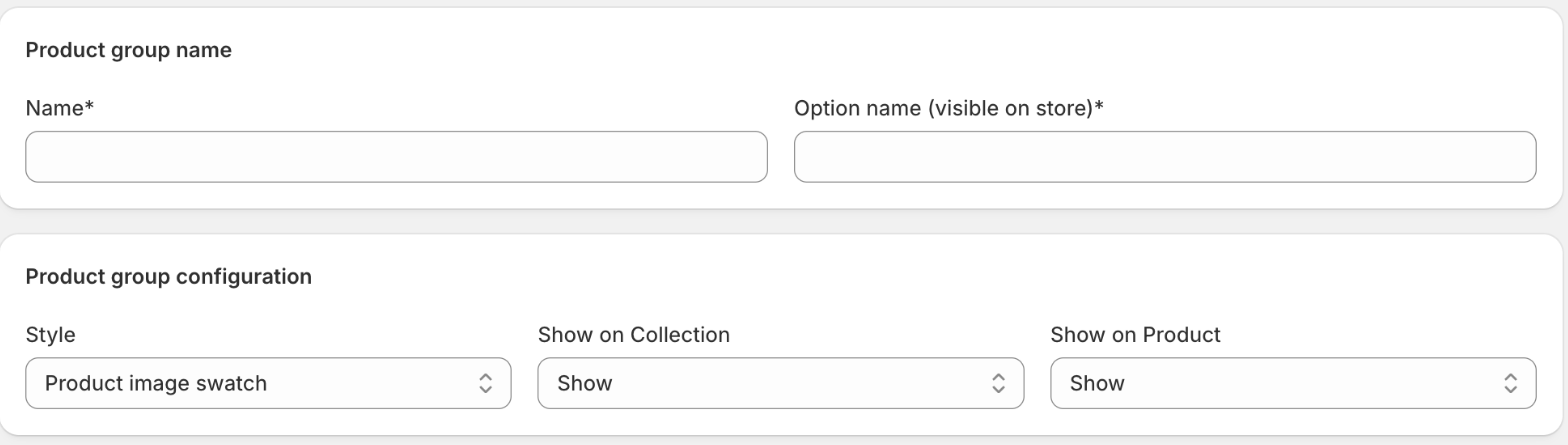
### Name it
Under **Product group name**:
* **Name** — your internal name for the group. Shoppers never see it. Use the common name of the products, for example "Classic Cotton T-shirt".
* **Option name (visible on store)** — the label shown above the swatches on your storefront, for example "Color" or "Model".
Both are required.
Name is for you; Option name is the label shoppers see above the swatches.
{% endstep %}
{% step %}
### Choose how it looks and where it shows
Under **Product group configuration**:
* **Style** — how the group is displayed. See [Product group styles and swatches](/swatch/product-groups/product-group-styles-and-swatches.md).
* **Show on Collection** — **Show** or **Do not show**.
* **Show on Product** — **Show** or **Do not show**.
{% endstep %}
{% step %}
### Add the products
Under **Add products**, click **Browse** (or start typing in **Search Product**) and select every product that belongs together. You can add as many as the group needs.
Each product becomes a row you can drag to reorder — the order here is the order shoppers see.
{% endstep %}
{% step %}
### Set each product's label and swatch
On each row:
* Edit the text field to change the label shoppers see. It defaults to the product title, but "Navy" reads better than "Classic Cotton T-shirt — Navy".
* Click the swatch thumbnail to open **Select color** and choose what the swatch shows — see [Product group styles and swatches](/swatch/product-groups/product-group-styles-and-swatches.md).
* Use **Delete** to remove a product from the group.
{% endstep %}
{% step %}
### Save and check
Click **Save**, then open one of the grouped products on your storefront. The other products in the group should appear as an option picker, and clicking one should take you to its own page.
{% endstep %}
{% endstepper %}
## Editing later
Open a group from the list with **Edit**. You can rename it, add or remove products, reorder them, change the style, and change where it shows. Use the bulk actions on the list page to show or hide several groups at once.
## Related pages
* [Product group styles and swatches](/swatch/product-groups/product-group-styles-and-swatches.md)
* [Show product groups on your storefront](/swatch/product-groups/show-product-groups-on-your-storefront.md)
* [Import product groups by CSV](/swatch/product-groups/import-product-groups-by-csv.md)
.png?alt=media)