For the complete documentation index, see llms.txt. This page is also available as Markdown.

Number

A numeric field with minimum and maximum values, for quantities, measurements, and values you price by amount.

A field that accepts numbers only, with a minimum and maximum you set.

Use it for quantities or measurements within a product, such as how many names to embroider, how many place settings are needed, or a width in centimeters. For the product’s own quantity, use Shopify’s quantity field instead.

What customers see

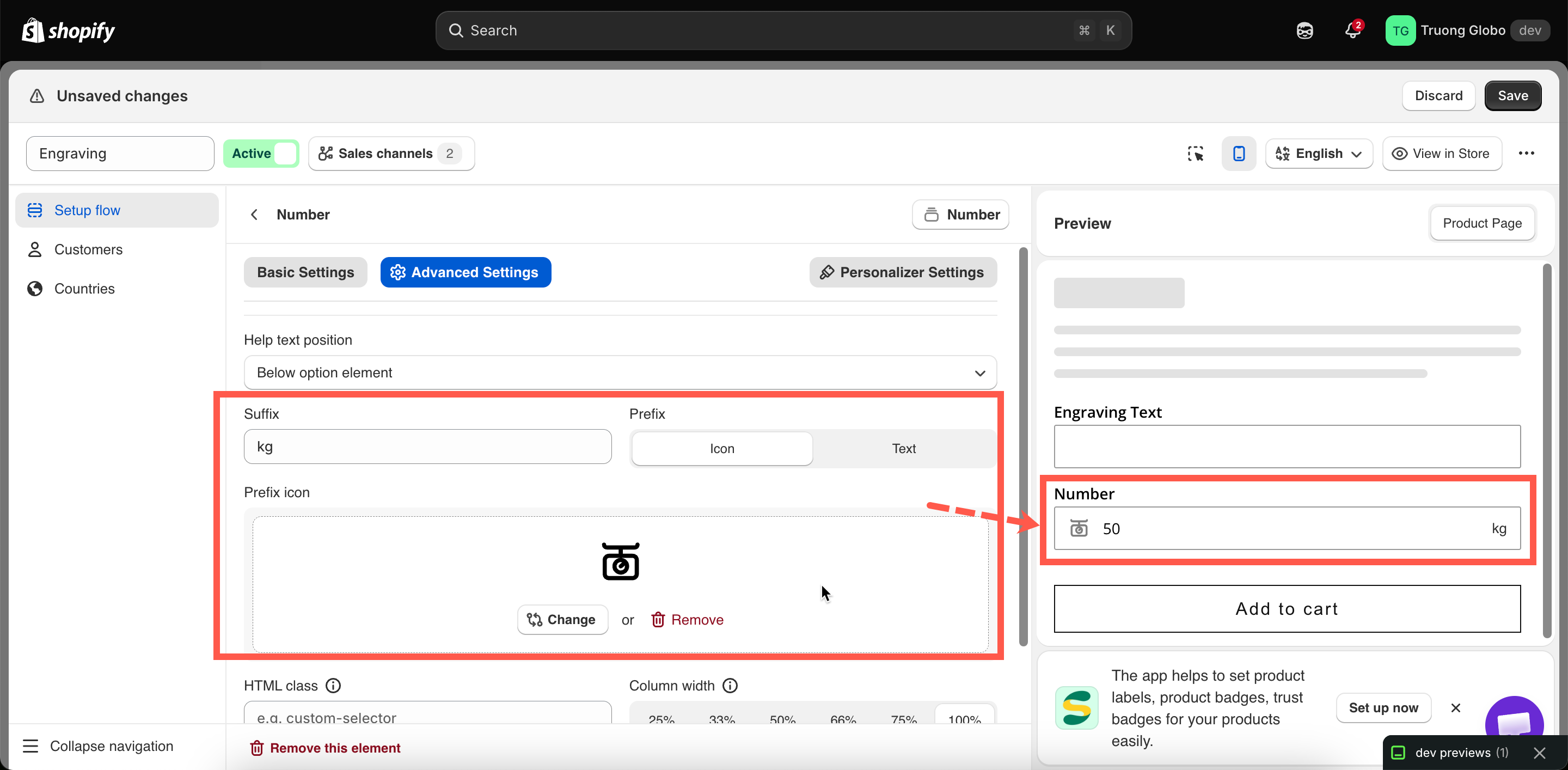
A numeric field with your label above it. You can add a prefix, such as a currency symbol, and a suffix, such as a unit.

A number field on a storefront product page with a unit suffix
A number field with a unit as its suffix, so the customer types only the value.

Basic

Setting
What it does

Customer-facing text, and the name on the order.

Blocks add to cart until a number is entered.

Hides the label.

The lowest and highest accepted numbers. Leave one empty for no bound at that end.

An example number inside the empty field.

Guidance that stays visible.

Pre-fills the field. Must fall inside min and max.

The add-on charge.

Show or hide based on other choices.

Advanced

Setting
What it does

How the add-on scales with quantity.

Where the help text sits.

A unit after the field — cm, kg, days.

A symbol or icon before the field.

Styling hook and field width.

Add-on pricing

The price applies to the whole option. The Add-on quantity modes let the number the customer enters set the quantity of the add-on:

Mode
With price $2.00 and the customer entering 5

Default

$2.00, following the main product quantity

One time charge

$2.00, once, whatever the main quantity

Fixed quantity (by customer)

$10.00 — the customer's 5 × $2.00

Dynamic quantity (by customer)

$10.00 per main product — so $30.00 on three

For example, to charge $2.00 for each extra embroidered name, use a Number field with Min value 0, Max value 6, a price of $2.00, and the Fixed quantity (by customer) mode.

See Advanced add-on modes.

Personalizer

Number supports the live preview and works the same way as Text. The digits are drawn on the product photo, with color, font, effects, position, Curve, and Auto-fit max width.

Use it for jersey numbers, house numbers, and years. See Product Personalizer.

Examples

Extra embroidered names

Setting
Value

Label / Name

Extra names

Min value / Max value

0 / 6

Default value

0

Price

$2.00

Add-on quantity

Fixed quantity (by customer)

Help text

$2.00 per additional name, up to six

Width to cut, priced by size

Min value 10, Max value 240, suffix cm, Required field on. To calculate a price from two or three measurements, use Dimension instead, which supports a formula.

Jersey number

Min value 0, Max value 99, Personalizer on, drawn large and centered on the back of the shirt.

Number of guests

Min value 2, Max value 12, Default value 4, no price. The number is only recorded for production.

Notes

  • Available on all plans.

  • Works in Shopify POS.

  • Only numbers can be entered, so no input rule is needed.

  • A Default value outside the minimum and maximum is rejected when you save.

  • To prevent negative numbers, set Min value to 0.

  • To let customers choose a value by dragging instead of typing, use Range slider.

Last updated

Was this helpful?