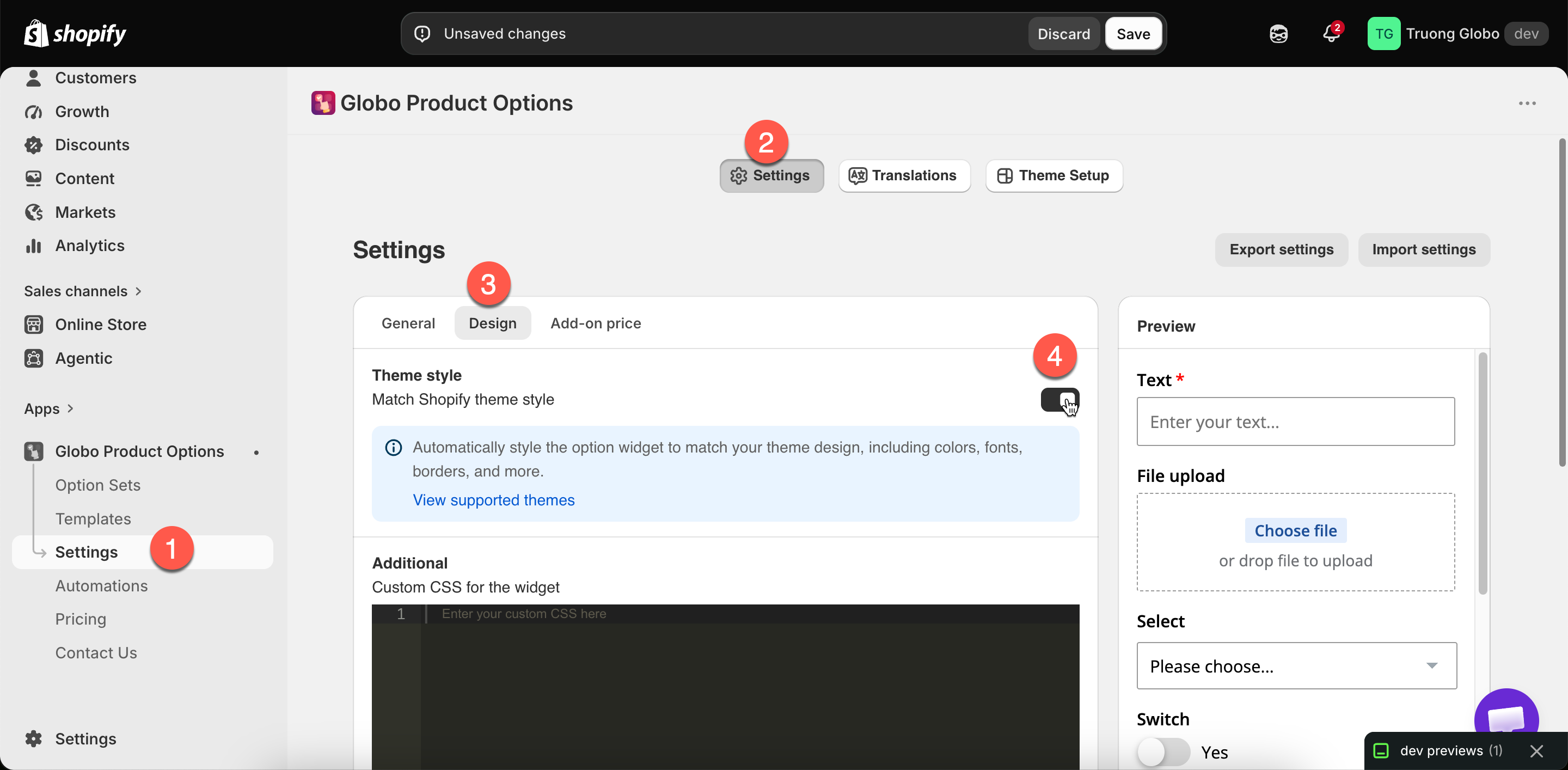
One switch, and a link to check whether your theme is covered.
One switch, and a link to check whether your theme is covered.
| ID | Theme | Also sold as |
|---|---|---|
57 | Sunrise | |
141 | Fashionopolism | |
230 | Expression | |
304 | Responsive | |
459 | Vantage | |
567 | Mr Parker | |
568 | Symmetry | Amara |
606 | Blockshop | |
623 | Testament | |
677 | Showcase | |
686 | Icon | |
691 | California | |
714 | Focal | |
718 | Grid | |
732 | Canopy | |
739 | Pipeline | Pahoa |
757 | Colors | |
777 | Palo Alto | Pluma |
801 | Flow | |
833 | Local | Emerge |
838 | Empire | |
847 | Motion | Memo |
855 | Prestige | |
857 | Impulse | |
859 | Cascade | |
868 | Broadcast | |
887 | Dawn | |
902 | Expanse | |
910 | Baseline | |
939 | Beyond | |
1114 | Bullet | |
1356 | Sense | |
1363 | Crave | |
1368 | Craft | |
1399 | Be Yours | |
1431 | Studio | |
1434 | Taste | |
1499 | Colorblock | |
1500 | Ride | |
1535 | Shapes | |
1567 | Refresh | |
1608 | Athens | Pharm |
1609 | Xtra | Vailt |
1611 | Zest | |
1615 | Yuva | |
1621 | Stiletto | Tapestry |
1651 | Thrive | Local |
1657 | Enterprise | |
1667 | Avante | |
1751 | Taiga | Meadow |
1762 | Reformation | Sunshine |
1791 | Handmade | Aroma |
1826 | Combine | |
1829 | Creative | |
1839 | Blum | |
1841 | Origin | |
1864 | Publisher | |
1878 | Neat | |
1891 | Spotlight | |
2048 | Eurus | Whiff |
2053 | Vision | |
2077 | Gain | Mio |
2138 | Berlin | |
2186 | Maranello | Sneakers |
2221 | Xclusive | |
2240 | Next | |
2264 | Unicorn | Cargo |
2316 | Minimalista | |
2328 | Cello | |
2412 | Concept | |
2481 | Horizon | |
2514 | Murmel | Aesthetic and Flirt |
2515 | Monk | |
2566 | Veena | |
2576 | Shine | |
2684 | Wonder | |
2698 | Release | |
2699 | Trade | |
2738 | Rise | |
2779 | Luxe | |
2801 | Nordic | |
2821 | Sleek | |
2825 | Soul | |
2852 | Pinnacle | |
2881 | Satoshi | |
2896 | Outsiders | |
2943 | Keystone | Kaleidoscope |
2948 | King | Noor |
2967 | Ultra | Grip |
2989 | Ascent | |
3027 | Ignite | |
3038 | Swiss | |
3039 | Motto | |
3051 | Boutique | Noom |
3094 | Nimbus | |
3247 | Hyper | |
3264 | Elixira | |
3422 | Allure | Carrara and Bijou |
3425 | Monochrome | |
3486 | Edge | |
3500 | Maya | Citrus |
3533 | Lyra | |
3605 | Purity | |
3620 | Pitch | |
3621 | Atelier | |
3622 | Fabric | |
3623 | Dwell | |
3624 | Heritage | |
3625 | Ritual | |
3626 | Savor | |
3627 | Tinker | |
3628 | Vessel | |
3716 | Maximize | Tender, Swift, Various, Vast, and Vigor |
3745 | Supreme | Heatwave, Royce, Realm, and Rose |
3754 | Krank | |
3773 | Stockist | Verve, Optic, Residence, and Porter |
3872 | Zenith | |
4032 | Pebble | Bunie |
4041 | Athora | Quantum |
4156 | Prompt | Imagine |
4267 | Nexus | |
4276 | Helix | |
4390 | Mivo | Woody |
4693 | Epitome | Daydream |
4920 | Gravity | GenZ |
4961 | Stylist | |
5077 | Analog | |
5231 | Radian | |
5359 | Node | Fuse and Fluid |
5560 | Sky | |
5665 | Cielo | Miro |
5679 | Chronicle | Tide |
| Not covered | Where to handle it |
|---|---|
| Where the widget sits on the page | Widget placement |
| Behavior — tooltips, height limits, selected values | Widget behavior |
| Anything specific to your own customizations of the theme | Custom CSS |
| The builder's preview panel | Nothing — the preview always uses the app's own styling. Compare with View in Store |