
UpCart
Using product options with the UpCart cart drawer.
UpCart — Cart Drawer Cart Upsell is recognized automatically. There is nothing to connect and no selector to enter.
What is specific to UpCart
Nothing. Once Go to cart immediately after adding to cart is off, the drawer opens on add to cart and the app manages the lines inside it.
What it looks like
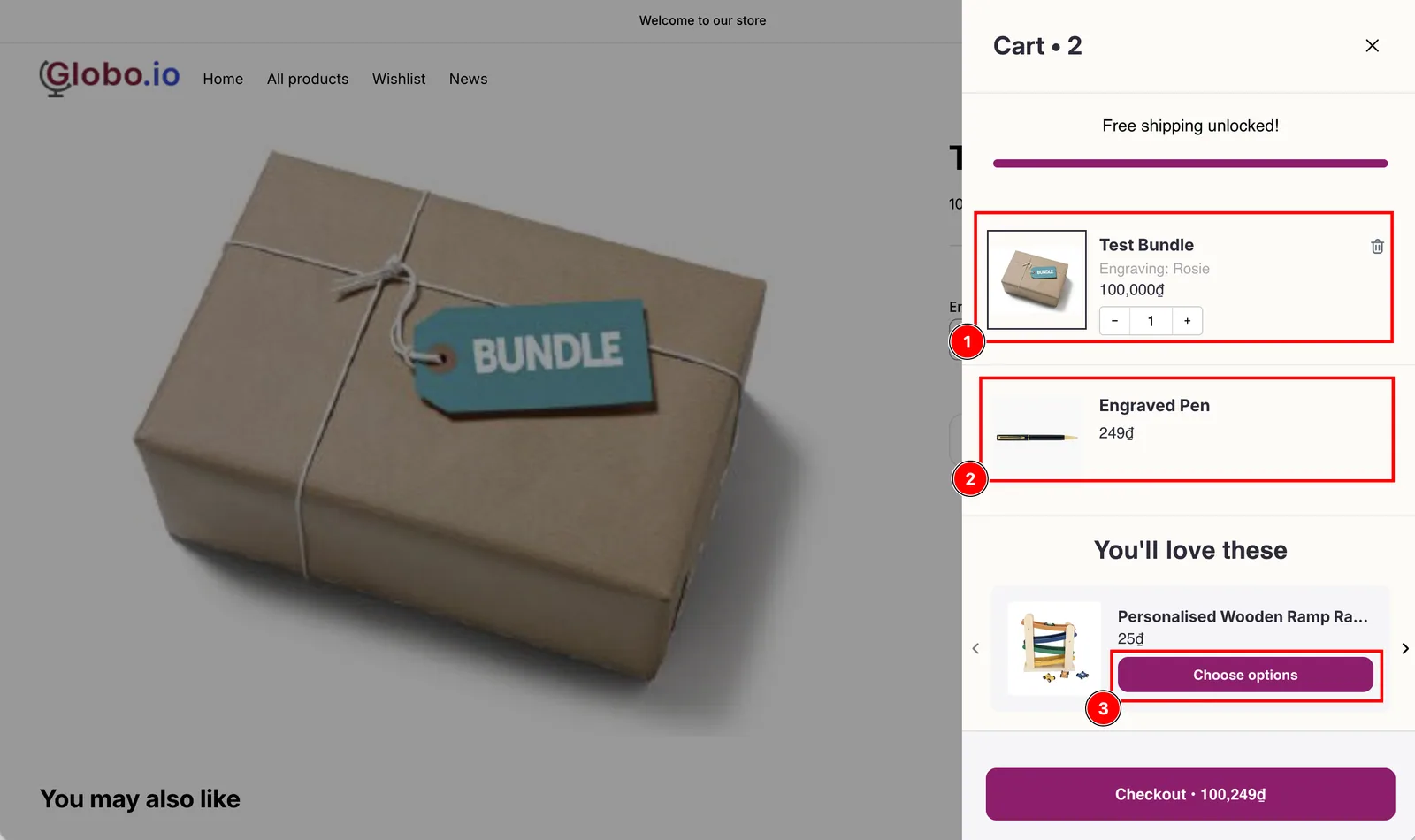
The add-on line has no quantity box and no Remove button, and the upsell button reads Choose options because the upsell redirect is on.
Reading down the drawer:
- The main item carries the customer’s choices, listed under its name.
- The add-on line sits below it, priced separately, with no quantity box and no Remove button. It cannot be changed or removed on its own.
- The upsell underneath shows Choose options instead of an Add button, because Send cart drawer app upsells to the product page is on. Clicking it opens the product page so the customer can fill the option form. See Upsells in the drawer skip your option form.
Next steps
- Set up — the two settings, with screenshots
- What a drawer cannot do — Edit Options, design previews, and the other limits
- Monster Cart, Kaching Cart, Qikify Slide Cart, Unicorn Cart Drawer, and Essent Cart Drawer — the other recognized cart drawer apps
Was this helpful?
Thanks for your feedback! Tell us what was missing
Report an issue