
During search
Control what appears in the live results panel as a shopper types — recent searches, suggestions, brands, categories, collections, products, pages, and blog posts.
What this does
During search is the instant widget itself — the panel that updates on every keystroke as a shopper types, before they press Enter. It can show more than just matching products: recent searches, search suggestions, brands, categories, collections, pages, and blog posts can all appear alongside product results, each as its own section.
Steps
- In the app, go to Search > During search.
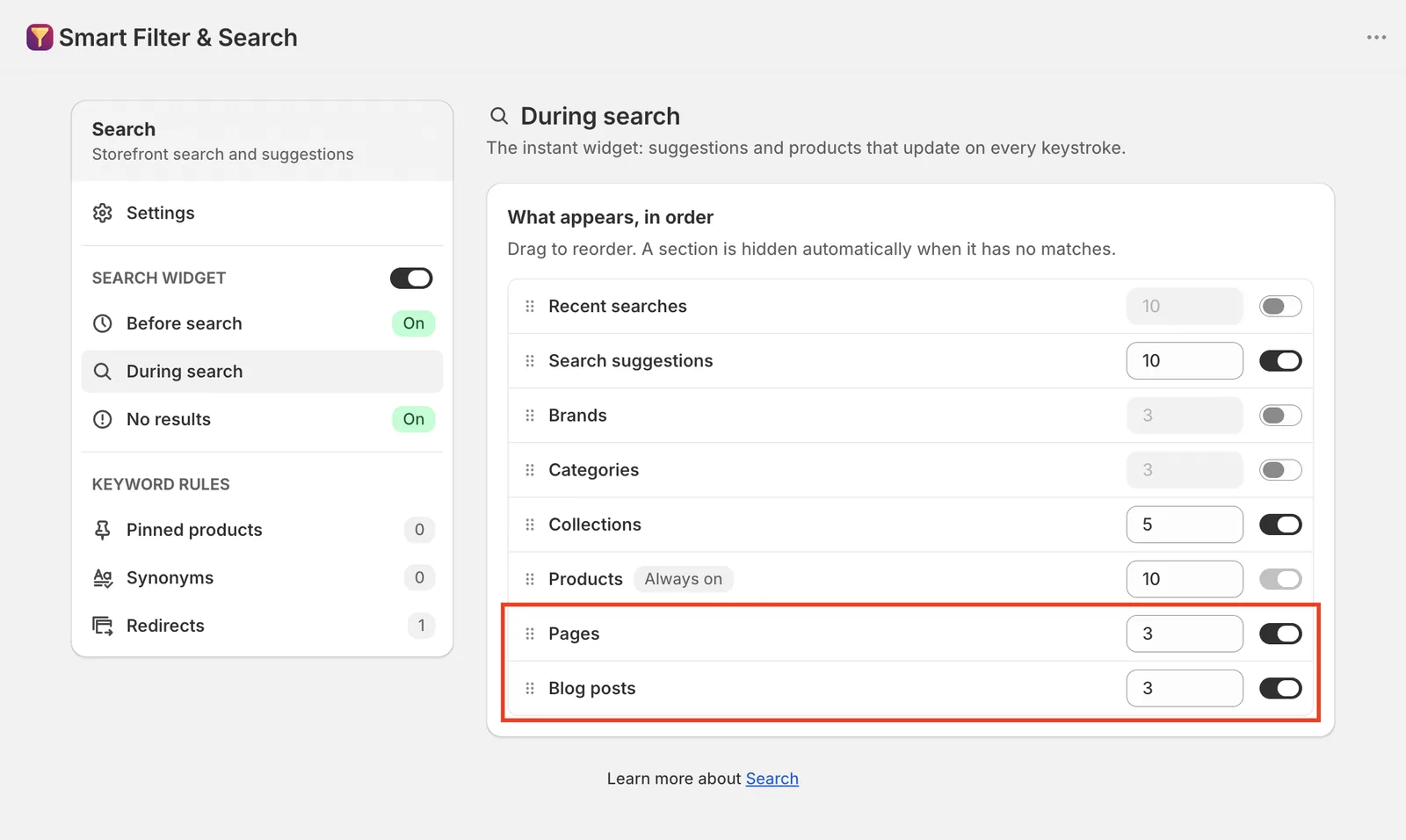
- Turn on whichever sections you want to show, and set how many items each one displays. Drag rows under What appears, in order to change the order they appear in — a section is hidden automatically when it has no matches for the current query:
- Recent searches — the shopper’s own past searches (per-device).
- Search suggestions — matching search terms/queries.
- Brands — matching vendors from your catalog.
- Categories — matching store categories.
- Collections — matching collections.
- Products — matching products. Always on — this is the one section you can’t turn off.
- Pages — matching store pages. Turn this on if you want a search like “return policy” to surface a page titled “Return Policy” — see Search for blog posts and pages.
- Blog posts — matching blog articles.
- Use the top-right switch to turn During search on or off entirely.
Related pages
Was this helpful?
Thanks for your feedback! Tell us what was missing
Report an issue